PlotLight vs RoleCall
Start your journey on the stage
PlotLight & RoleCall
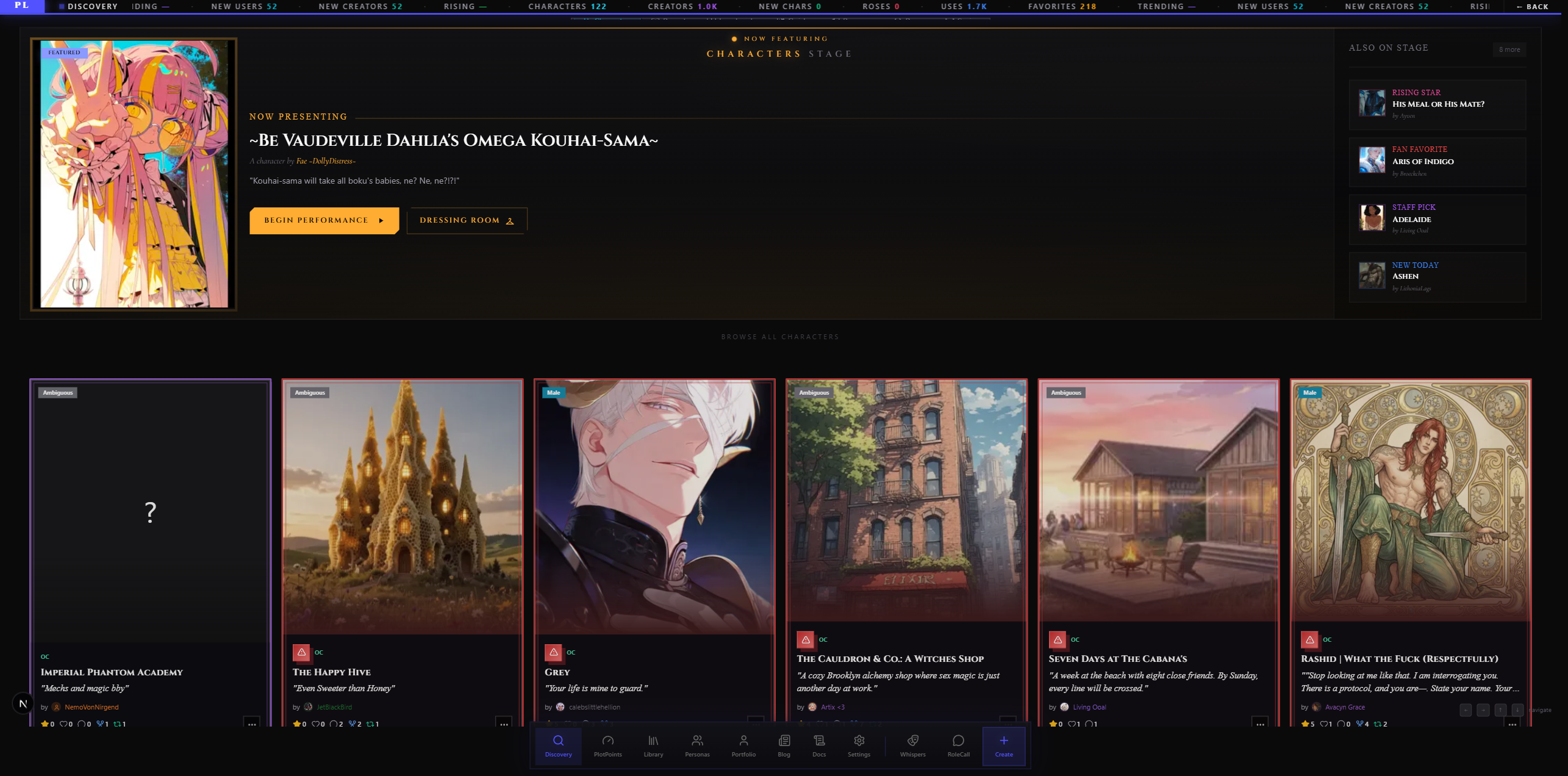
RoleCall is actually two sites that share one account, one library, and one set of users. You'll move between them as you play and create. This guide explains what lives where and how to navigate between them.
The short version: RoleCall is where you run scenes. PlotLight is where you publish, browse, and connect with other creators.
The Two Apps at a Glance
| App | URL | What it's for |
|---|---|---|
| RoleCall | rolecallstudios.com | The chat app. Scenes, groups, your library, your settings, your characters in motion. |
| PlotLight | plotlightstudios.com | The creator + community app. Discovery, portfolios, Stage Whispers, moderation, the model benchmark. |
Same sign-in. Same account. Same library.
What Lives in RoleCall
rolecallstudios.com is the chat half. Anything that involves talking to a character, configuring a scene, or running the AI happens here.
Chat surfaces
| Surface | What it is |
|---|---|
| Scenes | A live conversation with one or more characters. Where most of your time is spent. |
| Groups | Group chats with multiple AI characters in the same scene. |
| Visual Novel mode | The dedicated VN play surface — dialogue boxes, sprite swaps, music, choice menus. |
| Story Director | The immersion modules — relationships, quests, inventory, calendars, maps — that track scene state automatically. |
| Compendium | Lorebooks with an AI librarian. World info that gets pulled into scene context by meaning. |
| Post-Production | The cleanup pass that runs after each AI reply — declichéing, polish, translation, custom agents. |
Your library
Your personal collection of content lives in RoleCall. This is the same database that PlotLight reads from — but the editing surfaces and the chat-side picker UI live in RoleCall.
| Surface | What it's for |
|---|---|
| Library | Everything you've created, forked, or favorited — characters, presets, lorebooks, personas, prompts. |
| Characters editor | Create and edit character cards. |
| Personas editor | Build the personas you show up as in scenes. |
| Presets editor | Build AI behavior recipes — prompts + sampler settings. |
| Lorebooks editor | Build world-info books that activate by keyword or by AI selection. |
| Series | Group related characters, lorebooks, and presets into collections. |
| Regex scripts | Find-and-replace rules that clean up or reformat AI output. |
Configuration
| Surface | What it's for |
|---|---|
| Settings | Account, profile, accent color, notifications, recovery phrase backup. |
| Providers & Keys (BYOK) | Connect your own AI provider — OpenAI, Anthropic, Google, OpenRouter, NanoGPT, custom endpoints. |
| Models | Pick which models you actually want to see in the model picker. |
| Encryption | Recovery phrase, device pairing, the BYOK encryption that keeps your chats end-to-end encrypted. |
| Tier & Billing | Your tier, plan, and Premiere Theater access. |
Other RoleCall-only surfaces
- Docs — the pages you're reading right now
- Support — help requests
- Director's Notes — release notes and platform updates
- Staff tools (visible only to platform staff) — content review, user management, and operations surfaces
What Lives in PlotLight
plotlightstudios.com is the creator + community half. Anything browseable, social, or about a creator's public presence happens here.
Discovery & browse surfaces
| Surface | What it's for |
|---|---|
| Discovery | Browse and search every published character, preset, lorebook, persona, and prompt across the platform. |
| Featured stages | Staff-curated picks and trending content. |
| Discovery filters | Tag-based, fandom-based, content-rating filtering across all 5 content types. |
The Discovery editor experience — picking a character, hitting Fork, landing it in your library — lives here. The chat experience picks up afterward in RoleCall.
Add to Repertoire pins a published snapshot; Rewrite creates a separate editable copy. Removing that copy does not remove the pinned subscription. When you return to a discovery card after removing its Repertoire subscription, the button checks membership again so you can add it back.
Use on RoleCall prepares a copy and saves the selected character and variant for the handoff. If preparation fails, the page shows an error; retrying on that page reuses the saved copy if it still exists. After arriving in RoleCall, choose Start a Scene on the imported character's banner to open setup. This banner is available on both phone and desktop layouts, including an empty Scenes list.
Creator presence
| Surface | What it's for |
|---|---|
| Portfolio (Playbill) | Your public creator page. The thing someone sees when they tap your username. |
| Portfolio editor | Block-by-block editor for your portfolio — bio, pinned characters, curated carousels, featured work, links. |
| Portfolio viewer | The read-only public face of any creator's portfolio. |
Stage Whispers
The full Stage Whispers feed lives on PlotLight. Stage Whispers are standout AI messages users have hand-picked from their own chats and published to share.
| Surface | What it's there for |
|---|---|
| Whispers feed | The full scrolling feed of published whispers across the platform. |
| Whispers by character | All whispers tagged to a given character. |
| Whispers by tag | All whispers under a given theme tag. |
| My characters' whispers | Whispers from chats with characters you created. |
| Activity | What's happening with your whispers — likes, replies, mentions. |
| Liked | Whispers you've liked. |
| Flagged | Moderation triage for whispers you've reported. |
Moderation
The moderation control panel lives on PlotLight, because moderation is about public content — reports, queues, decisions. RoleCall keeps an in-app page at /moderation that hands you off there (the two sites share authentication, so the handoff is invisible when you're signed in) rather than a blanket site redirect.
| Surface | What it's for |
|---|---|
| Moderation queue | Reports you've filed and the actions taken on them. |
| Reporting flow | When you hit "Report" on a character, lorebook, preset, or whisper, the report is filed here. |
| Decision history | What moderators did with each report. |
PlotPoints (the model benchmark)
PlotLight hosts PlotPoints, the public benchmark scoring AI models on roleplay quality.
| Surface | What it's there for |
|---|---|
| Leaderboard | Live rankings of every model that's been benchmarked. |
| Rubric | The 11-axis scoring system — every dimension that goes into a model's score. |
| Methodology | How the benchmark works, what gets tested, how rounds are run. |
| Round detail | The chats and votes that produced each round's scores. |
| Author guide | How creators contribute to running and grading the benchmark. |
Blog
The RoleCall blog lives on PlotLight — release notes, deep-dives, creator interviews, platform updates that aren't just "the version bumped."
Side-by-Side: Where Do I Go For…?
The quickest mental model is this: doing things with a character → RoleCall. Finding, sharing, or showing off things → PlotLight.
| Task | App |
|---|---|
| Start a scene with a character | RoleCall |
| Run a group chat | RoleCall |
| Edit a character card | RoleCall |
| Edit a preset | RoleCall |
| Edit a lorebook | RoleCall |
| Edit a persona | RoleCall |
| Configure post-production | RoleCall |
| Manage Story Director modules | RoleCall |
| Open the Compendium | RoleCall |
| Run a Visual Novel scene | RoleCall |
| Connect an API key (BYOK) | RoleCall |
| Manage your recovery phrase | RoleCall |
| Browse Discovery | PlotLight |
| Search for a new character | PlotLight |
| Visit someone's portfolio | PlotLight |
| Edit your own portfolio | PlotLight |
| Publish a Stage Whisper | RoleCall (from inside a scene) |
| Scroll the Stage Whispers feed | PlotLight |
| Report someone's character | PlotLight |
| View your moderation queue | PlotLight |
| Look up a model's benchmark score | PlotLight |
| Read the blog | PlotLight |
| Read the docs | RoleCall |
A useful tell: anything that prompts the AI lives in RoleCall. Anything that's about people looking at things lives in PlotLight.
Single Sign-On — One Account, Both Apps
You don't need to sign in twice. The account is shared.
- Sign in on either app and your session is recognized on the other.
- When you click a link from one app to the other, RoleCall and PlotLight quietly hand off your session in the background. You arrive on the other domain already signed in.
- Your tier, your role, your library, your favorites, your portfolio data, your follows — all the same on both sides.
- Sign out on either app and you're signed out everywhere.
This handoff is invisible most of the time. The only place you'll notice it is when an external link (a Discord paste, a search result) sends you to a page on the other app — you might see a half-second flash as the session syncs before the page loads.
Navigation Between Them
Both apps have a quick link to the other right in their main navigation.
From RoleCall → PlotLight
The left-side dock in RoleCall has an entry labeled PlotLight (with a search icon). Tap it to open PlotLight in a new tab, signed in to the same account.
You'll also find direct links sprinkled throughout RoleCall:
- The Portfolio dock entry → your portfolio editor on PlotLight
- Any creator username (
@theatrix) anywhere on RoleCall → opens their portfolio on PlotLight - The Blog entry → the PlotLight blog
- The Discovery picker on character/preset/lorebook selection sheets → opens PlotLight Discovery
- The page at
/moderationon RoleCall hands you off to PlotLight moderation — see below
From PlotLight → RoleCall
The PlotLight dock has an entry labeled RoleCall (with a chat icon). Tap it to jump back into the chat app — usually landing on your Scenes list.
You'll also find direct links throughout PlotLight:
- Any character's Start Chat button → opens a fresh scene on RoleCall
- The Sign In / Sign Up buttons → bounce to RoleCall's auth pages
- The Docs link → the RoleCall docs
- The Support link → RoleCall support
The Moderation Handoff
If you click an old link to rolecallstudios.com/moderation — say, from a Discord conversation last month, or from a settings shortcut — you land on an in-app RoleCall page that hands you off to plotlightstudios.com/moderation. Moderation used to live in RoleCall; it moved to PlotLight when the split happened, and this page makes the move painless for anyone with a stale link. This is a different mechanism from the redirects below: /moderation is not one of the routes the middleware 301s straight to PlotLight.
A separate pattern protects a handful of moved routes at the middleware level — /discovery, /portfolio, and /blog 301-redirect from RoleCall to PlotLight directly, with signed-in users bounced through an SSO handoff instead of a bare redirect so they land on PlotLight already signed in. Old bookmarks, shared links, and OG previews still resolve.
What's Shared Between Them
The two apps are not two separate platforms with synced content. They are two viewing surfaces on the same database. Anything you create, fork, or favorite is immediately visible on both.
Shared automatically
| What | How it shows up on each side |
|---|---|
| Characters | Edited on RoleCall, browsable on PlotLight Discovery, displayed on portfolios. |
| Presets | Edited on RoleCall, browsable on PlotLight Discovery. |
| Lorebooks | Edited on RoleCall, browsable on PlotLight Discovery. |
| Personas | Edited on RoleCall, browsable on PlotLight Discovery. |
| Prompts | Edited on RoleCall, browsable on PlotLight Discovery. |
| Series | Created on RoleCall, displayed on portfolios. |
| Favorites | Hit Favorite anywhere, it's there everywhere. |
| Forks | Fork on PlotLight, the copy lands in your RoleCall library as a draft. |
| Profile | Your username, display name, avatar, bio — same on both apps. |
| Tier | Premiere tier on RoleCall = Premiere tier on PlotLight. |
| Staff roles | Platform moderation/operations access is recognized by both apps when it applies to an account. |
| Whispers | Published from inside a RoleCall scene, displayed on the PlotLight Whispers feed. |
| Bans/suspensions | Enforced by both apps the moment they're applied. |
Library status on both sides
When you fork a character from PlotLight Discovery, that character lands in your RoleCall library as a draft. You finish editing it on RoleCall. When you flip the status to published, it instantly becomes visible on PlotLight Discovery. The same lifecycle (draft → private → published) is enforced from both sides.
No syncing, no waiting, no manual republishing. The two apps see the same row in the same database.
Mobile
The two-app split works the same way on mobile as on desktop — two separate domains, two bookmarks, one shared sign-in.
A few mobile-specific notes:
- Both apps are responsive. There is no separate native app yet.
- Adding both apps to your home screen is the easiest setup. Tap RoleCall for chat, tap PlotLight for browse. They install as two separate web apps.
- Cross-app links open in the same browser tab on mobile (unlike desktop, where some links open a new tab). The SSO handoff still works — you'll just see a flash as the session syncs.
- If you primarily use RoleCall, install just RoleCall. The PlotLight links from inside RoleCall will still open in your browser when you need them.