Compendium
The systems that steer the story
Compendium
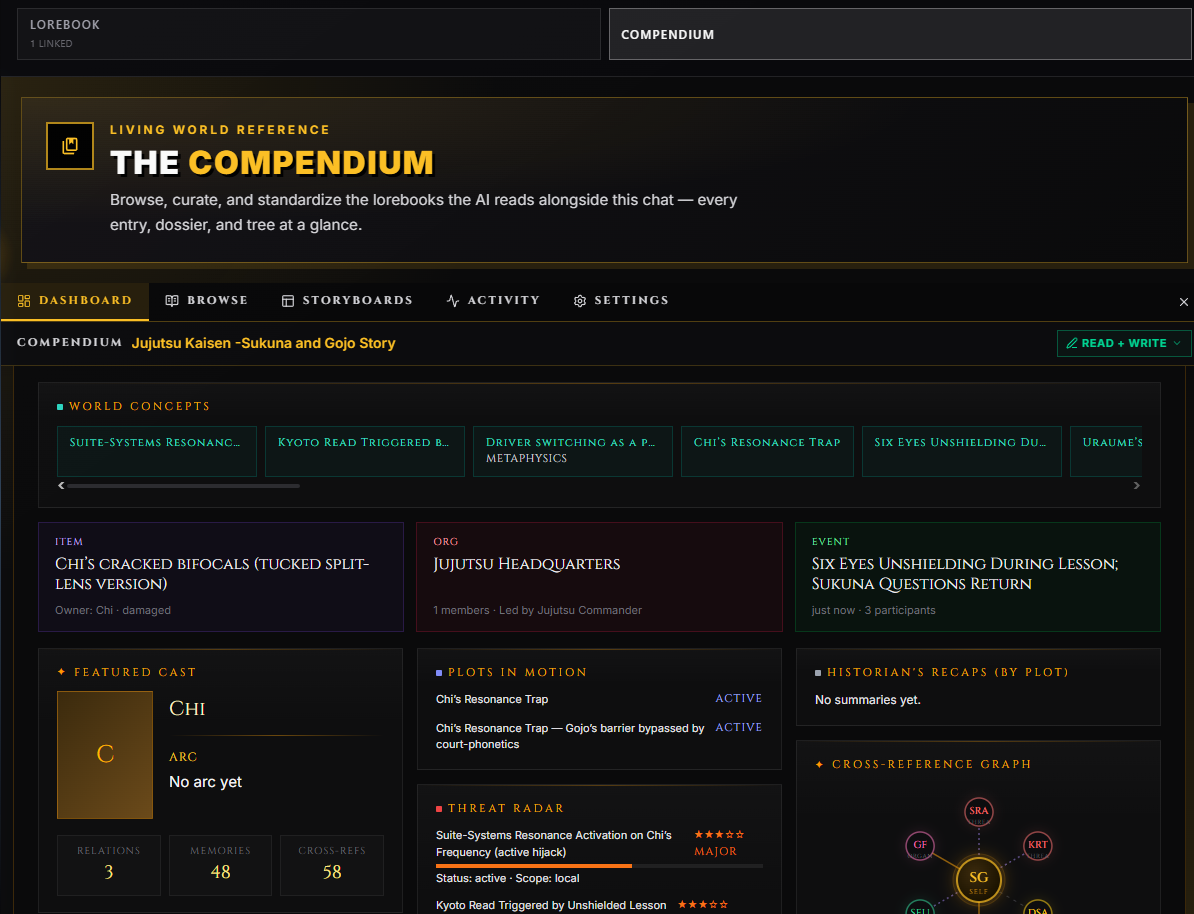
The Compendium is RoleCall's AI-managed knowledge layer. Instead of relying on lorebook keywords to fire when the right word happens to show up in a message, the Compendium has a dedicated AI sidecar that reads the scene, picks the entries that matter, writes new entries when something important happens, and keeps the whole thing organized.
You'll sometimes see this called TunnelVision or TV in older menus and slash commands — it's the same system, renamed to Compendium for clarity. The slash command prefix is still /tv.
Think of the Compendium as giving your lorebook a librarian. Traditional lorebooks are filing cabinets — keyword triggers pull files out when they match. The Compendium is a librarian who reads every scene, fetches what's relevant before the narrator writes, jots notes on what just happened, and reorganizes the shelves when they get cluttered.
Why It Exists
Keyword lorebooks have a stubborn problem: they only fire when the right word shows up in the chat. If your dragon is named "Verithrax" and {{user}} says "the beast," nothing matches. If a character is described as "the king" but the entry's keyword is "monarch," nothing matches. You can paper over this with longer keyword lists, but they get unwieldy and they still miss anything subtle.
The Compendium fixes this two ways:
- A sidecar AI reads each scene and picks relevant entries by meaning, not by keyword.
- It writes new entries when fresh facts emerge — so the lorebook grows alongside the chat without you stopping to file notes.
The narrator still writes the actual response. The Compendium just makes sure the narrator has the right context in front of it.
When NOT to use it
- You're running a tightly authored scene where you want exactly the lore the keyword list dictates and nothing else.
- You're testing a preset or character card and don't want background AI calls muddying the result.
- You're playing on a free model with a strict request quota — the Compendium runs extra calls per turn.
For most long-form roleplay, though, the Compendium is what turns a 30-message chat into a 300-message chat that still remembers who's still alive.
How It Works
Each turn, the Compendium runs three optional passes around the narrator, plus a periodic fourth.
Pre-Generation (Before the Narrator Writes)
The sidecar reads the most recent messages and the lorebook's tree index, then picks which entries should be in the narrator's context. The picks span four buckets:
- Active — characters present, the current location, powers and items in play.
- Anticipatory — what the narrator will likely need next: characters about to appear, locations being traveled to, plot threads about to pay off.
- Enrichment — world rules, lore, and relationship context that improves the scene.
- Wild Card — one or two picks that aren't strictly necessary but could inspire something interesting.
The chosen entries get injected as a [Retrieved World Knowledge] block right before {{user}}'s last message. The narrator sees them naturally and uses them.
You'll see one sidecar call per turn at minimum. If the Minimum entries to retrieve floor is set and the sidecar comes back under it, you'll see a second sidecar call demanding more picks. The legacy keyword engine optionally runs first and shows its matches to the sidecar as advisory hints — the sidecar still makes the final call.
During Generation (Optional)
If enabled, the narrator gets an explore_lorebook tool it can call mid-generation when it realizes it needs context it doesn't already have. Trades latency for accuracy. Use it when narrators routinely improvise lore that contradicts existing entries — the tool forces them to look things up first.
Post-Generation (After the Narrator Writes)
After the response, the sidecar reviews the scene and updates the Compendium — creating typed entries for new characters or locations, filling in structured fields (relationships, factions, dates), linking cross-references, and occasionally reorganizing the tree. Soft-deletes entries that should no longer exist (characters that died, places that were destroyed). Merges duplicates and splits bloated entries when it spots them.
Each post-gen pass tells the AI which entries are already in the lorebook (so it doesn't write duplicates), which managed books are write-targets, and what the current scene was. The AI's reasoning for each action is captured and surfaced per entry in the Activity feed under Why this entry.
Post-generation maintenance is a multi-step tool loop. The sidecar can search, read, write, inspect each real tool result, and continue until it explicitly confirms completion. It cannot mark a pass complete in the same response that proposes writes. If a safety limit or provider failure stops a broad pass, completed changes stay applied and the Activity feed reports both the partial progress and why the pass stopped.
If a response contains only prose or is empty, the loop allows one corrective model call when the round limit permits. The correction retains prior tool results and asks the model not to repeat successful writes. It still requires an explicit completion tool; prose alone is never treated as success. Pausing and resuming does not reset this correction allowance.
If Write frequency is set to N > 1, the post-gen pass only runs every Nth turn. The historian and the pre-gen pass still run every turn — write-frequency only gates entry creation/update.
The Historian
Every N messages (configurable in Settings) the historian writes a structured summary entry for the recent window: turn range, participants, key moments, significance level. Summaries are special — they're injected into context whether or not the sidecar picks them, so the narrator never loses the thread of long sessions. See Regular Entries vs Summaries below. The historian only runs when at least one enabled book allows writes; if every enabled book is read-only, it skips before making a model call, and so does the after-reply filing pass.
What the AI Can Do
The Compendium AI works through a fixed set of actions — useful to know so you can predict its behavior and read the Activity feed.
| Action | What it does |
|---|---|
| Search the lorebook | Walks the tree index, drills into categories, retrieves specific entries by ID, or runs a keyword search. The sidecar uses this during pre-gen to pick context; the narrator can use it during generation if the explore tool is on. |
| Remember new lore | Writes a new typed entry. Runs an automatic dedup check — if a near-duplicate exists, the AI is warned but the new entry can still be created. The post-gen pass uses this when fresh facts emerge. |
| Update existing lore | Rewrites an entry's content, title, or keywords. Replaces content wholesale, so the AI includes everything that should stay. |
| Forget lore | Soft-deletes an entry (disabled but recoverable) with a reason. Hard-deletes only when the AI is told the information is fundamentally wrong. |
| Create a summary | Writes a structured summary entry tied to a story arc, with participants and significance. The historian runs this on a fixed cadence; you can fire it on demand with /tv summary. |
| Reorganize lore | Moves entries to a different category, creates a new category, or lists what's inside an existing node. Triggered by /tv reorg or autonomously when the post-gen pass spots clutter. |
| Merge or split lore | Combines two entries on the same topic, or splits one bloated entry into two focused ones. The AI surfaces these when dedup warnings keep firing or an entry grows past a comfortable size. |
The post-gen pass picks which of these to run based on what just happened in the scene. The pre-gen pass only runs Search.
The Compendium Wing
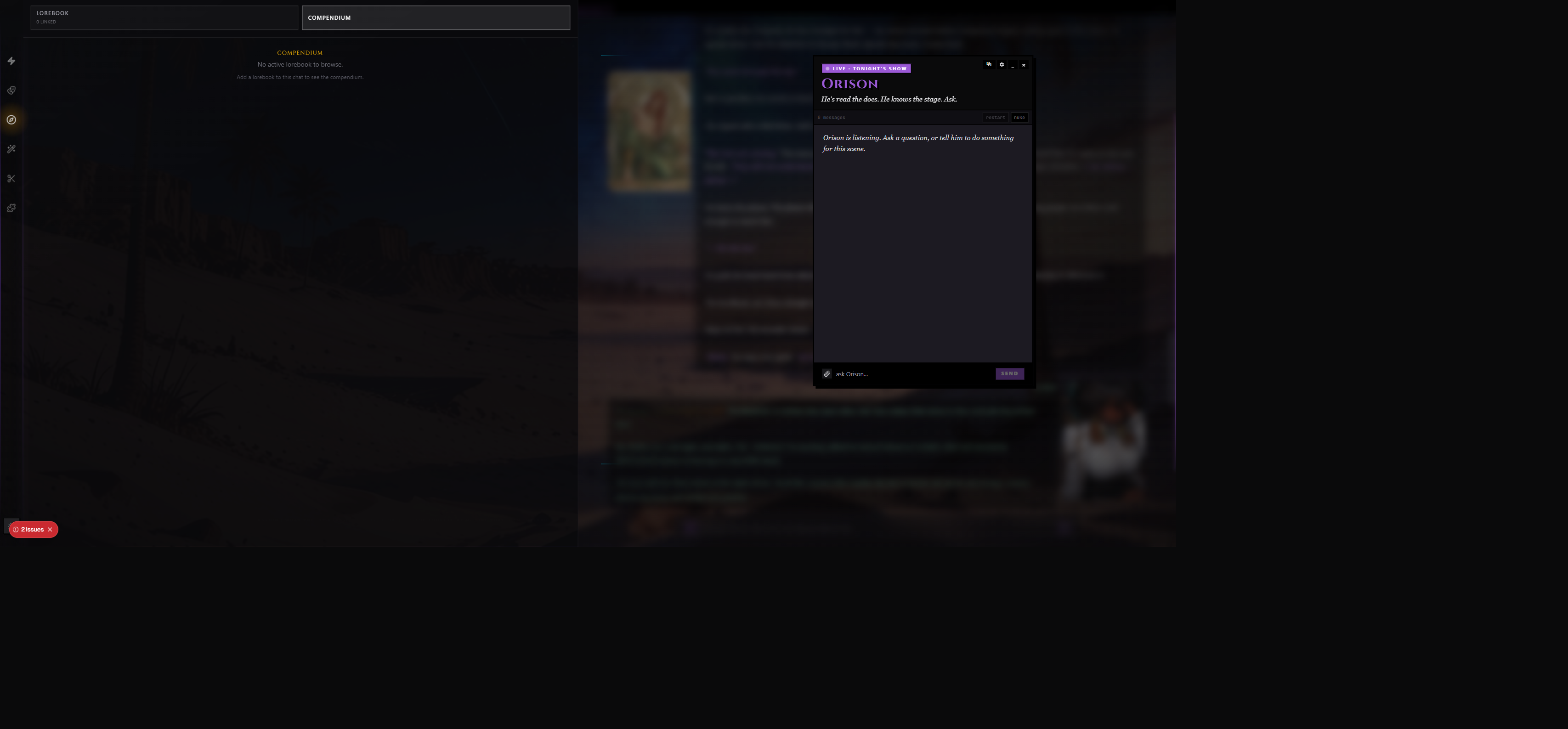
Open the Compendium wing from the chat rail to manage the whole system. It has five sub-tabs.
If you have multiple Compendium-managed books attached to the chat, a dropdown in the header lets you switch between them — every tab below re-mounts pointed at the new book. The header also surfaces a READ-ONLY or WRITE-ONLY chip if the current book's AI permission limits what the sidecar is allowed to do with it.
Dashboard
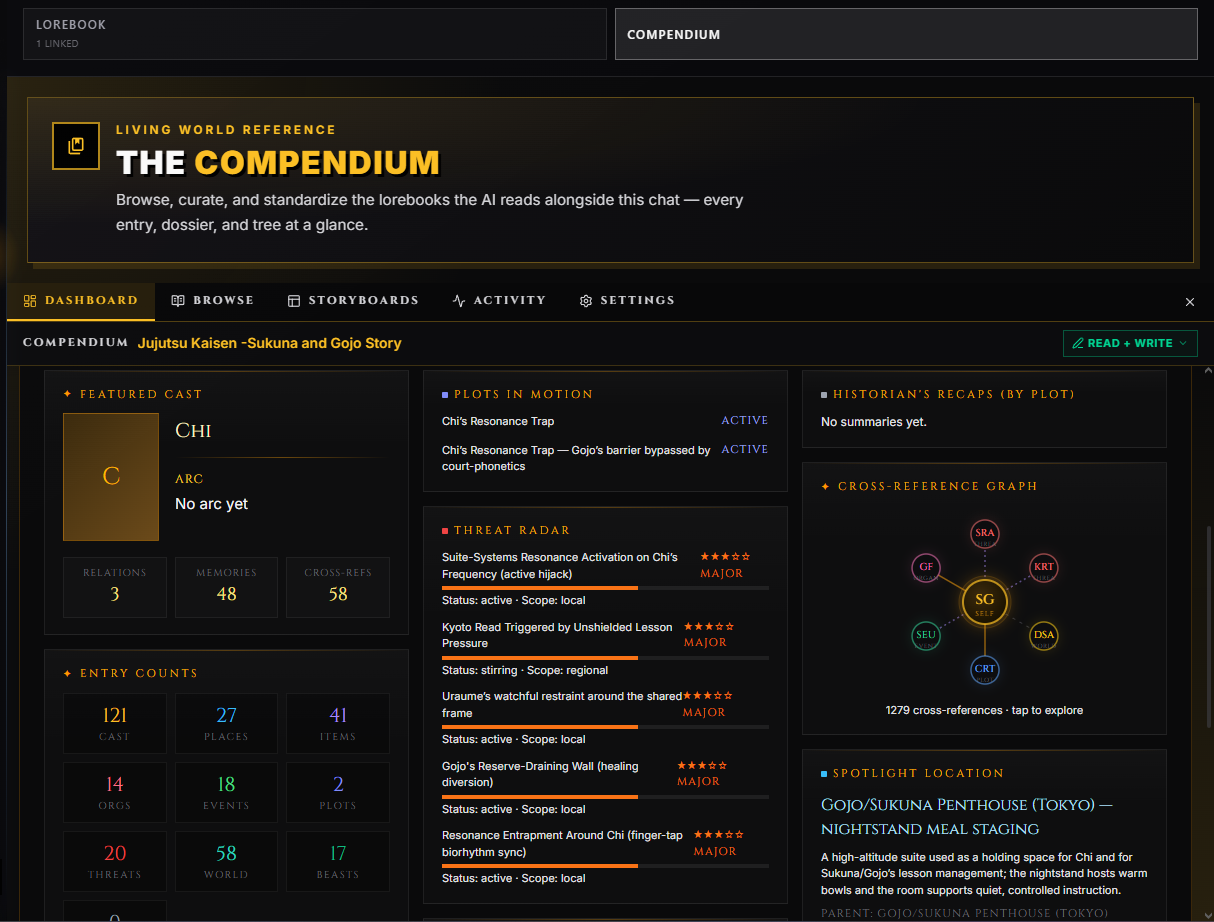
The landing surface. A bento-grid layout shows your active book at a glance with cells covering:
- Entry counts by type — Characters, Locations, Organizations, Items, Events, Powers, Threats, Worldbuilding, Creatures, Plots, Summaries.
- Relationship graph — a radial node graph of the most connected entries with one-click drill-in.
- Recent activity — the last few sidecar actions for this book.
- Summary cadence — when the historian last ran and how many summaries exist.
- Featured entries — character with the most relationships, location with the most events, etc.
- Threats — entries flagged as active threats, with severity bars.
- Active model — which model is configured to run the Compendium for this chat.
- A prominent Start Standardization button sized as the main call-to-action.
Inline rename works directly on the dashboard header — click the pencil to rename the lorebook without leaving the wing.
When a tree-build or standardize run is in flight, a live progress drawer overlays the dashboard so you can watch every tool call land in real time without having to leave the page. The drawer survives switching to other wing tabs — come back to the dashboard later and the run is still there.
If the current book is read-only or unmanaged, the Standardize button is disabled and a chip in the header explains why. If you don't own the source book, clicking Standardize opens the Fork & Enable gate so the AI doesn't write to someone else's library by accident.
Browse
The detail surface. A master-detail layout: a sidebar with search, sub-tabs, and the entry list on the left; the detail pane with the selected entry's hero image, structured fields, and relationship graph on the right.
The sidebar has three sub-tabs:
| Sub-tab | What it shows |
|---|---|
| By Type | Entries grouped by typed bucket — Characters / Locations / Items / Organizations / Events / Powers / Threats / Worldbuilding / Creatures / Plots. Right-click an entry to lock, forbid, or schedule it for reorganization. |
| TV Tree | The AI-built hierarchical tree. Drag entries between nodes to re-home them without waiting for the AI to do it. Right-click nodes to lock, forbid, or schedule the branch for reorganization. |
| Summaries | Just the historian's summary entries, in narrative order with their significance level and the message range they cover. |
A search box above the sub-tabs filters the active view by entry title, content, and keys. Searches survive sub-tab switches so you can keep the query while jumping between By Type and TV Tree.
Inside the detail pane:
- Edit any field inline — title, content, keywords, type-specific structured fields.
- Click related entries in the relationship graph to jump between them.
- See the entry's recent activity (who edited it, when, why).
- Soft-delete the entry with a stated reason, or hard-delete if it's permanently wrong.
A small banner sits at the top of the detail pane if standardization is rewriting the same book — edits are temporarily disabled until the run completes.
Narrow-mode (mobile or compact wing under 600px wide) collapses to one pane at a time with a back button.
Storyboards (Dossiers)
A specialized view that maps Compendium data to structured "case files" you can browse outside the entry list. Each dossier only shows up if the matching Story Director module is enabled in the storyboard stepper. Toggling Map off in the stepper hides the Map dossier even if old entries already populated it.
| Dossier | What it shows |
|---|---|
| Quest Board | Active plots and side plots — status (active / blocked / completed / failed), deadlines, blockers, consequences for failure, and promotion candidates (side plots ready to graduate into main plots). |
| Cast | Character case files — relationship webs, affinity and trust scores, current emotion and cause, memories, hidden knowledge, scene presence, and characterization drift. |
| Calendar | The story's time — current in-world date, event timeline, upcoming deadlines, active prophecies, and any temporal pressure the narrator should be tracking. |
| Map | Locations the party has been, regions they've heard about, current travel state, danger levels, discoveries pending, and movement history. |
| Renown | Public-facing standing — heat with factions, favors banked and owed, oaths in play, blackmail material, and the political web around the protagonist. |
Each dossier panel includes its own context controls — how much of the dossier to send to the AI when it generates new items, whether the dossier is included at all, and a "focus radius" knob that scopes context to nearby events vs the whole story.
The Storyboards tab also exposes an AI Context strip across the top — which dossiers are being sent, current scope (canon / chat / group), last AI write, and a warning when legacy snapshot data hasn't been migrated.
Activity
The floating activity popup shows every event from the latest generation, not an arbitrary number of recent rows. Open full Activity opens the Compendium wing directly on this same canonical feed. Redelivered stream events are deduplicated by generation and event identity, so reconnecting does not create a second activity row.
Real-time feed of every Compendium action — useful for seeing what the sidecar is actually doing during play.
| Activity | Examples |
|---|---|
| Searched | "Searched Locations (3 entries)" — sidecar walked the tree to pull entries. |
| Remembered | "Remembered Captain Thorne" — a new entry was written. |
| Updated | "Updated Gandalf the Grey" — an existing entry was revised. |
| Forgot | "Forgot Old Trade Route (destroyed)" — entry was soft-deleted. |
| Summarized | The historian wrote a summary for the recent message window. |
| Reorganized | "Moved 3 entries to Characters" — tree restructure. |
| Merged/Split | Duplicate entries were merged, or a bloated entry was split. |
| Ingested | "Ingested 12 entries from chat" — backfill from chat history. |
| Triggered | An exact prompt-assembly entry was sent to the narrator. The row says whether it was Always on (constant) or Keyword, and lists matched keywords when applicable. |
| Post-Gen | Status line summarizing the post-gen pass for the turn. |
| Read History | Sidecar pulled previous chat messages for context. |
| Historian | Status line for an in-flight summary pass. |
Each row shows:
- A phase badge — PRE / LIVE / POST / HIST — so you can tell which pass produced it.
- A model tag — which model handled the call (Sonnet, Haiku, GPT-4o, etc).
- A fresh-pulse animation on rows under three seconds old, so the newest actions catch your eye.
- An error chip when the call failed.
- The affected entry and lorebook, plus an Always on, Keyword, Retrieved, Condition, or Write provenance chip when applicable.
- An expandable Why this entry explanation that belongs only to that entry. A batch-wide explanation is never copied onto every result.
- An expandable Details dropdown with the full structured payload (titles affected, IDs, error message).
Three filter tabs at the top:
- All — every action.
- Entries — only actions that modified entries (Remembered / Updated / Forgot / Merged-Split / Ingested).
- Tools — only read or status calls (Searched / Triggered / Summarized / Read History / Historian).
A clear button empties the feed for the current chat. A pop-out button opens the feed in its own floating window so you can watch the AI work while you keep chatting in the main chat.
If Prompt Inspector is enabled, Compendium can legitimately ask for different approvals in one turn. Compendium Retrieval is the request before narration that chooses relevant context. Compendium Capture is the separate request after narration that records new facts. Retrieval can also retry when an answer is unusable or below the configured minimum. The review gate labels the phase, purpose, and retry round so each approval is distinguishable.
Settings
Per-chat configuration for the whole Compendium. See Configuration below for the full field reference.
Getting Started
Step 1: Pick a Lorebook
The Compendium needs a lorebook to manage. Two paths:
- Start fresh with an empty lorebook — let the AI build it from scratch as you play.
- Attach an existing lorebook — the Compendium will use what's there and grow it from there.
Open the chat's lorebook section and toggle TV Managed on for the book you want. If you don't own the book, you'll be prompted to fork it first — the Compendium needs write access to add and modify entries. You can choose:
| Option | What it does |
|---|---|
| Copy & Enable | Fork the lorebook, manage the copy. Safe; preserves the original. |
| Use Original | Enable directly on your own lorebook. No safety copy. |
| Fork & Enable | Shown when you don't own the source. Forks then attaches. |
Step 2: Build the Tree
The Compendium organizes entries into a navigable tree. Build it once and the sidecar can use it:
| Method | What it does |
|---|---|
| From Metadata | Auto-clusters entries into semantic groups (Characters, Locations, Magic, etc.) using keyword analysis. Fast, no AI cost. |
| With LLM | Sends entry titles and keywords to your AI for intelligent categorization. Slower, costs tokens, but produces better groupings for large unstructured books. |
For most lorebooks, From Metadata is enough. Save With LLM for large messy collections where keyword analysis isn't enough.
When a build is running, a live progress drawer shows you which categories are being created and which entries are being filed where. You can dismiss the drawer; the build continues in the background. Come back to the Dashboard or the TV Tree sub-tab when it finishes and the new layout will be there.
You can rebuild the tree at any time — /tv rebuild triggers an LLM rebuild from chat; the Dashboard has a Build Tree button. Locks and forbid flags survive rebuilds.
Step 3: Play
That's it. The Compendium runs automatically each turn — retrieving entries before the narrator writes, updating entries after the narrator finishes, summarizing periodically. Watch the Activity tab to see what it's doing.
Configuration
All Compendium settings are per-chat, found in the Settings tab of the wing. Settings are organized into sections, each with a colored dot and a header blurb.
Output Language
A single global field that sits above every section. Forces every Compendium pipeline (pre-gen, post-gen, ingest, historian) to write in this language. Leave blank to match whatever language the narrator is generating in.
Managed Books
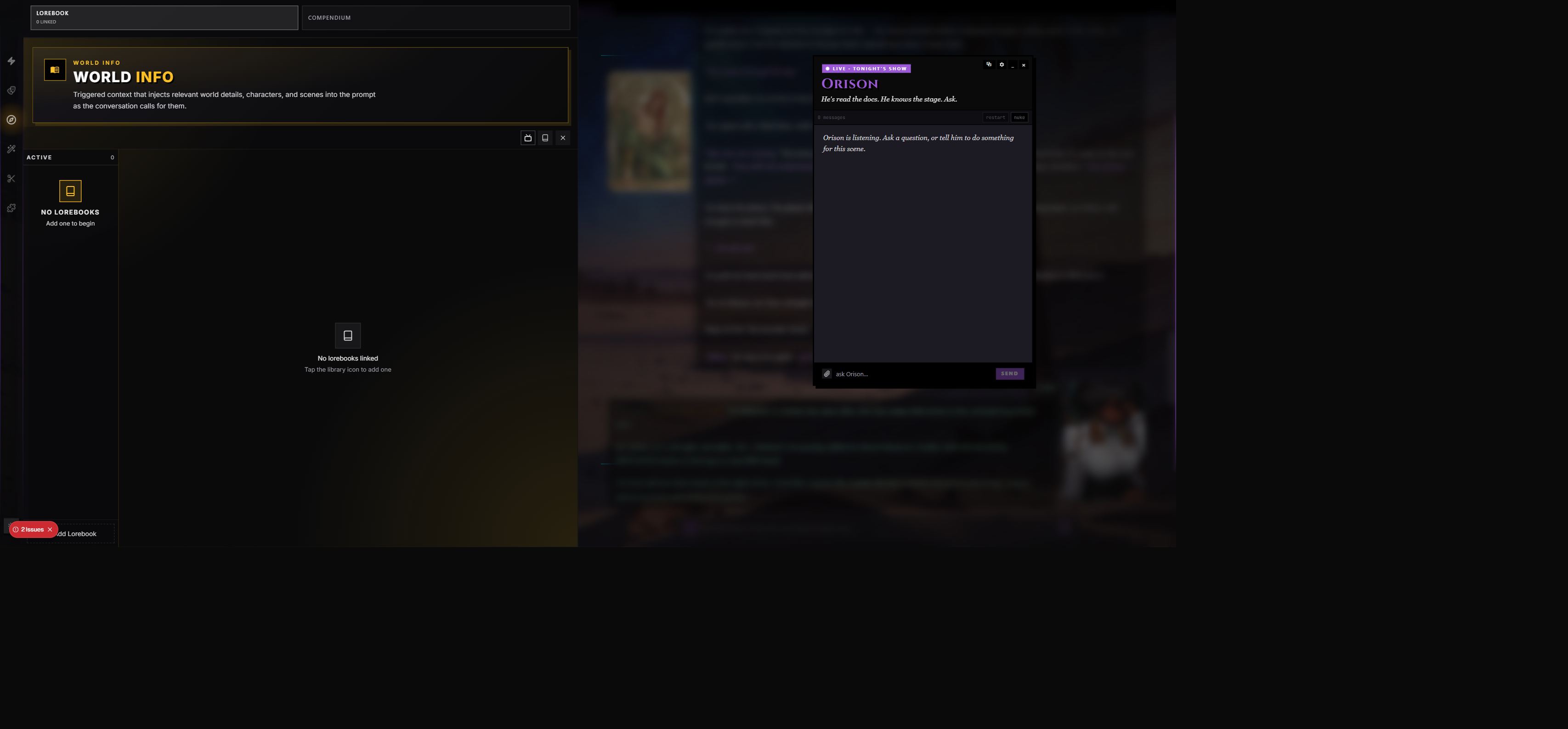
A list of every lorebook attached to the chat. Per-book controls let you decide how the AI treats each book.
| Setting | Options | What it does |
|---|---|---|
| TV Managed | On / Off | Whether the AI manages this book at all. When off, the book is invisible to the sidecar. |
| Primary | One book at a time | The default write target for new entries and summaries when the AI doesn't name a specific book. |
| AI Permission | Read + Write / Read Only / Write Only | What the sidecar can do with the book. Read-only books are pulled into context but never modified. Write-only books are written to but never used for pre-gen retrieval. When no enabled book allows writes, the historian and the after-reply filing pass skip instead of spending a model call. |
| Suppress keyword engine | On / Off | Skip the regex keyword engine for this book — only the sidecar's typed retrieval pulls from it. |
If a book gets removed from the chat's active lorebooks list while it's still marked TV-managed, the panel self-heals on next load — disabled books can't stay managed by the Compendium.
Tree & Entry Constraints
Surfaces every user-set flag on tree branches and individual entries so you can review and clear them in one place. Set new constraints by right-clicking nodes in the TV Tree sub-tab of Browse, or right-clicking entries in By Type.
| Flag | What it does |
|---|---|
| Locked | Keep the AI's hands off. The branch or entry survives rebuilds and reorgs untouched. |
| Forbidden | Never let this branch or entry exist. The AI must redistribute its contents elsewhere on the next rebuild. |
| Reorganize Pending | Fires once on the next rebuild — the AI is told to look at this node specifically — then auto-clears. |
| Pinned (entry-only) | The entry is pinned to a related entry; the two travel together when retrieved. |
A constraint can be cleared from this section with a single click (an X button on each row). All constraints survive tree rebuilds — your hand-curated structure won't get wiped by an AI run.
Standardization Defaults
Used when you click Start Standardization on the dashboard. See the Standardize section below for what the run actually does.
| Setting | Default | What it does |
|---|---|---|
| Default batch size | 5 | How many entries the AI converts per call. Larger batches = fewer calls, better dedup (the model sees more context per call), but risk context overflow. Set to your full lorebook size (e.g. 250) to run everything in one batch — guarantees no cross-batch duplicates. |
| Default model source | TV Sidecar | Which model runs the conversion. TV Sidecar is usually a smaller, faster model; Narrator uses the main chat model. |
| Rebuild typed tree after conversion | On | Auto-runs the deterministic typed-tree builder after standardization completes so the new entries appear in the right buckets immediately. |
| Auto-retry failed entries once | On | Eligible model-output failures get one corrective retry. Invalid provider requests, cancelled work, and unconfirmed writes stop for review instead of being repeated automatically. |
| Preserve original content | On (locked) | Original classic content is retained on in-place rewrites. Review the affected entries before using Revert; merged and newly created entries have different recovery needs. Always on. |
A Revert Last Standardization button sits at the bottom of this section. Confirms with a native dialog before firing.
Type Permissions
Per-type toggles for which kinds of entries the post-gen pass is allowed to create. The eleven Compendium types are:
- Character
- Location
- Item
- Organization
- Event
- Plot
- Threat
- Worldbuilding
- Creature
- Power
- Summary
Useful when you curate certain types manually — for example, "AI handles Cast and Plots, I handle Worldbuilding." Toggle a type off and the AI will skip writing it.
Pre-Generation
Settings for the sidecar's pre-gen entry-picking pass.
| Setting | Default | Options / Range | What it does |
|---|---|---|---|
| Pre-gen retrieval | On | On / Off | Master switch for pre-gen. Off = no retrieval pass before the narrator writes. |
| Max entries to retrieve | 10 | 1 – 30 | Hard cap on how many entries the sidecar can pick per turn. |
| Minimum entries to retrieve | 0 | 0 – 20 | If the sidecar returns fewer, it gets a second call demanding more. 0 disables the floor. |
| Entry detail level | Names + Taglines | Names Only / Names + Taglines / Names + Taglines + Preview | How much information about each entry the sidecar sees in the tree index. More detail = better picks, more tokens spent on the picking pass. |
| Context messages | 20 | 5 – 100 | How many recent messages the sidecar reads when deciding what to retrieve. |
| Keyword hint matching | On | On / Off | Run the legacy keyword engine first and show its matches to the sidecar as advisory hints. Doesn't bypass the sidecar's judgment; just nudges it. |
| Condition evaluation reasoning | On | On / Off | When an entry has a narrative condition, the sidecar must explain in one sentence why it accepted or denied the condition. Costs extra tokens, improves accuracy. |
| Search mode | Auto | Auto / Collapsed / Traversal | How the sidecar sees the typed bucket index. Collapsed shows all categories with counts; the sidecar drills into the ones it wants. Traversal navigates one level at a time. Auto picks based on lorebook size. |
| Collapsed depth | 2 | 1 – 20 | How many tree levels the sidecar sees at once in collapsed mode. Higher = more context, more tokens. Hidden when search mode is Traversal. |
| Multi-book display | Unified | Unified / Per-Book | How multiple lorebooks appear in the bucket overview the sidecar sees. Unified merges everything into one tree; Per-Book keeps them separate. |
During Generation
| Setting | Default | What it does |
|---|---|---|
| Narrator explore tool | Off | Give the narrator a mid-generation search tool it can call when it needs lore it doesn't already have. Trades latency for accuracy. |
Post-Generation
Settings for the sidecar's post-response bookkeeping pass.
| Setting | Default | Range | What it does |
|---|---|---|---|
| Post-generation bookkeeping | On | On / Off | Master switch for post-gen. Off = no entries created or updated after the narrator finishes. |
| Write frequency | 1 | 1 – 10 | Run post-gen every N turns. 1 = every turn, 2 = every other, etc. Useful for cheaper runs on long sessions. |
| Mandatory tool calls | On | On / Off | Sidecar must call at least one entry-writing or summary tool during post-gen, even if just to acknowledge the scene. Off lets the model decline to write anything for uneventful turns. |
Historian (Auto-Summary)
| Setting | Default | Range | What it does |
|---|---|---|---|
| Interval (messages) | 0 (off) | 0 – 100 | Every N messages, the historian summarizes the recent window. The settings UI suggests 20 as a starting point, but the runtime default ships off. 0 disables the historian entirely. |
| Context overlap | 10 | 0 – 40 | Messages of lookback from the previous summary window. Helps the historian bridge events that span summary boundaries. |
| Summary-aware context truncation | Off | On / Off | Drop older messages from the narrator's context once they've been summarized, freeing tokens for newer content. The summary stays in context so the narrator still knows what happened. |
Chat Ingest
Backfills the Compendium from existing chat messages. See Chat Ingest below for the workflow.
| Setting | Default | Options / Range | What it does |
|---|---|---|---|
| Cross-chunk continuity | On | On / Off | Send the previous chunk's entries to the next chunk so the AI doesn't double-write the same characters or locations. |
| Ingest model | TV Sidecar | TV Sidecar / Narrator | Which model processes the chat into typed entries. |
| Tokens per chunk | 6000 | 1000 – 32000 | How much context the ingest model sees per call. Bigger = fewer calls but more cost per call. |
| Phase: Search | On | On / Off | Discover existing entries before writing new ones (prevents duplicates). |
| Phase: Facts | On | On / Off | Extract characters, locations, items, organizations, abilities, and relationships. |
| Phase: Narrative | On | On / Off | Summarize scenes, create plots, organize entries into arcs. |
Below the toggles, a From / To range picker and Ingest Messages button kick the actual run. A live progress drawer streams every tool call as it lands. Cancel any time.
Diagnostics
A one-click Run Diagnostics button checks the compendium's health against this chat:
- Duplicate detection
- Missing trees
- Orphaned summaries
- Configuration sanity (e.g. is there a primary book, are managed books actually attached)
- Stuck standardization locks
Results group by category and severity (pass / warn / fail) so you can scan them at a glance.
Advanced · Classifier Model
Tucked behind a collapsed <details> at the bottom. Pre-gen retrieval, tree-building, and standardization are bucket-picking tasks — they pick categories, they don't write prose. Routing them through a cheaper classifier model (Haiku, GPT-4o-mini, Gemini Flash) cuts those passes' cost dramatically without affecting narration quality.
| Setting | Default | What it does |
|---|---|---|
| Use a cheaper classifier model | Off | When on, pre-gen / tree-building / standardize run on the model you pick below. When off, every phase uses your main Compendium model. |
| Classifier model | — | Provider + model picker. Shown only when the toggle is on. |
Regular Entries vs Summaries
The Compendium writes two kinds of entries that behave differently in context.
Regular Entries
Created by the sidecar with typed write tools (one per entry type — Character, Location, Organization, Item, Event, Power, Threat, Worldbuilding, Creature, Plot). These hold what things are — entities, facts, descriptions, relationships.
- Retrieved into context via the pre-gen pass when the sidecar picks them.
- Hidden from the keyword engine when Suppress keyword engine is on for the book.
- Stored with structured typed fields (relationship intensity, faction allegiance, danger level, etc).
- Can be created, updated, soft-deleted (with a reason), or hard-deleted (permanent).
Summaries
Created by the historian periodically (and on demand via /tv summary). These hold what happened — narrative events, scene beats, key moments.
- Marked as constant by default — always considered for injection, no keyword match needed.
- Stored with metadata: turn range, participants, significance level, arc node.
- Every summary belongs to a story arc. If no arc fits, the historian creates a new one first.
Significance levels for summaries:
| Level | When the historian uses it |
|---|---|
| Minor | Brief interaction, small color detail, routine exchange. |
| Moderate | Meaningful scene with character development or plot relevance. |
| Major | Plot turning point, significant revelation, or pivotal decision. |
| Critical | Story-changing event with irreversible consequences. |
Significance is what the pre-gen pass uses to weight summaries when context is tight — critical summaries always make the cut.
The clean distinction matters: regular entries are facts that may or may not be relevant; summaries are story memory that always is.
Standardize
Standardize is a one-shot pass that converts your existing classic lorebook entries into typed Compendium entries. The dashboard has a prominent Start Standardization button.
What It Does
- Reads every entry in the lorebook.
- Asks the AI to classify each into the right type (Character, Location, Organization, Item, Event, Power, Threat, Worldbuilding, Creature, Plot).
- Fills in the structured fields for that type — relationships, age, role, region, faction allegiance, danger level, and so on.
- Stores the original classic content so the whole run is fully reversible.
- Optionally rebuilds the tree from the new typed entries.
You can pick batch size, which model runs the pass, and whether to auto-rebuild the tree after.
Live Progress
While standardization runs, a progress drawer shows:
- Loading and batching status
- Each batch's lifecycle (queued → LLM call → tool calls received → writing rewrites → writing splits → complete)
- Live counters: processed, succeeded, failed, consumed (entries absorbed by dedup), created (split-offs), splits, dedup hits
- A rolling diagnostic log (the last 500 lines)
If a batch errors and auto-retry is on, you'll see the retry attempt. If something fundamentally breaks, an error frame surfaces with the message.
Revert
If anything goes wrong, Revert Last Standardization (in the Settings tab) restores every rewritten entry to its original classic content and deletes any brand-new split entries the pass created. Confirms before firing. The result message tells you how many rewrites were restored, splits deleted, and consumed entries brought back.
If a run gets stuck (browser crashes, network drops), use Clear Lock to release the in-progress lock so you can start fresh.
When to Standardize
Run it when:
- You just imported a lorebook from another platform (SillyTavern, Backyard, JanitorAI exports).
- You've been adding entries by hand without typed structure and you want them typed all at once.
- You attached an existing community lorebook and want it converted to play nicely with the dossiers.
Don't run it when:
- The book is already typed (the standardizer skips already-typed entries, but you're spending tokens for nothing).
- You're mid-chat and the standardizer might rewrite an entry the narrator is about to read — wait for a natural break.
Standardize is the single biggest quality-of-life feature for migrating an old keyword lorebook into the Compendium. Run it once and stop fiddling with keyword lists forever.
Chat Ingest
Ingest takes a range of chat messages and asks the AI to extract structured facts from them — characters, locations, events — and writes them into the Compendium.
Two ways to trigger:
- From the Settings tab, set a From and To message index, then click Ingest Messages.
- Type
/tv ingestin chat — runs in the background on recent messages.
What Happens
- Messages are split into chunks (size controlled by Tokens per chunk).
- Each chunk runs through up to three phases (each toggleable):
- Search — look up what's already in the compendium so you don't double-write the same character.
- Facts — extract characters, locations, items, organizations, abilities, relationships.
- Narrative — summarize scenes, create plots, organize entries into arcs.
- If cross-chunk continuity is on, the previous chunk's entries get passed to the next chunk to prevent re-writing duplicates.
- Each fact is deduplicated against existing entries (trigram similarity).
- Non-duplicate facts are created as Compendium entries.
A progress drawer streams tool calls live. Cancel any time — partial work stays in the compendium.
Use ingest when you're starting the Compendium mid-chat to backfill from the conversation you already have. Or use it after a long session to capture facts you didn't write into entries by hand.
Slash Commands
Type these in the chat input. The command itself is parsed locally and never becomes a narrator message. Maintenance commands can start the Compendium sidecar model through the normal durable generation queue.
/tv on and /tv off change only whether Compendium is enabled. Your selected narrator model, preset, and Story Director settings stay as you saved them.
| Command | What it does |
|---|---|
/tv or /tv status | Show current Compendium configuration. |
/tv on | Enable Compendium for this chat. |
/tv off | Disable Compendium for this chat. |
/tv summary | Force a historian summary on the next turn. |
/tv summary last N | Force a summary scoped to the last N messages. |
/tv ingest | Trigger ingest of recent messages. |
/tv search <query> | Search across Compendium-managed entries; jumps to the Browse tab with the query pre-filled. |
/tv update: <hint> | Run a targeted post-gen update with your hint. Use when a fact the AI missed needs to be written into the right entry. Example: /tv update: she's allergic to dogs. |
/tv reorg | Reorganize the lorebook — move entries to the right categories, merge duplicates, split bloated entries. |
/tv reorg <prompt> | Reorganize with specific guidance. Example: /tv reorg split out the new characters from the Misc bucket. |
/tv <prompt> | Run the full post-gen pipeline with your prompt as guidance (creates, updates, and reorgs). |
/tv rebuild | Rebuild the tree index with AI categorization. Use after adding many entries by hand. |
/tv help | Show the command list. |
Shortcuts: !ingest is the same as /tv ingest, and !tv is the same as /tv status.
/tv update, /tv reorg, the full /tv <prompt> command, automatic post-generation writing, and the Historian all use the same completion rule: every tool result is returned to the sidecar and the operation ends only after a separate status call. Large requests may take several model calls.
Slash-command maintenance runs as a durable background operation. When Prompt Inspector is enabled, each model round pauses at the same review gate as other generation calls. Approving a later round resumes from the saved checkpoint instead of replaying earlier writes. Refreshing, reconnecting, or a provider failure likewise keeps already completed changes and the operation's progress; if the safety ceiling is reached, run the same command again to continue.
Storyboards Deep Dive
The Storyboards tab pulls structured Compendium data into specialized views. Each dossier renders action buttons that fire structured edits back into the Compendium and the matching Story Director module — generate a new quest, refresh an event, add a relationship, and so on.
AI Context Strip
Across the top of every dossier, the AI Context strip shows you exactly what the narrator is and isn't seeing:
| Chip | What it means |
|---|---|
| AI Context | Whether dossier context is enabled and how much is sent (focused / broad / full). |
| Scope | What scope you're in — canon / chat / group. |
| Events | How many tracked events the dossier currently holds. |
| Last Write | When the AI last updated this dossier (relative time). |
| Legacy | A warning if old-shape snapshot data hasn't been migrated yet. |
Per-dossier, an Include in AI context toggle and a Focus radius slider tune how much of the dossier ships to the narrator with each turn. Focused (radius 5) sends only recent events; broad sends more; full sends everything tracked.
What Each Dossier Tracks
- Quest Board — status, deadlines, blockers, consequences, linked characters, linked locations, urgency, and promotion candidates. Add or refresh quests with AI assistance ("a noble wants
{{user}}to deliver a sealed letter"). - Cast — per-character: affinity and trust (0–100), current emotion with intensity and cause, memories with impact, hidden knowledge, scene presence, and characterization drift. Refresh a relationship with a one-line guide and the AI rewrites the card.
- Calendar — current in-world date, event timeline, upcoming deadlines, active prophecies, temporal pressure. The calendar tracks its own structure (year length, months, era name). Generate structure, populate events, add a single event, or refresh an existing one.
- Map — locations visited, regions heard about, travel state, danger levels, discoveries pending, movement history. Pairs with the Map immersion module — same data backs both surfaces.
- Renown — heat with factions, favors banked and owed, oaths in play, blackmail material, and the political web around the protagonist.
Each dossier only renders if the matching Story Director module is enabled in the storyboard stepper.
Why It Was Renamed
The system used to be called TunnelVision (and you'll still see "TV" all over the menus, slash commands, and config keys). The name was a metaphor for the AI's focused-attention pattern — drilling in on the relevant subset of lore for each scene. The rename to Compendium trades the metaphor for a clearer noun: a structured book of everything the AI knows about your world. The slash commands (/tv) and config field names stayed tv_* to avoid breaking existing chats and lorebooks. If you read older docs, character cards, or community posts that say "TunnelVision" or "TV," they mean Compendium.
Multi-Book Workflow
You can attach multiple lorebooks to a single chat and let the Compendium manage them all together.
Why Use Multiple Books
- Separation of concerns — keep canon worldbuilding in one book, this-chat-only memory in another.
- Reusability — a Modern Fantasy: London worldbuilding book can ride along with three different characters.
- Cleaner forks — when you share a character, your private journaling stays private because it lives in a separate book that wasn't attached for export.
How It Works
When more than one book is managed:
- The primary book receives every new entry and every summary by default.
- Non-primary managed books still get read by the sidecar during pre-gen and can be updated when the sidecar specifically targets them.
- The sidecar sees a tree index that includes every managed book — Unified mode merges them into one tree; Per-Book mode keeps them separate.
- Each book has its own AI permission (read+write / read-only / write-only) so you can pin a canon book as read-only while a chat-specific book stays read+write.
Example Setup
Suppose you're playing a long Lord of the Rings roleplay:
| Book | Permission | Primary? | Purpose |
|---|---|---|---|
| LOTR Canon | Read Only | No | Tolkien-derived lore. Sidecar reads, never writes. |
| My Frodo Variant | Read + Write | No | Character-specific tweaks you've curated by hand. |
| Chat Journal | Read + Write | Yes | This-chat memory. Everything new lands here. |
The sidecar pulls from all three for context, writes only to the journal, and respects your hand-curated character variant.
Upgrading an Imported Lorebook
The most common workflow — taking a lorebook you imported from another platform and turning it into a full Compendium book:
- Attach the lorebook to your chat and toggle TV Managed on.
- Open the Compendium wing → Dashboard.
- Click Start Standardization. Start with the default batch size of 5, and reduce it for long entries.
- Let it run. Watch the progress drawer.
- When it finishes, the tree rebuilds automatically.
- Spot-check a few entries in Browse. If something looks off, click Revert Last Standardization in Settings.
You're done. From now on, post-gen will fill in structured fields the standardizer didn't have enough context for.
Tips
Rebuild the tree after adding many entries by hand — new entries won't show up in the index until you rebuild.
From Metadata first. It's fast and free. Reach for With LLM only when keyword analysis produces visibly bad groupings.
Standardize once. Run it on day one of a Compendium-managed lorebook to convert old classic entries to typed format. Don't run it repeatedly — it's a one-shot conversion.
Set Primary deliberately. New entries land in your primary book by default. If you've got separate books for World Lore and Active Cast, pick the one the AI should grow most often.
Monitor the Activity feed. If the sidecar is creating too many entries per turn, raise the summary interval or tighten post-generation. If it's missing facts, lower it.
Use /tv update. When the chat introduces a fact the sidecar didn't catch, type /tv update: she's allergic to dogs and the post-gen pass will hunt down the right entry and update it.
Use /tv reorg periodically. Long sessions accumulate clutter. A reorg pass cleans it up without any manual work.
Keep summaries on. They're the difference between a 200-message chat with coherent long-term memory and one where the narrator has forgotten who's still alive.
Lock entries you've hand-edited. If you spent ten minutes rewriting a character entry exactly how you want it, lock it. The AI won't touch it on the next post-gen pass.
Forbid the Miscellaneous bucket. Right-click Miscellaneous in the TV Tree sub-tab and forbid it. The next rebuild will redistribute every entry to a real category.
Try the cheaper classifier. If you're running a top-tier narrator model, route pre-gen and tree-building through Haiku or Gemini Flash. The picking quality is indistinguishable; the bill is a fraction.
Pair with Story Director. The Compendium and Story Director are designed to work together — Story Director runs modules, the Compendium stores their data persistently, and the Storyboards tab surfaces it.
Build a tree before you ingest. Ingest works best when the AI has a tree to file new entries into.
Run Diagnostics before a big session. A two-second sanity check beats discovering at message 80 that the primary book got disconnected.
Troubleshooting
Standardization seems stuck
Check the progress drawer for an error frame. If the stream dropped without finishing, an explicit error surfaces telling you the run may still be processing on the server — refresh the dashboard and check whether new entries appeared.
If the lorebook is locked from a previous run that died, use Clear Lock in Settings to release it.
Entries keep getting written to the wrong book
Open Settings → Managed Books and confirm exactly one book has the Primary star. The AI uses primary as the default write target when it doesn't have a strong opinion about which book a new fact belongs in.
The dossier is empty even though things have happened
- Confirm the matching Story Director module is enabled in the storyboard stepper.
- Confirm post-gen is on. Without it, no entries get written and the dossiers stay empty.
- Check Activity → Entries for recent Remember calls. If there aren't any, the AI isn't writing — open Settings and confirm Mandatory tool calls is on.
"The AI won't stop creating new characters"
Open Type Permissions in Settings and disable Character. Or raise the historian interval — long summary windows reduce the per-turn writing pressure on the sidecar.
Edits keep getting overwritten
Lock the entry. Right-click it in the Browse tab and pick Lock. The post-gen pass will skip it from that point on.
Standardize created duplicates
Inspect the affected entries and the run errors before retrying. Increasing batch size does not guarantee deduplication and can exceed the model?s output limit. Avoid overlapping runs. If a write outcome is unconfirmed, check whether the entry was saved before retrying or reverting.
Run Diagnostics says "missing tree"
Open the Dashboard and click Build Tree (or use /tv rebuild). The book has no index for the sidecar to walk.
My ingest is slow
Lower Tokens per chunk. Smaller chunks = more calls but each returns faster. Or turn off the Narrative phase if you only need facts.
The narrator keeps citing a fact that's no longer true
If you updated an entry mid-chat but the older message is still in context, the narrator may be reading the older form. Turn on Summary-aware context truncation in Historian — once the older messages are summarized, they drop out of context and only the current entry remains.
What happens to my Compendium if I delete the lorebook?
Everything goes with it. Compendium data is stored inside the lorebook itself — there's no separate database. Fork the lorebook before deleting if you want to preserve the data.
Glossary
| Term | Meaning |
|---|---|
| Sidecar | The Compendium's dedicated AI worker. Runs alongside the narrator on its own model. |
| Entry | A single unit of lore — a character, location, item, event, etc. The atom of the Compendium. |
| Typed entry | An entry tagged with one of the 11 Compendium types (Character / Location / Item / Organization / Event / Plot / Threat / Worldbuilding / Creature / Power / Summary). Holds structured fields specific to its type. |
| Classic entry | An older entry that hasn't been standardized into a typed entry yet — pure title + content + keywords. |
| Summary | A historian-written entry recording what happened in a scene window. Always considered for context injection. |
| Tree | The hierarchical index of every entry. Branches are categories; leaves are entries. Used by the sidecar to pick what to retrieve. |
| Tree node | A single branch in the tree. Can be locked, forbidden, or scheduled for reorganization. |
| Bucket | A top-level type category in the tree (Characters, Locations, etc.). |
| Pre-gen | The retrieval pass that runs before the narrator generates. |
| During-gen | The optional explore tool the narrator can call mid-generation. |
| Post-gen | The bookkeeping pass that runs after the narrator generates. |
| Historian | The summary-writing pass that runs periodically. |
| Standardize | The one-shot conversion of classic entries into typed entries. |
| Ingest | The pass that processes existing chat messages into typed entries. |
| Managed book | A lorebook the sidecar is allowed to read from and (sometimes) write to. |
| Primary book | The default write target when the sidecar doesn't specify a book. |
| Dossier | A specialized cross-cutting view of compendium data — Quest Board, Cast, Calendar, Map, Renown. |
| Constraint | A user-set flag on a tree node or entry — Locked / Forbidden / Reorganize Pending / Pinned. |