Final Cut
After the scene: images, edits, exports
Post-Production
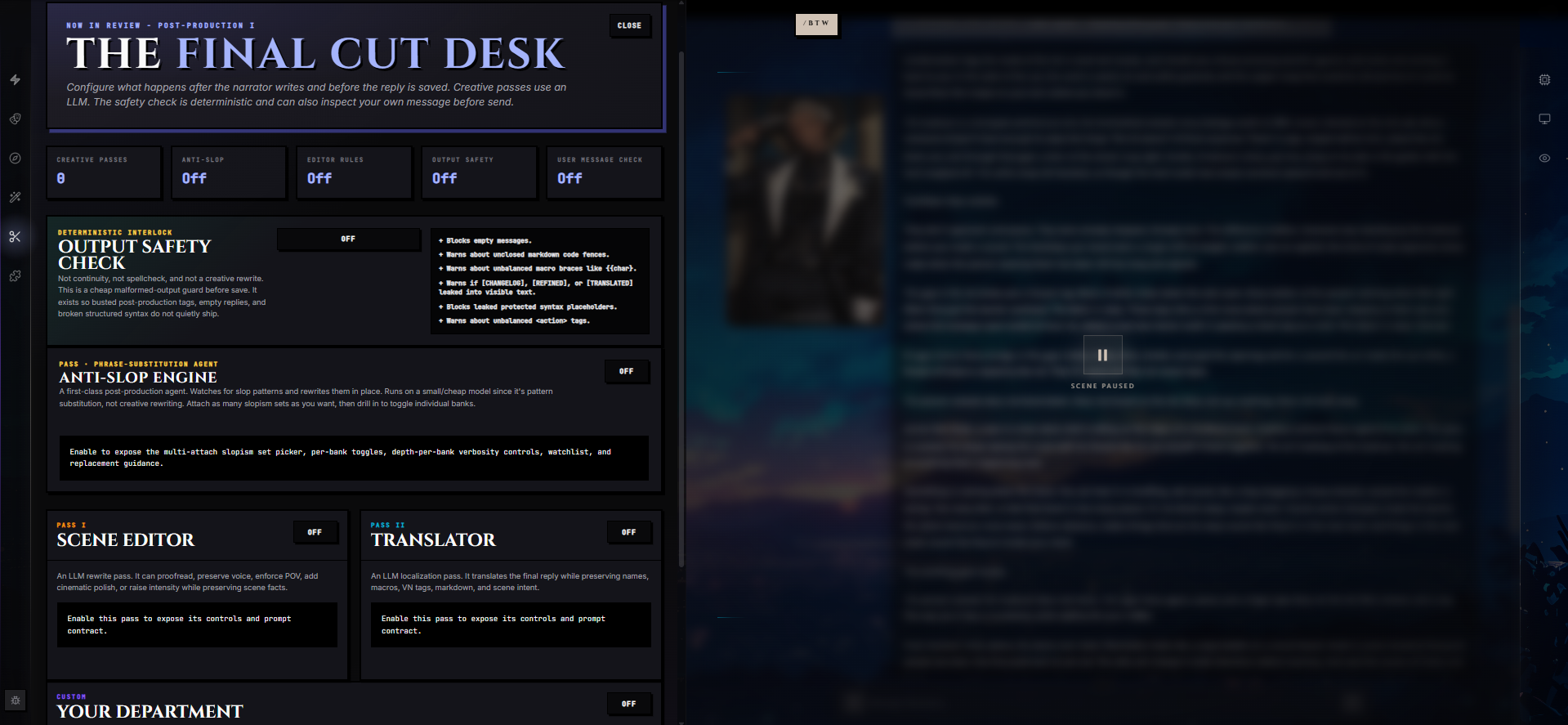
Post-Production runs additional AI passes over each generated message after the narrator finishes writing, before the reply is saved. It is the cleanup booth between "what the model produced" and "what you actually see in the chat" — anti-slop scrubbing, editorial polish, translation, a custom agent of your own design, and a deterministic safety check.
Every reply has two acts. The narrator writes the scene; Post-Production does the final cut. Configure once in the Post-Production wing — "The Final Cut Desk" — and every subsequent reply on this chat flows through your chosen passes automatically. You can also rerun the whole pipeline on any saved message later, with different passes or different models, if you change your mind.
How Post-Production Works
By default, the narrator's output is saved verbatim and the pipeline does nothing. Once you enable a pass, every reply on this chat is fed through the enabled passes in order:
- The narrator writes a reply.
- The reply is handed to the first enabled pass. The pass's model reads the reply (along with a configurable amount of recent chat history) and returns a refined version plus a structured changelog.
- That refined output becomes the input to the next pass. They chain.
- The deterministic Output Safety Check, if enabled, inspects the final text for malformed output before save.
- The final reply is saved to the chat and an Activity Badge appears next to the message. Expanded, the badge shows you what each pass did, with a word-level before/after diff, per-rule review, warnings, and the literal raw payload the model returned for any pass you want to audit.
Passes don't have to apply every turn. Each pass can declare No Changes Needed — meaning the text genuinely doesn't need this pass's attention — and return the input verbatim with a per-rule review explaining what was considered. So you're not paying for cosmetic edits on messages that didn't need them.
The Five Passes
There are four creative passes you can stack in any combination, and one deterministic guard:
| Pass | What it does | Default temperature |
|---|---|---|
| Anti-Slop Engine | Pattern-substitution agent. Scans the reply against your attached slopism banks and rewrites flagged phrases in place. Runs on a small/cheap model by default. | 0.15 |
| Scene Editor | LLM rewrite pass. Proofreads, preserves voice, enforces POV/tense/distance, or applies cinematic polish. Pick from four editor profiles. | 0.35 |
| Translator | Localization pass. Translates the final reply into a target language while preserving names, macros, formatting, and scene intent. | 0.20 |
| Your Department | Your own pass. Pick a model, write an instruction, optionally attach a Preset as a rulebook. Whatever the prompt asks for. | 0.35 |
| Output Safety Check | Deterministic interlock. No model call. Inspects the final text for empty replies, leaked post-production markers, unbalanced macros, broken markdown fences, and busted action tags. | — |
Passes run in the order you enable them. A typical stack is Anti-Slop first (cheapest, narrowest job), then Editor (the heavier creative rewrite), then Translator (so the editor never has to polish text in a language it doesn't speak), then any Your Department pass you've added.
Anti-Slop — Banks, Sets, Kinds, and Depth
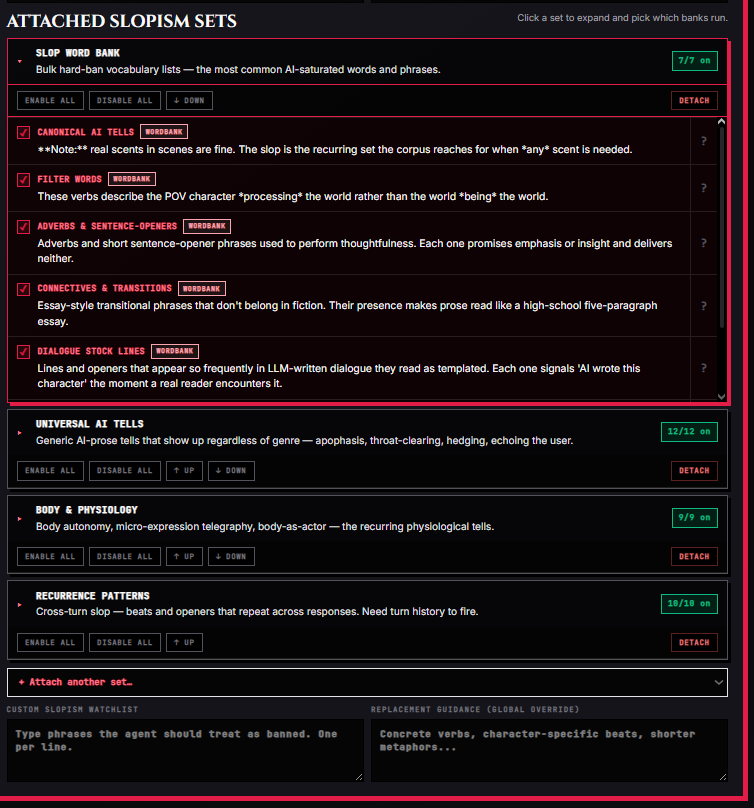
The Anti-Slop Engine is a first-class agent dedicated to one job: catching catalogued slop patterns and rewriting them out. It runs on a small, cheap model by default because it's pattern substitution, not creative writing.
Its catalog is large. RoleCall ships 156 anti-slop banks organized into 69 sets (12 universal sets plus 57 one-genre opt-in sets), and you can author your own banks on top of the shipped catalog.
What a Bank Is
A bank is a curated description of one kind of slop. Every bank carries:
| Field | Purpose |
|---|---|
| Label | Human-readable name. |
| Kind | The shape of the fix needed: phrase, structure, technique, lexical, wordbank, or pattern. |
| Pattern | One-paragraph recognition prose — what this slop actually is in any surface form. |
| Examples | Five to fifty-plus concrete excerpts (or banned words, for wordbanks). |
| Replacement guidance | What the agent should rewrite toward instead. |
| Why (optional) | One-paragraph human-facing rationale for why this pattern fails. |
| Scope | When the bank fires: always, scene, response, or turn-history. |
The Six Kinds
Different kinds of slop need different rewrites. The engine sends a different action verb per kind:
| Kind | What it catches | Fix shape |
|---|---|---|
| phrase | Specific stock phrases. | Substitute or cut. |
| structure | Sentence rhythms and constructions (apophasis, tricolon abuse, redundant second sentence). | Rewrite the sentence so the pattern breaks — not just the words swapped. |
| technique | Prose habits (emotion-as-actor, swappable character voices, feature catalogs, mirror description). | Swap the technique for an alternative. |
| lexical | Small curated word lists (intensifiers, hedges, corporate vocab). | Replace or cut every occurrence including close synonyms. |
| wordbank | Bulk banned-word lists (often hundreds of entries — verbs, adjectives, connectives, fillers). | Hard ban, case-insensitive, including inflections. Replace with the plain alternative or cut. |
| pattern | Recurrence — one instance is fine, the loop is the slop. Needs turn-history context to fire. | Break the loop, not just the words. Vocabulary swap alone fails. |
The Four Scopes
Scope tells the agent when a bank's diagnostic can fire:
| Scope | When it fires |
|---|---|
| always | Single sentence is enough. No context needed. |
| scene | Needs the scene's worldbuilding, register, and cast to judge. |
| response | Needs the full response, not a single sentence — for structural-shape detection across paragraphs. |
| turn-history | Needs prior turns to detect (recycled beats, cross-turn echoes, repeated descriptors). Skipped automatically when this pass's context window is 1 message — they would otherwise fire false positives on every turn. |
The Activity Badge tells you when a bank silently skipped itself because the context window was too small.
The 12 Universal Sets
Attach as many sets as you want; drill into each one to toggle individual banks. The non-genre sets are the universal cleanup layer that applies regardless of genre:
| Set | What it covers |
|---|---|
| Slop Word Bank | Bulk hard-ban vocabulary — the most AI-saturated words, phrases, adverbs, connectives, fillers, dialogue tics, metaphors. |
| Universal AI Tells | Generic AI-prose tells regardless of genre: apophasis, throat-clearing, hedging, intensifiers, corporate vocab, tag adverbs, echoing the user, unprecedentedness claims, named-prose bans. |
| Naming Bans | Default-elevated character names, surname formulas, faction-name templates, nominative determinism. |
| Body & Physiology | Body autonomy, micro-expression telegraphy, eye clichés, body-as-actor, body-inventory adjectives, mind-as-actor, physical-state writing-around-copulatives. |
| Emotion & Melodrama | Curated sorrow, beautiful tragedy, weather-as-mood, possession vocabulary, voice-as-animal, predator-prey metaphors, cosmic melodrama, sensation transfer, narrative community, weather-narrator. |
| Setting & Atmosphere | Ambient detail without payoff, atmosphere-naming, generic settings, mirror description, sacralized mundane, world-notices-anomaly. |
| Narrator & Craft | Narrator overreach, exposition dumps, swappable character voices, stress-mismatched syntax, adjective stacking, accent labeling in narration, four-step amplification, redundant second sentence, tricolon abuse, vague-first, instant expertise, internal contradiction, memory asymmetry, narrator outpacing character, performing the rule, relationship-pacing rush, narrative sycophancy, trauma as aesthetic, writer being funny. |
| Recurrence Patterns | Cross-turn slop — beats and openers that repeat across responses. Choppy dialogue, convenient coincidences, dialogue echo, negation-as-default, redescription of established facts, response-end deceleration, rhythm recurrence, striking-word reuse, time-allocation mismatch, turn stagnation. Needs turn history. |
| Romance & Intimacy | Pining treadmill, perfect confessions, feature catalogs, italics-as-volume, aura romance, chosen singularity, everyone-knows, everything charged, feelings autopsy, masquerade lecture. |
| Erotica | Instruction-manual choreography, flatline intensity, personhood dropout, three-verb treadmill. |
| Sci-fi & Tech | Rogue AI tropes, frictionless physics, technobabble. |
| Period & Faux-Archaic | Ren Faire dialect, feudalism lectures, gothic inventory, brooding silhouettes, ancestral brochure, grimdark-as-character. |
The 57 Genre Opt-In Sets
In addition to the universal sets, the Anti-Slop Engine ships 57 one-genre sets, each containing one bank tuned to the catalogued AI failure modes specific to that genre. Attach only the genres you're actually writing — the other 56 do nothing for you and waste tokens.
The full genre list:
Academia · Action · Adventure · Alternate history · Ancient · Antihero · Apocalyptic · Comedy · Coming of age · Cosmic horror · Cozy mystery · Crime · Cyberpunk · Dark comedy · Dark romance · Dead dove · Demihuman · Drama · Enemies to lovers · Epic fantasy · Erotica · Feudal Japan · Gang · Gothic · Heist · Historical · Horror · Isekai · LitRPG · Medieval · Military · Mystery · Nation-building · Noir · Omegaverse · Police procedural · Regency / Victorian · Reverse isekai · Road trip · Romance · Romantasy · Royalty · Sci-fi · Slice of life · Space opera · Steampunk · Superhero · Thriller · Time travel · Twenties · Urban fantasy · Villain protagonist · Werewolf / shifter · Western · Whovian · Wuxia / Xianxia · YA dystopian
When you attach a set, the panel auto-enables the first three banks so the pass does something immediately. You can flip the rest on individually or use Enable all / Disable all to bulk-toggle the whole set.
Reordering and Detaching Sets
Sets show in the order you attached them. Use the ↑ up and ↓ down buttons on each card to reorder; this controls the order banks ship in the prompt. Detach removes a set and clears every bank in it from the enabled list.
Bank Depth
Banks are not all-or-nothing. Each enabled bank ships at a configurable depth that controls how much of the bank's structured data ends up in the agent's prompt:
| Depth | What ships in the prompt |
|---|---|
| Minimal | Label and pattern only. The agent knows the bank exists but gets no examples and no replacement guidance. |
| Light | Adds the per-kind action line plus 2 examples. |
| Standard | Adds 5 examples plus the replacement guidance. (Default.) |
| Deep | Every example plus replacement guidance. Maximum specificity, highest token cost. |
You set a default depth for the whole pass, then override any individual bank if you want it shallower or deeper. The card shows you, in plain English, exactly what the agent will see at the chosen depth: "pattern + action, 5/22 examples, replacement guidance."
For wordbank-kind banks (which can contain hundreds of banned entries), the depth limit applies to how many of those entries ship — the rest are skipped at that depth. The panel shows you visually which entries are in-prompt and which are skipped.
Custom Watchlist and Replacement Guidance
Beyond the shipped banks, every Anti-Slop pass has two free-text fields:
- Custom slopism watchlist. Phrases the agent should treat as banned, one per line. Use this for project-specific tics ("she breathed out a laugh", brand-name leaks, your own pet hates). They're treated as kind=phrase additions on top of every enabled bank.
- Replacement guidance (global override). A free-text note appended to every rewrite. Concrete verbs, character-specific beats, shorter metaphors — whatever you want the agent to lean toward across every bank.
Both apply across every enabled bank.
User-Authored Banks
You can also author your own anti-slop banks (via the Narrator agent) and they merge into the prompt alongside the shipped catalog at runtime. User banks are scoped to your chat — they don't show up in other users' libraries.
Editor Pass — Profiles, Controls, and Craft-Floor Rules
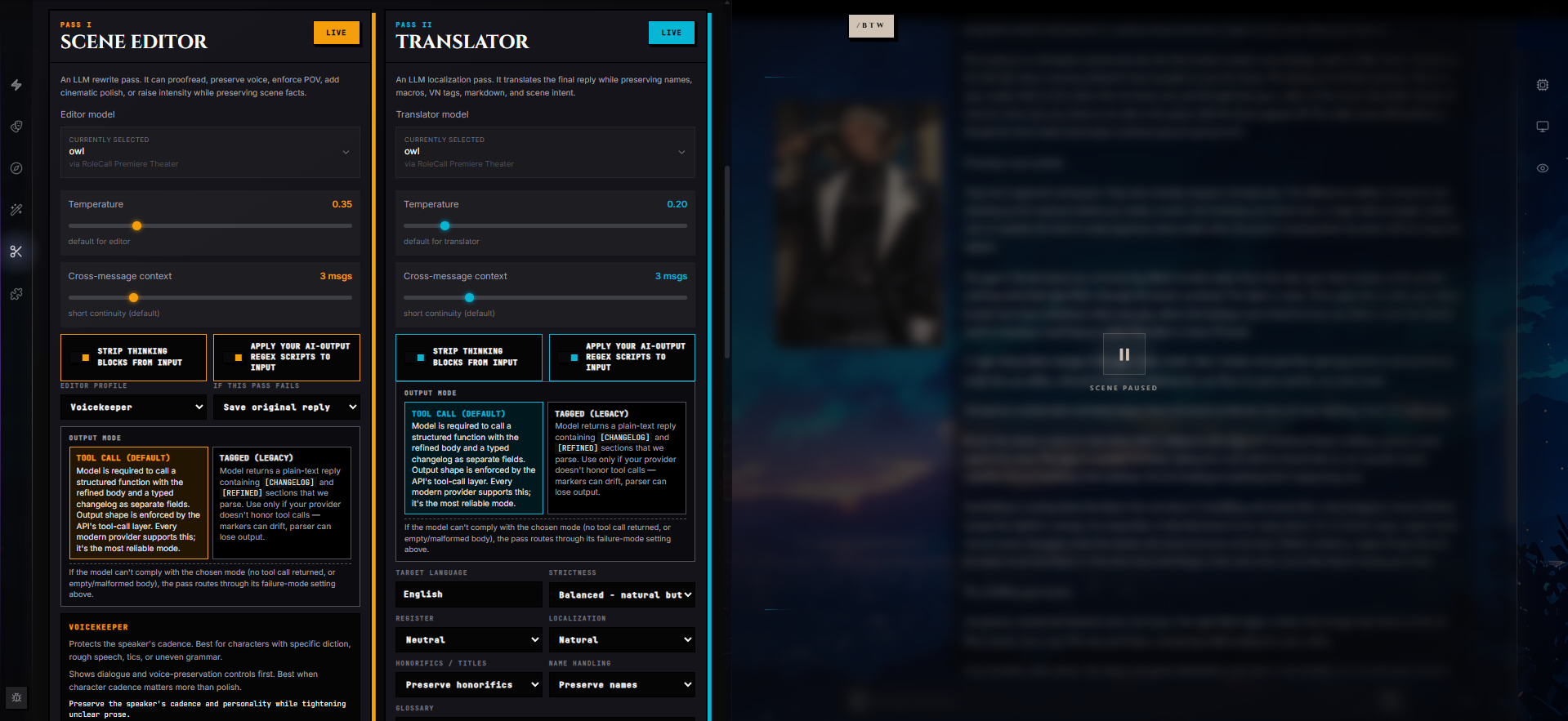
The Scene Editor is the heavyweight creative rewrite. Anti-Slop catches catalogued slop; the Editor handles voice, POV, pacing, tense, and "the prose is correct but flat" problems.
The Four Editor Profiles
Pick one. Each profile is a starting posture — the panel will show you a different set of controls depending on which profile you choose:
| Profile | What it does |
|---|---|
| Proofreader | Minimum viable cleanup. Fix spelling, punctuation, grammar, and obvious awkwardness. Hides the heavier creative knobs. |
| Voicekeeper | Preserves the speaker's cadence and personality while tightening unclear prose. Best for characters with specific diction, rough speech, tics, or uneven grammar. |
| Strict POV | Removes accidental omniscience, POV leaks, and narration that reveals thoughts the speaker could not know. Best for first-person, second-person, or close-third-person roleplay. |
| Cinematic Polish | Improves sensory flow, pacing, and imagery without changing facts, actions, or outcomes. Best when the scene is correct but flat. |
Editor Controls
Profiles unfold into the controls relevant to that profile's job. You won't see every control for every profile — Proofreader hides the heavier creative knobs (no POV picker, no dialogue policy); Strict POV foregrounds POV / tense / distance; Cinematic surfaces narration distance and paragraph density.
POV contract — which point of view to enforce:
| Option | Effect |
|---|---|
| Preserve current POV | Only fix accidental POV slips, otherwise leave the draft's existing POV alone. |
| First-person locked | Maintain first-person narration. Speaker can't perceive what they couldn't perceive. |
| Second-person locked | Maintain second-person narration with the user's embodied perspective stable. |
| Close third limited | Stay inside the current viewpoint character's perceptions and inferences. |
| Camera objective | Only describe observable actions, dialogue, sensory details; no private thoughts. |
| Omniscient allowed | Omniscient narration permitted, but no contradiction of established scene facts. |
Tense: Preserve tense · Past tense · Present tense.
Rewrite strength — how aggressive the rewrites are:
| Option | Effect |
|---|---|
| Surgical | Smallest possible edits. Preserve wording over improving style. |
| Light polish | Light sentence-level improvements, preserve nearly all wording and structure. |
| Balanced | Rewrite weak sentences when useful, preserve facts, speaker intent, key phrasing. |
| Bold pass | Substantially improve flow, pacing, emphasis — must not change facts, outcomes, intent, continuity. |
Dialogue policy — what the editor is allowed to touch inside quotes:
| Option | Effect |
|---|---|
| Preserve dialogue | Don't rewrite quoted dialogue except for obvious typos. |
| Typos only | Inside quotes: fix spelling and punctuation only. |
| Smooth dialogue | Lightly smooth awkward dialogue but preserve intent, subtext, and voice. |
| Voice pass | Adjust dialogue toward the character's established voice without changing meaning. |
Narration distance — how close the camera sits to the viewpoint character:
| Option | Effect |
|---|---|
| Preserve distance | Keep the draft's current narrative distance. |
| Tight interior | Close to the character's body, perceptions, biases, immediate emotional texture. |
| Balanced camera | Balance interiority with clear staging. Don't over-explain internal states. |
| Distant camera | Favor observable staging, action, and dialogue over internal exposition. |
Paragraph density — how the editor treats paragraph breaks:
| Option | Effect |
|---|---|
| Preserve breaks | Don't reflow the draft's paragraphs unless one is clearly malformed. |
| Compact | Tighter paragraphs, fewer line breaks. |
| Balanced | Readable paragraphing with clean action/dialogue beats. |
| Expanded | Slightly more paragraph separation for beats, turns, readability. |
Preservation Toggles
Three checkboxes lock down what the editor isn't allowed to touch (all default on):
- Preserve quoted dialogue — Don't rewrite anything inside quotes except to fix a typo or rule violation.
- Preserve formatting / VN tags — Don't normalize markdown, macros, VN-mode tags, action tags, or other structured blocks.
- Forbid new scene facts — Don't add facts, actions, lore, outcomes, objects, injuries, locations, or relationship changes. Polish only.
Craft-Floor Rules
Separate from the anti-slop catalog, the Editor pass can attach craft-floor rules. Rules describe what good prose looks like — the floor, not the failure shapes. RoleCall ships 8 craft-floor rules you can attach to any editor pass:
| Rule | What it teaches the editor |
|---|---|
| Dialogue craft floor | Each character's dialogue carries a distinct voice — vocabulary range, idiom set, rhythm, accent rendered inside the quotes — such that two named characters can't swap a line without the reader noticing. State warps speech on the page. |
| Diction by setting | Vocabulary, idiom, metaphor inventory, profanity register, and address-terms come from the setting's culture, era, and class. No medieval characters saying "okay"; no therapy-speak in pre-therapy settings; curse-words and address-terms follow culture. |
| Reading level cap | Default narrative prose stays at a mid-tier vocabulary register — direct, concrete, unornamented. Elevated register only when the character thinks in it, the scene demands it, or it's dialogue with its own ceiling. |
| Scene isolation | Characters in one scene have zero knowledge of another scene unless they were present, or the prose has explicitly rendered an information transfer. No knowing-by-smell, no knowing-by-vibe, no overheard private dialogue through walls. |
| Sensory density | Roughly one concrete sensory detail every two paragraphs. Prefer one sensory channel per paragraph over a five-sense sweep. No featureless white rooms; no five-senses-at-once over-description. |
| Sentence rhythm variance | Across every paragraph, three things must vary: sentence length, sentence opener, and sentence structure. No three subject-openers in a row; no four plain-declaratives in a row; uniform-length sentences only when the uniformity is intentional. |
| Show don't tell | The prose presents evidence; the reader draws conclusions. No narrator-summarized emotion, no narrator-named atmosphere, no narrator-asserted character traits. Render the body language, the gesture, the dialogue beat, the consequence. |
| Spatial coherence | Track where bodies are, how far apart they are, what's between them, how the geography of the scene constrains action. No instant teleporting across rooms; no kissing without prior approach; no character seeing the face of someone they're behind. |
Each rule shows its scope on the toggle row. Rules with turn-history scope (most commonly Sentence rhythm variance) only fire when the editor pass has at least 2 prior messages of context — single-message edits skip them automatically. The panel warns you when you attach a turn-history rule.
House Style
The editor pass has a free-text House style / scene rules field. Use it for whatever doesn't fit into the structured controls: "Preserve clipped dialogue. Don't soften threats. Remove repeated gestures. Keep paragraph breaks before dialogue." Whatever you write here ships verbatim as part of the editor's prompt.
Translator Pass
The Translator renders the final reply into another language while preserving everything that matters: names, scene facts, character voice, macros, and protected formatting.
| Control | Options |
|---|---|
| Target language | Free text — type the language you want. Defaults to English. |
| Strictness | Loose (natural phrasing wins) · Balanced (natural but faithful) · Strict (preserve source structure) |
| Register | Casual · Neutral · Literary · Formal |
| Localization mode | Literal (stay close to source structure, preserve idioms when understandable) · Natural (favor target-language phrasing) · Adapted (adapt idioms so the target reader understands the same intent) |
| Honorifics / titles | Preserve honorifics (keep exactly unless glossary overrides) · Adapt honorifics (into natural target-language equivalents) · Drop honorifics (when unnatural in target, preserve hierarchy in wording) |
| Name handling | Preserve names (exactly as written) · Romanize names (only when the source script requires it; no invented localized names) · Localize if requested (only when the glossary or notes explicitly say so) |
Plus three free-text fields for terminology control:
- Glossary — Term-by-term locks.
Bankai = Bankai,honored guest = honored guest, not customer. - Never translate — Names, spells, factions, places that must pass through untouched.
- Always translate as — Forced renderings.
kami = spirit,senpai = senior. - Localization notes — Any free-form direction. "Keep spell names untranslated. Make dialogue natural, not literal."
Already in Target Language
If the source message is already entirely in the target language, the Translator will return Already in Target Language as an honest no-op rather than producing a busywork rewrite. The Activity Badge surfaces this as a clean note ("Source already in target language; no translation applied.") — useful when the narrator model is already replying in your target language and a Translator pass would otherwise round-trip the text for nothing.
Your Department Pass
A focused post-production agent with whatever prompt and model you want. Use this for any cleanup task the four built-in passes don't cover — a continuity check, a vibe-of-the-scene rater, a tone enforcer, a fact-extractor, anything.
| Control | Purpose |
|---|---|
| Department name | What this agent appears as in the Activity Badge. Default "Your Department". |
| Agent instruction | The actual prompt — what you want this agent to do. If empty, the agent will refuse to run. |
| Attached preset rulebook (optional) | Pick a Preset from your accessible presets. The preset's prompts get shipped to the agent as its rulebook. |
| Per-prompt toggles (when a preset is attached) | Pick exactly which prompts in the attached preset are active for this pass. Up to 30 enabled prompts, capped at ~24,000 characters total — large prompt sets clip from the bottom. |
The Your Department pass gets the same shared chrome as every other LLM pass — model picker, temperature, context window, output mode, failure mode, input filter toggles. It runs full-width below the Editor / Translator grid in the panel.
Per-Pass Configuration
Every LLM pass (Anti-Slop, Editor, Translator, Your Department) exposes the same shared controls.
Model and Provider
Each pass can run on a different model than your scene. Anti-Slop is pattern substitution and runs fine on a small/cheap model; the Editor benefits from a capable mid-tier model; the Translator needs strong target-language fluency. When you don't pick a model, the pass falls back to whatever your scene is using.
The picker is the same model selector you use elsewhere — see Providers & Keys. If you pick a model from a different provider than your scene model, the pass routes to that provider with its own credentials.
Temperature
A per-pass temperature override, on a 0–1.5 slider. Each pass type has a different baseline:
| Pass | Default temperature |
|---|---|
| Anti-Slop | 0.15 (stability matters; this is substitution work) |
| Translator | 0.20 (terminology stability) |
| Editor | 0.35 |
| Your Department | 0.35 |
The slider footer tells you whether you're at the default or running an override. Past 1.5, providers either reject the request or produce slop — neither is useful in a refinement pass, so the cap stops there.
Cross-Message Context
How many recent messages this pass sees, from 1 to 10. Anti-Slop banks that detect cross-message recurrence need at least 2–5 messages of history. Editor passes can usually get by with 1–3 for simple voice continuity. Translator passes use it for terminology stability and pronoun continuity. Your Department receives the slice for whatever your prompt asks about.
| Context | What it means |
|---|---|
| 1 message | Current draft only — recurrence-detection banks and turn-history rules silently skip themselves |
| 2 | Current + last reply |
| 3 | Short continuity (default) |
| 4 | 4 messages |
| 5 | Pattern detection sweet spot |
| 6–9 | Deeper history |
| 10 | Maximum — heavy context, highest cost |
Input Filters
Two checkboxes (both default on) control what gets stripped from this pass's input before the model sees it:
- Strip thinking blocks from input. Reasoning models (DeepSeek-R1, Ring-2.6, the thinking variants of Trinity) emit
<think>...</think>scratchpads. Sending those to a post-production agent burns tokens and confuses the pass — "why am I being asked to polish the model's scratchpad?" The user never sees the thinking anyway, so polishing it is pure waste. - Apply your AI-output regex scripts to input. If you have regex scripts configured to filter what the AI writes (emoji stripping, brand redactions, markdown normalization), apply them to this pass's input too. Keeps post-prod aligned with what the user actually sees instead of having the editor "fix" text that downstream regex would just delete anyway.
Both are per-pass — the Editor and Translator may have different needs.
Output Modes — Tool Call vs Tagged
Every LLM pass returns its result in one of two modes. You pick per pass.
| Mode | What happens |
|---|---|
| Tool call (default) | The model is required to call a structured function with the refined body and a typed changelog as separate fields. Output shape is enforced by the provider's tool-call layer. Every modern provider supports this; it's the most reliable mode. |
| Tagged (legacy) | The model returns plain text containing [CHANGELOG] and [REFINED] (or [TRANSLATED]) sections that get parsed out. Use only if your provider doesn't honor tool calls — markers can drift and the parser can occasionally lose output. |
Tagged mode is slightly more forgiving on weaker models that can't comply with strict tool schemas, but the markers can drift and the parser can lose output in rare cases. Tool-call is the default for every new pass.
If the model can't comply with the chosen mode — no tool call returned, malformed JSON, empty body — the pass routes through its failure-mode setting (below).
Reflection Retry
On the tagged path, if the model emits a [CHANGELOG] but forgets to actually apply the changes in [REFINED] (a common failure mode where the model commits to edits but returns the body untouched), Post-Production performs a reflection retry: it feeds the model its own declared changelog back and asks it to actually apply the changes. When this happens, the Activity Badge surfaces a small "retried" chip on the per-pass row so you know one of your passes needed a self-correction round. Tool-call passes never need this — the strict schema makes the failure mode impossible.
Failure Modes
Each pass can be configured for what happens if it fails outright:
| Mode | Behavior |
|---|---|
| Save original reply (fallback) | If the pass fails, the message is saved as the narrator wrote it. The Activity Badge surfaces the failure with actionable error copy. |
| Skip failed pass | If the pass fails, ignore it and continue with whatever the previous pass produced. |
| Block generation | If the pass fails, abort the whole generation. The reply is not saved. Use sparingly — this is the strict mode for critical pipelines. |
Anti-Slop defaults to skip (best-effort cleanup). Editor, Translator, Your Department, and the Safety Check default to fallback (preserve work, surface the warning). Block is only safe when you really do mean "don't ship this reply if this pass can't run."
The Output Safety Check
The Output Safety Check is a deterministic interlock — no LLM call, no model cost, no creative judgment. It's a cheap malformed-output guard before save, with one toggle and one optional checkbox.
It blocks or warns about:
- Empty messages — blocks. The narrator returned nothing.
- Unclosed markdown code fences — warns. A
```block was opened and never closed. - Unbalanced macro braces — warns. Something like
{{char}without the closing}}. - Leaked post-production markers — warns.
[CHANGELOG],[REFINED], or[TRANSLATED]made it into the visible reply (tagged-mode parse failures). - Leaked protected-syntax placeholders — blocks. Internal protection tokens slipped through into the saved text.
- Unbalanced action tags — warns.
<action>opened without</action>, or vice versa.
Also Check My Messages Before Send
The Safety Check has one optional checkbox: Also check my messages before send. When enabled, it inspects your outgoing messages too — so if you're composing with macros and accidentally type {{char} with a missing brace, or open a code fence and forget to close it, you get a heads-up before hitting submit. Useful if you compose with heavy macro usage.
This is the cheap insurance pass. It's deterministic — no model call, no cost. Leave it on.
The Activity Badge
After every reply runs through the pipeline, a small Activity Badge appears next to the message's action buttons. The icon tells you the worst outcome across all passes:
| Icon | What it means |
|---|---|
| Check (green) | At least one pass applied changes; nothing failed. |
| Minus (gray) | All passes ran but none changed the text — pure no-op. |
| Warning triangle (amber) | One or more passes were skipped (fallback ran). |
| X (rose) | One or more passes failed outright. |
Click the badge to open the full activity modal. It shows:
Header — Did the Pipeline Change Anything?
A direct summary at the top: "Differs from the narrator's original output" (green) or "Identical to the narrator's original output (no net change)" (amber), plus the truncated original and final hashes so you can audit exactly which text the pipeline started with and ended on.
Two Tabs
Changelog tab — every pass that ran, grouped by run number. Each pass shows:
- The pass type (Editor / Anti-Slop / Translator / Your Department) and its effective status:
- Applied (green check) — pass produced different output than its input; changes were kept.
- Ran (no change) (gray minus) — pass ran successfully; the model returned the same text it received.
- Skipped (fallback) (amber triangle) — pass was skipped; the original was preserved per the failure-mode setting.
- Failed (rose X) — pass errored; the original text was preserved.
- The "retried" chip (violet) if this pass needed a reflection retry.
- Rule review — one entry per rule/bank in the prompt with a verdict and one-sentence reasoning. This is required of the model on every call as proof of work. Verdicts:
- applied (green) — the model edited the body to address this rule.
- clean (cyan) — nothing matched.
- minor (amber) — matched but kept (intentional).
- ignored (zinc) — not applicable to this input.
- Plus a tally footer: "Reviewed 14 rules · 3 applied · 9 clean · 1 minor · 1 ignored."
- Changelog — the per-rule edit log the model emitted: rule name + description.
- Warnings — any warnings the pass surfaced.
- Input/output hashes — short forensic hashes for the pass's input and output, so you can verify identity.
- Show raw model response — disclosure that expands to the verbatim tool-call arguments JSON the model emitted, or (if the tool call was malformed) the entire backend response body. This is the audit trail for "what did the model actually say?"
Before / After tab — a side-by-side word-level diff of the whole pipeline. The left panel shows the narrator's original with removed words highlighted in rose; the right panel shows the final saved reply with added words highlighted in emerald. A small footer counts how many words were removed and added. Equal text renders plain on both sides so the eye can scan past untouched prose.
Run Grouping
If you've rerun the pipeline on this message (see below), the Changelog tab groups entries by Run 1 / Run 2 / Run 3 / … with collapsible headers. Each run header shows the run number, how many passes ran in that run, how many applied changes, and when the run happened. Older runs collapse so the history doesn't visually explode after several reruns.
Rerun Footer
When the Changelog tab is open and at least one pass is currently enabled, a Rerun N enabled passes button appears at the bottom of the modal. Click it to run the currently-enabled passes over the saved message again (see below).
The badge persists with the message permanently — long after the chat session ends, you can come back and see exactly which passes touched any message and what they did.
Rerunning the Pipeline on an Existing Message
The pipeline doesn't only run at generation time. Any saved message can be rerun through whichever passes are currently enabled:
- Click the message's Activity Badge.
- Click Rerun N enabled passes in the footer.
- The current text plus your enabled-pass config is sent back through the pipeline.
- New action entries append to the badge under a new run number — Run 2, then Run 3, and so on. Prior runs stay visible.
- The "After" tab updates to show the latest run's output as the saved final text.
- The original narrator output is preserved — you can always see what the first run started with.
Reruns are additive. Older runs stay in the changelog history under their own collapsed Run-N header so you can compare what each round did. Rerun is useful when you change your pass config mid-chat and want to retroactively apply it, or when a pass failed the first time and you want to give it another shot after switching models.
How the Pipeline Prompt Is Assembled
The panel includes a live Pipeline Prompt Contract preview at the bottom. It shows you exactly what each agent will receive — wrapped in XML, with a token count per pass and a total token count across the whole pipeline. Token counts use the cl100k tokenizer; counts are approximate for non-OpenAI tokenizers.
- Click any pass chip to drill into just that agent's prompt. Chrome recolors to match the active pass's accent (red for Anti-Slop, amber for Editor, cyan for Translator, violet for Your Department, emerald for Safety).
- Click the active chip again, or ← All passes, to return to the full pipeline view.
- Click Copy XML to copy the whole pipeline contract (or just the selected pass) to your clipboard for offline inspection.
- Open the View full pipeline XML disclosure to see the literal prompt body.
This is the audit surface. If you're not sure why a pass is doing (or not doing) something, the contract preview shows you the exact text the model is being shown. Each pass's input is the previous pass's output, with {{narrator_output}} standing in for the original reply. Variables resolve at runtime; the preview shows the structural shape.
When no passes are enabled, the preview shows a one-line stub: "No passes enabled. The narrator output saves unchanged."
When a Pass Decides "No Changes Needed"
Every pass has an honest escape hatch. After reading the input, the model can declare no_changes_needed — meaning the text genuinely doesn't need this pass's attention.
When this happens:
- The pass returns the input unchanged.
- The Activity Badge shows a "Ran (no change)" verdict for that pass.
- The pass still returns a per-rule review register — one entry per rule or bank it considered, with a verdict (clean / minor / ignored / applied) and a one-line reasoning. This is required by the tool schema as proof of work: the model can't just say "looks fine"; it has to walk every rule and adjudicate each one.
This is intentional. A pass that always rewrites — even when the text is already clean — produces busywork edits that drift voice and waste tokens. The escape hatch keeps passes honest, while the required rule-review keeps the escape hatch honest.
The Translator pass has its own variant: Already in Target Language, which fires when the source is already in the target language and produces a no-op with a single changelog entry explaining the detection.
When NOT to Use Post-Production
Post-Production runs an extra model call (or several) on every reply. It's not free — it adds latency and provider cost. Skip it when:
- You're prototyping a character. You're still tuning the character card and preset; you don't need cleanup yet, you need to see what the raw output looks like.
- The narrator model is already strong on the axes you care about. Strong frontier models on a well-tuned preset often don't need an editor pass for "voice protection" — the voice is already protected.
- You're chatting for speed, not polish. Anti-Slop alone on a cheap model adds ~1–3 seconds. A full Editor + Anti-Slop + Translator stack on a frontier model can add 10–30 seconds. Worth it for finished prose; overkill for fast back-and-forth.
- You're trying to debug a model issue. Disable post-prod temporarily so you can see exactly what the narrator is producing without an editor masking the symptoms.
- The pass keeps returning No Changes Needed. That's the pass telling you it has nothing to do. If it consistently no-ops on three or four messages in a row, your prose probably doesn't need that pass on this character — turn it off.
Tips & Common Patterns
Stack Anti-Slop first, then Editor. Anti-Slop is cheap and surgical — it catches the catalogued failures before the Editor has to deal with them. The Editor then handles voice, POV, and structural concerns on already-clean prose.
Match the Editor profile to the problem. Don't reach for Cinematic when you actually need Strict POV. Cinematic will polish your POV slip into a nicer-sounding POV slip.
Use Your Department for project-specific concerns. Lore consistency, brand voice, "don't break character", "always end on a beat that opens forward" — these are good Your Department jobs that don't fit the catalogued passes.
Attach only the genre sets you're actually writing. The 57 genre opt-ins are designed to be cherry-picked. Attaching every genre set wastes thousands of tokens on slop patterns that have nothing to do with your scene.
Lower depth for genre banks; raise it for the specific bank that keeps failing. Most genre banks at Light depth (label + 2 examples) are enough signal for the agent. The one bank that catches your particular tic — raise that to Deep.
Keep context messages low for solo chats, higher for groups. Solo continuity rarely needs more than 3 messages. Group scenes with multiple characters cross-talking benefit from 5–7 for recurrence detection and voice continuity.
Recurrence-detection banks and turn-history rules need ≥ 2 messages of context. Attaching the Recurrence Patterns set or the Sentence Rhythm Variance rule with context set to 1 message will silently skip them. The Activity Badge tells you when this happened.
The Safety Check is cheap insurance. It's deterministic — no model call, no cost. Leave it on. The "Also check my messages before send" toggle is a quality-of-life add for macro-heavy compose workflows.
Reruns are free of past mistakes. If a pass produced a bad edit on a message, you can rerun the pipeline with different settings — change the model, change the editor profile, change the bank set — and the badge will show both runs side by side. The original is never lost.
Your Department + Preset rulebook is the power move. If you're a Preset creator with a strong house style, attach your preset as Your Department's rulebook and write a one-line instruction. The pass becomes "apply my house style to this reply" — repeatable across every chat.
Read the Pipeline Prompt Contract before adding a pass. It tells you exactly what every agent will see and how many tokens each one costs. If a pass's token count is shockingly high, you've probably attached more banks than you need.
See also: Presets for the AI behavior recipe Post-Production builds on, Generation Controls for sampler profiles that affect the narrator's output before it ever hits the pipeline, and Providers & Keys for the model selection mechanics each pass uses.