Lorebooks
Everything you create and cast
Lorebooks
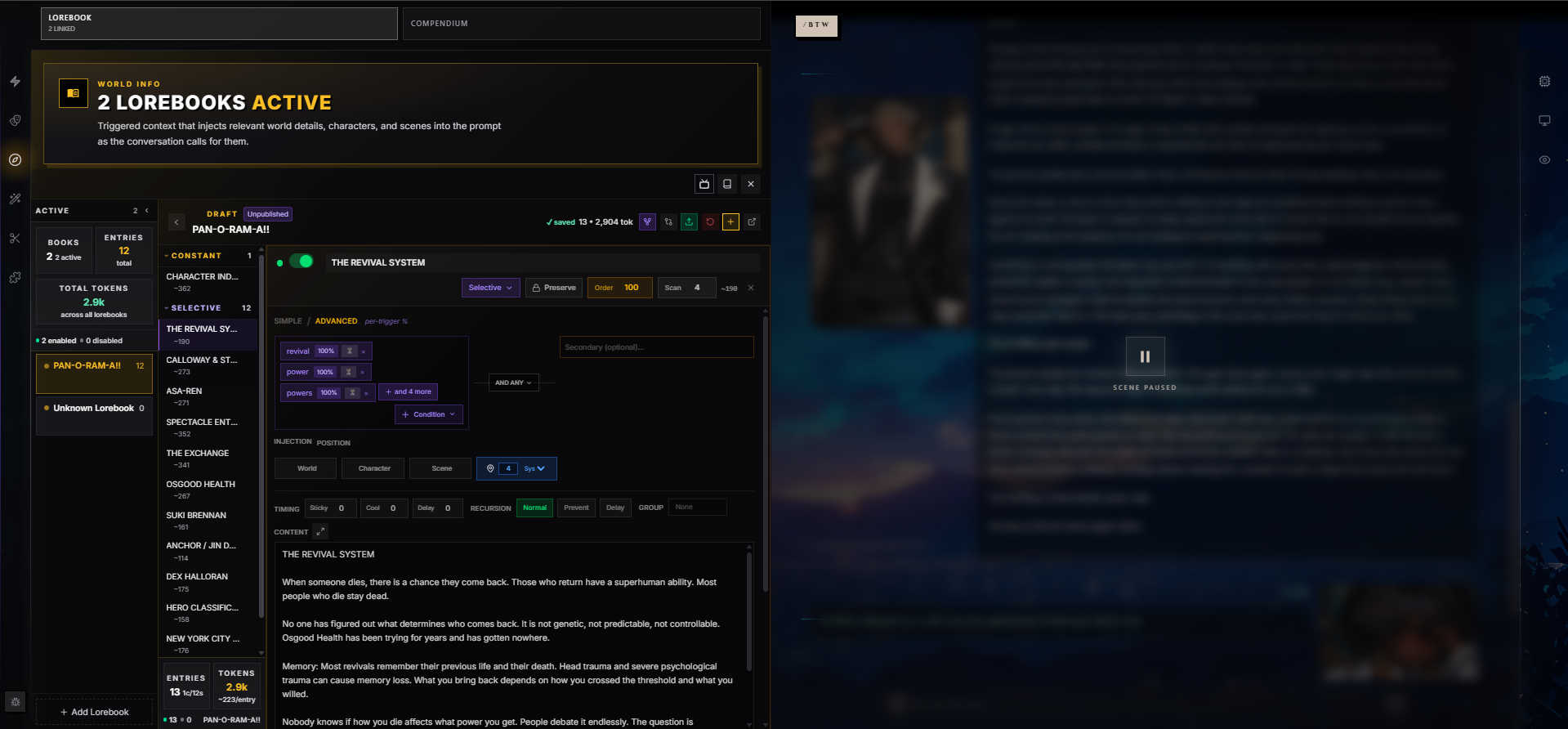
A Lorebook is a collection of world information entries that get injected into the AI's context when their trigger conditions are met. They're the tool you use to build rich, consistent worlds — lore that the AI remembers only when it's relevant.
Think of a lorebook as a reference library for the AI. Instead of cramming every detail about your world into the system prompt (which wastes context tokens), you define entries that activate only when the conversation touches on their topic. Mention "dragon" and the AI suddenly knows about Dragonspire Peaks. Talk about the queen and the court's political intrigues materialize.
How Lorebooks Fit In
The in-scene Add Lorebook picker keeps its naming controls within the panel and scrolls long library results. In the full editor, expanded settings scroll with the page so they do not squeeze the entry workspace; each open entry can still scroll its own content.
Every chat session in RoleCall can use one or more lorebooks alongside a character, preset, and persona:
Chat Session
├── Character      — Who the AI plays
├── Preset         — How the AI behaves
├── Persona        — Who you are
├── Lorebooks (0+) — World context (activated by triggers)
└── Extra Prompts  — Additional injected snippets
When you send a message, RoleCall scans the recent chat history for keywords defined in your lorebook entries. Any entries whose triggers match get their content injected into the AI's context — silently, behind the scenes — so the AI "knows" that information for its next response.
A single chat can layer many lorebooks. They share one trigger engine and one token budget, so an entry from your campaign lorebook competes with an entry from your world lorebook on priority and probability alone.
Anatomy of a Lorebook
Every lorebook has a top-level identity and a bag of global defaults that its entries inherit unless they override them.
Identity
| Field | Description |
|---|---|
| Name | The lorebook's display name. Shown in pickers, in the active list, in Discovery. |
| Description | Long-form blurb shown on the lorebook's page and in Discovery. |
| Image / Thumbnail | Cover art used on cards and detail pages. Two slots so the thumbnail can be cropped tighter than the hero. |
| Lorebook Type | One of world, character, scenario, rules, utility, or other. Helps users filter Discovery and reminds you what role this book plays. |
| Genre / Fandom | Free-text labels for browsing — e.g. "dark fantasy" or "Final Fantasy XIV". |
| Tags | Categorization labels for Discovery search and filtering. |
Global Matching Defaults
These apply to every entry unless the entry sets its own override.
| Setting | Default | Description |
|---|---|---|
| Global Scan Depth | 100 | How many recent messages get scanned for keyword matches. Higher values scan further into the past — useful for slow-burn lore, wasteful when entries are time-sensitive. |
| Global Case Sensitive | Off | When off, Dragon and dragon both match. When on, capitalization matters. |
| Global Match Whole Words | Off | When on, dragon matches "dragon" but not "dragonfly" or "dragons". When off, substring matches count. |
| Global Recursion | Off | When on, the trigger engine performs multiple scan passes so entries can trigger each other in chains. See Recursion below. |
| Token Budget | 0 (unlimited) | The combined token ceiling for everything this lorebook injects in a single turn. When set, the engine drops lowest-priority entries first to stay under the cap. |
| Budget Mode | token | Whether Token Budget counts tokens (token) or entries (entry). |
| Entry Budget | 20 | Used when Budget Mode is entry. Caps how many entries can fire in a single turn. |
Display Preferences
| Setting | Description |
|---|---|
| Default Sort | How entries are ordered in the editor: manual (your drag order), priority, alpha, tokens, or uid. |
| Default Sort Direction | asc or desc. Applies on top of the sort mode. |
Anatomy of an Entry
A lorebook is a stack of entries. Each entry is a self-contained piece of world info with its own trigger conditions, injection rules, and content.
Core Fields
| Field | Description |
|---|---|
| Title | A short name shown in the editor and used for XML wrapping when Memo is on. Required. |
| Content | The actual text injected into the AI's context when the entry fires. Supports the full macro system. |
| Comment | Internal notes visible only to you in the editor. Never sent to the AI. RoleCall-specific — does not survive export to SillyTavern format. |
| Enabled | On/off switch. Disabled entries are skipped during processing entirely (no trigger work, no token cost). |
| Constant | Always-on. Constant entries bypass keyword matching and inject every turn. |
When to Use Constant
Constant entries are great for foundational world facts that should always be present:
- The core rules of your magic system
- The current story arc or main quest objective
- Physical laws that differ from the real world
- A relationship state that always matters
Since constant entries always consume context tokens, keep them lean. Reserve them for the essentials — every constant entry is a tax on every single turn.
When NOT to Use Constant
If a fact only matters in specific scenes, use keywords instead. Marking a 600-token character backstory as Constant means you pay 600 tokens every turn forever, even when that character is asleep three towns away.
Trigger Modes
Every entry runs in one of two trigger modes. They use the same keyword list but treat probability differently.
Simple Mode
The default. You list keywords; if any of them match in the scan window, the entry triggers. A single entry-level Probability value gates whether it actually fires (more on probability below).
- Enter keywords separated by commas:
dragon, wyrm, drake - Any single keyword matching is enough to activate the entry
- A 100% probability means "always trigger when matched"
Simple mode is the right default for almost everything. Reach for advanced mode only when you need per-keyword probability or special triggers.
Advanced Mode
Same keyword list, plus access to the full special trigger vocabulary and per-keyword probability weights.
| Trigger Type | Syntax | What It Matches |
|---|---|---|
| Plain keyword | mother | Simple text match in the scan window |
| Regex pattern | /drag(on|ons)/i | Regular expression with optional flags (g, i, m, s, u, y) |
| Emotion | [emotion:sadness] | Emotional tone in recent messages |
| Message count | [messageCount:>=50] | Conversation has reached that many messages |
| Random chance | [randomChance:25] | A flat X% probability each turn |
| Generation type | [generationType:swipe] | The current action: normal, continue, swipe, regenerate, impersonate |
| Swipe count | [swipeCount:>=3] | User has swiped on the current message at least N times |
| Group chat | [isGroupChat:true] | Only in group performances (false for 1:1) |
| Speaker | [speaker:Elena] | The named character is currently speaking |
| Lorebook active | [lorebookActive:DragonLore] | Another entry or lorebook is already triggered |
| Recency | [recency:5m] | A message was sent within the last X seconds, minutes, or hours |
You can mix plain keywords and special triggers freely in the same entry.
Numeric Comparisons in Special Triggers
[messageCount:...] and [swipeCount:...] accept full comparison operators:
| Form | Meaning |
|---|---|
>=50 | At least 50 |
<=10 | At most 10 |
>5 | More than 5 |
<3 | Fewer than 3 |
=10 or ==10 | Exactly 10 |
Recency Units
[recency:X] accepts seconds, minutes, or hours:
| Value | Meaning |
|---|---|
30s | A message was sent within the last 30 seconds (very active conversation) |
2m | Within the last 2 minutes |
5m | Within the last 5 minutes (recent activity) |
15m | Within the last quarter hour |
1h | Within the last hour |
If no message timestamps are available, recency defaults to true — it doesn't lock you out of a fresh session.
Narrative Conditionals (Compendium-Powered)
Some triggers can't be evaluated by simple pattern matching — they need to understand the scene. RoleCall's Compendium (formerly known as TunnelVision) uses a small sidecar model to read recent messages and decide whether these conditions are true.
| Trigger | What It Asks |
|---|---|
[emotion:sadness] | What emotions are the characters feeling? (See the emotion table below.) |
[mood:tense] | What's the overall vibe — tense, romantic, eerie, foreboding? |
[timeOfDay:night] | What time is it in the fiction — dawn, dusk, the witching hour? |
[location:tavern] | Where are the characters right now — indoors, outdoors, somewhere specific? |
[weather:storm] | What are the environmental conditions — rain, blizzard, acid rain, clear? |
[activity:combat] | What are the characters doing — fighting, traveling, performing a ritual? |
[relationship:hostile] | What's the dynamic between characters — hostile, flirting, reluctant allies? |
These narrative conditionals are evaluated by an AI that reads the scene, so they understand subtext. You write the condition in plain language ("foreboding", "the witching hour", "performing a ritual") and the sidecar judges whether the scene matches.
When Compendium Is Off
- Emotion falls back to regex pattern banks that match emotion-related vocabulary. Faster and free, but it only catches obvious cues.
- All other narrative conditionals don't fire at all. No sidecar means no evaluation. Plain keywords and pattern-based special triggers still work as normal.
What Compendium Brings to Lorebooks
When Compendium is enabled, a lorebook can be promoted to managed by Compendium. That changes how it behaves:
- Its entries are organized into a hierarchical tree (categories → sub-categories → entries) instead of a flat list.
- Before each AI response, the sidecar reads recent messages and picks which entries are relevant — you get smarter selection than keyword matching alone can achieve.
- After each response, the sidecar can update the lorebook itself: writing new entries, fixing facts, summarizing scenes, reorganizing entries between categories.
- The narrator can be given a
search_lorebooktool to look things up mid-generation.
Compendium-managed lorebooks suppress the normal keyword engine by default. You can re-enable keyword hint matching so that classic matches are run anyway and shown to the sidecar as suggestions it can accept or ignore.
See the Compendium guide for the full surface.
Emotion Triggers
In Advanced mode, you can trigger entries based on the emotional tone of the conversation using [emotion:type]. RoleCall recognizes 27 emotion types:
| joy | sadness | anger | fear |
| surprise | disgust | love | trust |
| anticipation | jealousy | guilt | shame |
| pride | hope | despair | gratitude |
| contempt | pain | pleasure | arousal |
| exhaustion | confusion | curiosity | boredom |
| loneliness | nostalgia | determination |
When Compendium is on, emotion is evaluated by the sidecar reading the scene — that's the upgraded path. When Compendium is off, RoleCall falls back to scanning recent messages against keyword and regex banks associated with each emotion type. It's not as nuanced as AI sentiment analysis, but it's fast and predictable.
Example
An entry about a character's tragic backstory with the trigger [emotion:sadness] activates when the conversation drifts into melancholic territory — tears, loss, grief-related language — making the backstory available to the AI exactly when it's most dramatically relevant.
Primary, Secondary & Selective Logic
For more precise control than "any keyword matches", entries split their triggers into two groups — primary and secondary — joined by a logic operator.
[Primary Keywords] — [Logic Operator] — [Secondary Keywords]
The primary keywords determine the initial match. The logic operator and secondary keywords act as a gate:
| Operator | Meaning |
|---|---|
| AND ANY | Primary matches AND at least one secondary matches |
| AND ALL | Primary matches AND every secondary matches |
| NOT ANY | Primary matches AND no secondary matches |
| NOT ALL | Primary matches AND not every secondary matches |
Either group can mix plain keywords with special triggers in Advanced mode — that's how you build "dragon scenes during tense moods" or "the queen unless she's in the tavern."
Example: Contextual Dragon Lore
Imagine you have lore about a specific dragon encounter at a specific location:
- Primary:
dragon, wyrm - Logic: AND ANY
- Secondary:
mountain, peaks, Dragonspire
This entry only triggers when someone mentions a dragon and the mountains. Talking about a dragon in a tavern scene won't activate it — only the mountain dragon encounter does.
Example: Exclusive Lore
- Primary:
sword, blade - Logic: NOT ANY
- Secondary:
rusty, broken, old
This triggers for swords, but not if the conversation is about damaged weapons. Your pristine legendary blade lore stays quiet when someone's complaining about a rusty dagger.
Example: Layered Conditions
- Primary:
Elena - Logic: AND ANY
- Secondary:
[mood:tense],[location:outdoors]
Elena's "wary in the wilderness" entry fires when she's mentioned AND the scene is either tense OR set outdoors. Mention her in a tavern over a quiet ale and the entry stays quiet.
Per-Entry Matching Overrides
Each entry can override the lorebook's global matching defaults. When the override is left blank (the default), the entry uses the lorebook setting.
| Override | Effect |
|---|---|
| Case Sensitive | Forces the entry's keyword matches to honor (or ignore) capitalization regardless of the lorebook default. |
| Match Whole Words | Forces whole-word matching (or substring matching) for this entry only. Useful when 90% of your entries match cat substring-style but one entry needs Cat as a precise proper noun. |
| Scan Depth | A custom scan window for this entry alone. Lower values keep ephemeral lore from cluttering long conversations; higher values catch slow-burn references. |
Per-keyword regex patterns also carry their own flags (/.../gi, etc.), so you can mix case-sensitive and case-insensitive matches even inside a single entry.
Activation Conditions Per Entry
Beyond keyword matching, each entry has a handful of gates that decide whether a matched entry actually fires.
| Gate | Default | Effect |
|---|---|---|
| Probability | 100 | After keywords match, the engine rolls 0–100. Below this value, the entry fires. 100 means always; 50 is a coin flip. |
| Probability Mode | highest | How per-trigger probabilities combine in Advanced mode (see Probability section). |
| Min/Max Activations (via cooldown) | — | The cooldown field caps re-fire rate; there is no separate hard cap on "activations per chat." Use cooldown + sticky to shape activation cadence. |
| Constant | Off | Bypasses every gate above — fires every turn regardless of keywords or probability. |
| Frequency (per trigger) | None | A trigger-level cooldown: this specific keyword can only cause activation every N messages. Different triggers on the same entry can still fire. |
Probability Modes
In Advanced mode each individual trigger has its own probability weight. Probability Mode decides how those weights combine when multiple triggers match in the same turn:
| Mode | Behavior |
|---|---|
| Highest | The single best-matching trigger's probability is used. "Mother (70%)" matching with "[emotion:sadness] (80%)" rolls at 80%. |
| Additive | Matched trigger probabilities stack, capped at 100%. The same scene rolls at 100% (70 + 80 → 150 → capped at 100). |
Highest is conservative — partial signals stay partial. Additive is dramatic — overlapping triggers push toward certainty.
Probability & Boosting
Not every matching entry needs to fire every time. Probability adds variety.
Simple Mode Probability
In Simple mode, each entry has a single Probability field (0–100%). When keywords match, the engine rolls against this percentage. 100% means always trigger. 50% means a coin flip. This is great for ambient flavor entries you don't want appearing every single turn.
Advanced Mode Probability
In Advanced mode, the entry-level probability is ignored. Instead, each individual trigger has its own probability weight:
Trigger              Probability
mother               70%
dead mother          100%
mom                  50%
[emotion:sadness]    80%
When multiple triggers match, Probability Mode (above) decides whether to take the highest or stack them together.
Cross-Entry Boosting
Entries can boost other entries' probability with a flat bonus. For example:
- "Dragon Sighting" has a 40% base probability
- "Dragon Territory" is active and is configured to boost "Dragon Sighting" by +30%
- "Dragon Sighting" now has a 70% chance of triggering
| Setting | Description |
|---|---|
| Boost IDs | A list of other entry IDs this entry boosts when it fires. |
| Boost Amount | The probability bonus applied (0–1, where 0.3 = +30 percentage points). |
This lets you create cascading probability chains — being in dragon territory makes dragon sightings more likely.
Injection: Where Content Lands in the Prompt
When an entry triggers, where does its content appear in the AI's context? The Position field controls this.
Positions
| Position | Where It Lands |
|---|---|
| World | Injected early, before the character card. Treated as background knowledge. Good for geography, history, world rules. |
| Character | Injected near the character definitions. Good for character-specific lore, relationships, secrets the AI keeps. |
| Before Example | Injected immediately before the example dialogues. Useful for context the AI should see before it studies how the character talks. |
| After Example | Injected immediately after the example dialogues. Good for state that applies after the demonstrative scenes. |
| Scene | Legacy generic position that maps near recent messages. Good for active quests, immediate surroundings, ongoing events. |
| @ Depth | Injected at a specific position in the recent message stack — see Depth below. |
| Append | Glued onto the end of an existing message at the given depth, rather than inserted as its own message. |
| Append Preset | Pinned to the very end of the assembled prompt, after chat history, post-history instructions, and author's note. |
| Prepend Preset | Pinned to the very top of the assembled prompt, before everything else. |
Before Example and After Example are kept distinct so round-trips to and from SillyTavern format don't collapse them — your lorebook survives a trip through other tools intact.
Depth (only when Position is "@ Depth")
For fine-grained control, choose @ Depth to inject at a specific position in the message stack:
- Depth 0 = right before the latest message (maximum influence)
- Depth 4 = four messages back (moderate influence; the default)
- Higher depths = further back in context (less immediate influence)
Lower depth means the AI pays more attention to the content, since LLMs weight recent context more heavily.
Role
Each entry can also specify what role its content is injected as:
| Role | Effect |
|---|---|
| System | Part of the system prompt (default). The AI treats it as instructions. |
| User | Appears as if the user said it. Can be useful for steering behavior. |
| Assistant | Appears as if the AI said it. Useful for establishing tone or "memories." |
Preset Integration
Preset creators can place lorebook content precisely using macros in their prompt stack:
| Macro | Injects |
|---|---|
{{lorebook:world}} | All triggered entries with World position |
{{lorebook:character}} | All triggered entries with Character position |
{{lorebook:scene}} | All triggered entries with Scene position |
{{lorebook:all}} | All triggered entries (respects bucket ordering) |
If the preset doesn't use these macros, RoleCall auto-injects lore at sensible default positions.
Priority, Sort Order & Budget Drops
Two fields control the order entries are processed and what happens when budget runs out:
| Setting | Description |
|---|---|
| Sort Order | The position of the entry in the lorebook list. Drag entries to reorder. This is the default processing order. |
| Priority | An explicit number that overrides list position. Higher priority = processed first. Default 100. |
When the token (or entry) budget fills up, entries are dropped starting from the lowest priority. If you have lore that must always appear, give it a high priority — or use Ignore Budget.
Ignore Budget
The Ignore Budget flag forces an entry to always inject, regardless of the lorebook's token or entry cap. Use it sparingly for absolutely critical lore — the core rules of your world, the current main quest objective, safety-relevant context.
Example
You have 20 entries but only budget for 10. The engine processes entries by priority, highest first. Once the budget is full, remaining entries are skipped. Your core world rules (priority 100) always make it in; flavor text about tavern decor (priority 5) gets dropped first.
Inclusion Groups
Sometimes you have several variations of the same lore and only want one to appear. Inclusion groups solve this.
Give multiple entries the same Group Name (any text string). When the group triggers, only one entry from the group is selected per turn.
Group Weight
Each entry in a group has a Group Weight value. Higher weight means that entry is more likely to be chosen:
| Entry | Group | Weight | Chance |
|---|---|---|---|
| Sunny weather | weather | 60 | 60% |
| Rainy weather | weather | 30 | 30% |
| Thunderstorm | weather | 10 | 10% |
Every turn, if the "weather" group triggers, one of these three entries is selected based on their weights. This creates natural variety — mostly sunny, sometimes rain, rarely storms.
Mutual Exclusion Mechanics
- Only one entry per group fires per turn, regardless of how many of the group's entries match.
- If you want a guaranteed "always pick one of these," make sure every entry in the group shares at least one keyword (so the group is always eligible).
- If you want a "sometimes nothing happens," add lower-weight entries with
Probability< 100 — the engine first picks an entry by weight, then rolls its own probability gate before injecting. - Constant entries inside a group still mutually exclude; the group rule wins.
Recursion (Chain Reactions)
Recursion is when triggered entries scan each other's content for additional keyword matches, creating chain reactions.
Example: You have an entry for "Elves" that mentions "Silverwood Forest." If recursion is enabled, the "Silverwood Forest" entry also triggers because its keyword appeared in the Elves entry's content — even though nobody in the chat actually mentioned the forest.
Global Setting
Recursion is controlled at the lorebook level (on/off). When enabled, the engine performs multiple scan passes, each one scanning the previous pass's triggered entries as if they were new chat messages.
Per-Entry Recursion Controls
Each entry has four recursion settings for fine-grained control:
| Setting | Effect |
|---|---|
| Allow Recursion | This entry can be found via chain reactions. Default: off (entries are direct-match only unless you opt in). |
| Exclude Recursion | This entry will NOT be found during chain reactions — only direct chat matches trigger it. |
| Prevent Recursion | This entry's content will NOT trigger other entries. It stops the chain at itself. |
| Delay Until Recursion | This entry only activates at recursion level N. Level 0 = first pass (normal), level 1 = first recursion, level 2 = second recursion, etc. |
Practical Scenarios
"I can start chains, but don't chain into me." Use Exclude Recursion. Good for important entries that should only respond to actual player discussion, not get swept up by tangential lore chains.
"I can be found, but I don't cascade." Use Prevent Recursion. Good for leaf-node entries that provide detail without spawning more chain reactions.
"Only find me in deep chains." Use Delay Until Recursion: 2. This entry only appears when the chain has gone at least two levels deep. Good for deeply hidden lore that only surfaces through a sequence of connections.
"I'm an explicit chain-starter." Set Allow Recursion on the entries that should be reachable by chain. Without it, the recursive scan ignores them.
Timing: Sticky, Cooldown, Delay & Frequency
Four timing controls let you manage when entries fire relative to their trigger moment.
Sticky
Once triggered, the entry stays active for N additional messages even if its keywords no longer appear. Useful for lore that should linger — if someone mentions the haunted forest, the eerie atmosphere should persist for a few turns, not vanish the moment the topic shifts.
Cooldown
After firing, the entry cannot fire again for N messages. Prevents the same lore from being re-injected every single turn. A cooldown of 5 means the entry waits at least 5 messages before it can trigger again.
Delay
The entry won't fire until N messages after its keywords first match. This creates a buildup effect — the party mentions the ancient temple, but the detailed lore about its traps doesn't appear until a few turns later, as if the characters are gradually discovering it.
Trigger Frequency (Advanced Mode)
In Advanced mode, each individual trigger keyword can have its own Frequency — a cooldown that applies only to that single keyword's ability to cause activation. Different triggers on the same entry can still fire while one is on cooldown.
This is different from the entry-level cooldown:
- Entry cooldown: "After this entry fires, wait N turns before the whole entry can fire again."
- Trigger frequency: "This specific keyword can only cause activation every N messages, but other keywords on this entry are unaffected."
Use trigger frequency to throttle hyperactive keywords ("dragon" appears in every paragraph of dragon-themed RP) without muting the rest of an entry's trigger list.
Additional Scan Sources
By default, entries only scan chat messages for keyword matches. You can expand what gets scanned per-entry:
| Source | Default | When to Enable |
|---|---|---|
| Chat messages | Always on | — |
| Character description | Off | Entries tied to what a character is (race, class, appearance) |
| Character personality | Off | Entries tied to personality traits |
| User persona | Off | Entries that react to who the player is |
| Scenario | Off | Entries tied to the current scenario or setting |
| Active preset | Off | Entries that adapt based on which preset is in use |
These are per-entry settings — enable them only where they help. Scanning everything for every entry burns work the engine doesn't need to do.
Example
A lorebook entry about "Elven customs" has Character Description scanning enabled. If the character card mentions "elf" in its description, the customs entry activates for every turn — no chat keyword needed. The AI always knows elven customs when playing an elf character.
Character Filter (Whitelist / Blacklist)
Entries can be restricted to specific characters using whitelist or blacklist filtering:
| Mode | Behavior |
|---|---|
| Whitelist | Entry only triggers when chatting with these characters or characters with these tags |
| Blacklist | Entry never triggers for these characters or characters with these tags |
Filter by character name or character tag. This is especially useful for shared lorebooks used across multiple characters:
- A "Vampire Clans" entry whitelisted to characters tagged
vampire - A "Human History" entry blacklisted from characters tagged
alien(they wouldn't know it) - An "Embarrassing Memory" entry whitelisted to a specific character by name
In group chats, the filter is evaluated against the character currently speaking, so the same lorebook can serve different members of a party without leaking lore between them.
Memo (XML Wrapping)
Enabling Use Memo on an entry wraps its content in XML-style tags using the entry's title:
<Dragon Lore>
Dragons in this world are ancient beings of immense power.
They hoard knowledge, not gold.
</Dragon Lore>
This helps the AI distinguish between different pieces of injected lore. Without wrapping, multiple entries blend together as one wall of text. With wrapping, the AI can "see" where one piece of world info ends and another begins.
When to Use Memo
- When you have many entries injecting at the same position
- When entries contain conflicting or contrasting information that the AI needs to keep separate
- When you want the AI to reference specific lore by name in its responses
When NOT to Use Memo
- When a single entry is the only thing injected at a given position — wrapping adds noise without helping the AI separate anything.
- When the AI is producing prose and the wrapper tag risks bleeding into the output.
Side Effects (Variable Mutations)
A triggered entry can change variables when it fires. This makes lorebooks active participants in stateful storytelling — not just passive context — and lets variables drive macros elsewhere in the prompt.
Each side effect has:
| Field | Description |
|---|---|
| Type | One of: setvar (set to a value), addvar (append/concatenate), incvar (increase by amount), decvar (decrease by amount), delvar (delete). |
| Variable | The variable name to mutate. |
| Value | For setvar/addvar — the string value. |
| Amount | For incvar/decvar — the numeric delta. |
| Scope | local (this chat only) or global (across all chats for this user). |
Two entry-level toggles shape when the effects run:
| Toggle | Behavior |
|---|---|
| Only On First Trigger | The effects run only the first time the entry fires in a session. Useful for "discovery" entries that should grant a flag once but not on every re-trigger. |
| Clear On Deactivate | Variables set by this entry are reset when the entry stops matching. Useful for transient state — atmosphere flags, scene-specific moods. |
Example
An entry "Met the Queen" with a side effect of setvar: met_queen = true (global) and Only On First Trigger fires once when the queen is first mentioned, sets a permanent flag, and then never sets it again. A different entry can read {{getvar::met_queen}} to remember whether you've actually met her in this campaign.
Macros in Lorebooks
Lorebook entry content supports the full macro system. Macros are resolved at injection time, so they always contain current values.
Common Macros in Entries
{{char}} is known throughout the land as a master swordsman.
{{user}} has heard rumors about the cursed blade.
The current time is {{time}}, and the {{weather}} weather affects visibility.
Lorebook-Specific Macros
You can reference other entries and lorebook metadata:
| Macro | Description |
|---|---|
{{lorebook::EntryName}} | Get another entry's content by name |
{{lorebookrandom::GroupName}} | Random entry from an inclusion group |
{{lorebookcount}} | Number of currently triggered entries |
{{lorebooktokens}} | Token count of triggered entries |
{{triggeredentries}} | Comma-separated list of triggered entry names |
Outlet Macros (Reusable Snippets)
Use {{lorebook:EntryName}} in your chat messages to expand an entry's content inline. This turns lorebook entries into reusable snippets:
Entry named "Shibuya Incident":
A catastrophic event that occurred on October 31st when cursed spirits launched a coordinated attack on Shibuya...
You type:
Remind me about {{lorebook:Shibuya Incident}}
What the AI sees:
Remind me about A catastrophic event that occurred on October 31st when cursed spirits launched a coordinated attack on Shibuya...
The entry must exist in an active lorebook attached to the current chat.
Multiple Lorebooks in One Chat
A single chat can use many lorebooks simultaneously. All attached lorebooks are processed together — their entries are merged into one pool and evaluated by the same trigger engine.
Layer lorebooks by role:
- World lorebook — Geography, factions, history, magic system
- Character lorebook — Deep lore specific to one character
- Campaign lorebook — Current story arc, active quests, session notes
Entries from all lorebooks share the same token budget and compete on priority. An entry in your campaign lorebook with priority 100 will outrank a world lorebook entry with priority 10.
Active vs Available
- Available lorebooks are everything in your library plus published lorebooks added from Discovery.
- Active lorebooks are the subset attached to the current chat session.
- Inside the chat panel, each active lorebook also has its own enabled toggle. Disabled but still-attached lorebooks contribute nothing to the prompt this turn but stay one click away from being switched back on.
You can reorder active lorebooks within a chat (drag in the panel). Order affects nothing engine-side — it's purely a sidebar convenience.
Per-Chat Overrides
You can customize a lorebook for your chats without modifying the upstream lorebook. Overrides apply to:
- Top-level lorebook fields (name, description, global settings)
- Individual entries (any field — content, triggers, priority, enabled state, etc.)
- Added entries (new entries created locally without touching the source)
Overrides are stored separately from the base lorebook. They survive even if the upstream creator pushes updates — your tweaks aren't blown away. You can also republish your overrides back to the lorebook if you own it, turning your local drafts into the new canonical version.
For forked lorebooks, overrides are the layer where you make the fork yours without giving up the ability to sync upstream changes later.
The Editor: Two Views
Lorebooks ship with two editing surfaces. You pick what's right for the lorebook at hand.
Flat List
The traditional lorebook editor. Entries are grouped by behavior into collapsible buckets:
| Bucket | Contains |
|---|---|
| Constant | Entries with the Constant flag set (always fire) |
| Selective | Entries with secondary-keyword logic (selective gating) |
| Other | Everything else (regular keyword-triggered entries) |
Each entry shows its title, token cost, and a small badge for enabled/disabled state. You can:
- Search — Filter by entry title or content via the search bar
- Drag to reorder — Reorder entries within their bucket (sort order)
- Bulk operations — Select multiple entries to toggle enabled, change category, or delete
- Inline preview — Hover an entry to see its content preview
- Quick-toggle — Click the enabled dot to flip a single entry on or off without opening it
Tree View
When a lorebook is managed by Compendium, the editor switches to a hierarchical tree:
- Root nodes represent top-level categories (Characters, Locations, History, etc.)
- Sub-nodes drill down into finer categories
- Entries live at the leaves, with their full text accessible inline
- Drag entries between nodes to reorganize (or let Compendium do it for you)
- Each node carries an AI-written summary describing what's in the branch, used during retrieval
Tree User Constraints
Compendium-managed trees let you pin AI behavior per node. Right-click any node to set:
| Flag | Behavior |
|---|---|
| Locked | The AI may not modify, move, or delete anything inside this node. Safe haven for canon you don't want rewritten. |
| Forbidden | The AI may not write new entries into this node. Existing entries can still be edited and read. |
| Reorganize | The AI is encouraged to actively re-sort entries inside this node — explicitly opting in to AI shuffling for a branch you don't mind being touched. |
Constraints persist with the lorebook and apply across every chat where Compendium is on. They're how you draw a line between "AI sandbox" and "my canon, hands off."
Search
Both views support a search bar that filters entries by title and content. Matching nodes auto-expand in tree view so you can drill straight to what you're looking for.
Bulk Operations
Across both views, multi-select supports:
- Toggle enabled on/off in bulk
- Move to a different category (flat) or node (tree)
- Delete (with confirm)
- Adjust priority by delta (+10/-10)
The Chat Wing Panel
Inside an active chat, the Lorebook wing panel is your live workspace. It exposes:
- Active lorebooks sidebar with per-book enabled toggles, entry/token stats, and a search bar for adding more
- Add to chat — Pull a lorebook from your library or from Discovery into the active set
- Inline editor — Click into an active lorebook to view and edit its entries without leaving the chat
- Quick stats panel — Across all active lorebooks: total entries, active entries, total tokens
- Compendium section — When Compendium is enabled, surfaces the tree, the activity feed, and the settings drawer for any managed lorebooks
- Tree overview — A compact view of the active managed lorebooks' trees, with click-through to drill in
The wing remembers expand/collapse state, sidebar collapse state, and which lorebook you were viewing last.
Activation Logging (Activity Feed)
When a lorebook is managed by Compendium, the Activity Feed records every operation the engine and the sidecar perform — visible right there in the wing panel. Each entry shows:
| Field | Meaning |
|---|---|
| Phase | When it happened: pre-gen, during-gen, post-gen, or summary |
| Action | What happened: Searched, Remembered, Updated, Forgot, Summarized, Reorganized, Merged/Split, Ingested, Triggered, Post-Gen status, Read History, Historian status |
| Entry / Node | Which entry or tree node was touched |
| Model | Which model performed the action (sidecar or narrator) |
| Timestamp | Relative time (5s, 2m, 1h, etc.) — updates live |
| Pulse glow | Fresh activity pulses for a few seconds before fading |
The feed makes it visible why a particular piece of lore showed up (or didn't) — you can see the sidecar's reasoning trail and confirm that your trigger conditions are doing what you expect.
Even when Compendium is off, the regular keyword engine surfaces "Triggered" events so you can see which entries fired on each turn.
Token Budget & Cost Awareness
The lorebook editor and wing panel both surface token costs at multiple levels:
| Display | Where |
|---|---|
| Per-entry token count | In the entry list and on the entry's detail panel |
| Per-lorebook total | In the active lorebooks sidebar and on the lorebook's page |
| Cross-lorebook total | In the wing panel's aggregate stats |
| Average tokens per entry | In the lorebook stats panel |
Watching these numbers is the difference between a lorebook that quietly enriches scenes and one that eats the entire context window.
Budget Behaviors
| Budget Mode | What "Exceeded" Means |
|---|---|
| Token | The sum of triggered entries' token counts exceeds the cap. Lowest-priority entries are dropped first. |
| Entry | The number of triggered entries exceeds the cap. Same priority-based dropping rules apply. |
Entries with Ignore Budget are added first and never dropped. They count against the cap but they're guaranteed.
Lorebook Statuses & Visibility
Lorebooks use this status set:
| Status | Who Sees It | In Discovery? |
|---|---|---|
| Draft | Only you (work in progress) | No |
| Private | Only you (finished but private) | No |
| Published | Everyone | Yes |
| Unlisted | Anyone with the link | No |
| Removed | Only you (taken down) | No |
There is no Archived state and no lorebook-specific "Pending Review" state for library content.
Publishing a lorebook makes it discoverable. You can unpublish back to private at any time without losing the lorebook itself — your library copy stays intact.
Versioning & Rollback
Lorebooks support versioned snapshots so you can publish updates without breaking forks:
- Every published version carries a version number
- Snapshots capture the lorebook's state at a moment in time
- Rollback restores the lorebook to an earlier snapshot
- Content versions track entry-level history (you can see what changed in each entry between versions)
- Publish from version lets you publish a specific snapshot as the new canonical version
When you fork someone else's lorebook, your fork records the source version. Later, upstream-diff can show you what changed between your fork's source version and the latest upstream — and sync lets you cherry-pick the upstream changes you want without losing your own customizations.
Forking
Forking lets you copy someone else's published lorebook into your library.
How It Works
- Find a lorebook on Discovery
- Click Fork — a copy lands in your library as a draft
- Customize anything: rename, edit entries, add new entries, delete what doesn't fit
- Attribution to the original creator is preserved
Attribution
Forked lorebooks preserve attribution to the original creator:
- "Forked from Aetheria by @worldbuilder"
- Attribution persists even if the original is later deleted or made private
- The original lorebook's fork count increments as social proof
Syncing With Upstream
If the original creator publishes updates after you've forked, you can check for updates and selectively pull in changes:
- Accept content — Pull updated entry content from upstream
- Accept toggle — Pull upstream's enabled/disabled state for an entry
- Reject — Keep your version for that entry
- New entries on upstream can be added to your fork
- Entries removed upstream stay in your fork (they're yours now)
It's cherry-picking, not auto-merging. Your customizations survive intact.
Bundling a Lorebook to a Character
Your lorebook can be bundled to a character by its creator — meaning every time someone starts a scene with that character, your lorebook auto-attaches to the session. This is one of the most powerful distribution paths a lorebook has: instead of waiting for users to find your lorebook on Discovery and manually add it to their chats, it arrives automatically when they open the character it belongs to.
How Bundling Works (Creator Perspective)
Character creators bundle lorebooks from the Lorebooks tab of the character editor. They can bundle:
- Lorebooks they own — works you wrote specifically for this character
- Lorebooks from their Library — including lorebooks they forked from other creators
When your lorebook is bundled by another creator, you receive attribution in the bundle — users can see that the lorebook came from you, with a link to your profile and the original lorebook's page.
What Bundling Means for Your Lorebook
When your lorebook is bundled to a character:
- New users who play that character see your lorebook offered at session start
- Each auto-attach is counted in your lorebook's usage stats
- Users can disable the bundle per-session without affecting other users or the character itself
- Forks of the character inherit the bundle — your lorebook travels with every fork of that character
Your lorebook retains its own publishing status independently. If you update or unpublish your lorebook, the bundle reflects the change — characters that bundled you will pull the new version (or stop offering the lorebook, if it's unpublished).
Cross-Creator Bundles
Another creator can bundle your lorebook if:
- Your lorebook is published (publicly available)
- The creator has forked your lorebook into their Library (they then bundle their fork, not the original)
If they bundle their fork, the lineage chain is preserved — the fork traces back to your original, and attribution is kept. You'll see fork counts accumulate from bundle inheritance as every fork of their character also inherits the fork of your lorebook.
Entry Order and Priority
When your lorebook is bundled alongside other lorebooks in the same character, all lorebooks share one trigger engine and one token budget per session. Your entries compete with entries from other active lorebooks on priority and probability.
If your lorebook covers topics where another bundled lorebook might also have entries, consider your default priority values carefully — higher priority entries are preserved when the token budget fills. Add clear titles and use Memo wrapping on entries that overlap with common topics.
Tips for Creators Whose Lorebooks Get Bundled
- Write the lorebook as if it will be read without the character card. Users who bundle it with different characters need it to be self-contained — don't assume the character's name or backstory will always be present.
- Keep bundled-ready lorebooks focused. A tight, well-organized lorebook with 30 targeted entries is a more compelling bundle than a 200-entry omnibus. Character creators are more likely to bundle something that complements their character card without overwhelming it.
- Use clear, descriptive entry titles. Titles appear in the Lorebook wing panel inside the chat. Users who see "Dragon Clans of the Thornwood" understand what they're getting; "Entry 12" tells them nothing.
- Version your lorebook. When you push an update, all characters that have bundled your lorebook (directly or via forks) will update automatically. Breaking changes can affect a lot of sessions — publish updates thoughtfully.
See the Characters doc for the character-creator's perspective on bundling, including how to add lorebooks to a character's bundle and set per-lorebook activation toggles.
Recommendations on Characters
Characters can list lorebooks as recommended content — and optionally flag them to auto-enable when the character is used in a chat.
- Auto-enabled lorebooks are pulled into the active set automatically when a chat starts with that character
- Recommendations show on the character's profile so users can one-click add them
- Embedded lorebooks (see Import / Export below) come along when a character is exported
This is how you bundle a character with the world it lives in.
Import & Export
RoleCall supports importing and exporting lorebooks in several formats.
Import Formats
| Format | Notes |
|---|---|
| SillyTavern World Info (JSON) | Full round-trip compatible. The most common format. |
| SillyTavern Character Book (embedded in character JSON or PNG) | Detected on character import — you're prompted to import the lorebook alongside |
| Agnai | Converted to RoleCall entries on import. One-way. |
| RoleCall v1.0 (JSON) | Native format with all RoleCall-specific fields preserved. |
| Compendium Export (JSON) | A managed lorebook plus its tree, summaries, and Compendium settings — round-trips between RoleCall users with everything intact. |
When importing from SillyTavern, all entries arrive in Simple trigger mode. Switch to Advanced manually if you want per-keyword probability or special triggers.
Export Formats
| Format | What's Included |
|---|---|
| SillyTavern | Core fields preserved: keywords, secondary keywords, content, position, priority, scan depth, case sensitivity, match whole words, recursion settings, probability, sticky, cooldown, delay, group settings. RoleCall-only fields are dropped. |
| RoleCall v1.0 | All fields including comments, advanced triggers, per-trigger probabilities, character filters, side effects, boosting, scan source flags, recursion modes, origin tracking. |
| Compendium Export | The lorebook plus its Compendium tree, AI-written node summaries, and Compendium settings. |
Filtering on Export
When exporting you can filter entries before serialization:
| Filter | Effect |
|---|---|
| Enabled status | Export only enabled / only disabled / both |
| Constant flag | Export only constants / only non-constants / both |
| Position | Export only entries at a specific injection position |
| Tags | Export only entries with selected tags |
| Exclude IDs | Skip a manual list of entry IDs |
What Doesn't Survive a SillyTavern Round-Trip
These RoleCall-only features are preserved in the native format but won't transfer through SillyTavern:
- Entry comments (internal notes)
- Per-trigger probabilities (Advanced mode)
- Probability mode (highest vs additive)
- Emotion and narrative-conditional special triggers
- Side effects (variable mutations)
- Cross-entry boosting
- Preset scanning and Allow Recursion
- Persona and personality scan sources
- Origin tracking, tree categories, and Compendium metadata
Character filters (whitelist/blacklist) and Exclude / Prevent / Delay Until Recursion do survive the round trip.
Use the RoleCall format when sharing between RoleCall users; use SillyTavern when interoperability with other tools matters more than feature completeness.
Entry Origin Tracking
Every entry quietly tracks how it came into being. You see this as a small label on the entry's row.
| Origin | Meaning |
|---|---|
| Initial | Created when the lorebook was first imported or made |
| Created | You manually added it later |
| Imported | Added by importing a file into an existing lorebook |
| Duplicated | Copied from another entry in this lorebook |
| Merged | Pulled in from another lorebook you own |
| Forked | Came along when you forked someone else's lorebook |
| Restored | Brought back from a rollback / earlier version |
Origin labels are mostly informational — they make it easier to audit which entries are yours, which came from upstream, and which were generated by Compendium during ingest or post-gen.
Discovery & Social
Published lorebooks appear on the Discovery page where other users can find them.
How Discovery Works
- Lorebooks are searchable by name, description, genre, fandom, and tag
- Filter by tags, lorebook type, and content rating (when applicable)
- Sort by rating, downloads, forks, or recency
- Featured lorebooks are highlighted by staff curation
Social Metrics
Your lorebook's page shows engagement metrics:
| Metric | Tracks |
|---|---|
| Favorites | How many users have favorited the lorebook |
| Downloads | Export count |
| Forks | How many users have forked the lorebook |
| Fans | Lorebook-specific patronage tracking |
These metrics help users find well-received lorebooks and serve as social proof for your work.
Tips & Best Practices
Start simple. Use plain keywords in Simple mode. Add Advanced triggers only when you need them. Most lorebooks never need anything fancier.
Keep entries focused. One topic per entry. "Elven Culture" is better as separate entries for "Elven Language," "Elven Architecture," and "Elven Customs" — each with its own keywords and budget cost. The AI does better with five 100-token snippets than one 500-token wall.
Use priority strategically. Core world rules get high priority. Flavor text gets low priority. When the budget fills up, your essential lore survives.
Test with different scan depths. Too shallow and entries never trigger. Too deep and irrelevant lore from 50 messages ago keeps appearing. Start at 100 and tighten when you notice noise.
Combine inclusion groups with probability. A "Random Encounter" group with weighted entries creates organic variety without overwhelming the AI.
Don't overuse constants. Every constant entry burns tokens every turn. If something is truly static world info, consider putting it in the character description or system prompt instead — and reserve Constant for things that must be in every prompt.
Use Memo wrapping for clarity. When you have 10+ entries triggering at once, XML wrapping helps the AI parse what's what. For a single entry per position, leave Memo off — wrapping just adds noise.
Reach for sticky and cooldown before you increase scan depth. A 200-message scan depth catches everything but pays for it on every turn. Sticky + smaller scan depth gives you the same "lore lingers" feel for a fraction of the work.
Let Compendium organize big lorebooks. Above 50 entries, the flat list gets unwieldy and the regex engine gets noisy. Promote it to a managed lorebook, build the tree, and let the sidecar do retrieval. Use Locked on canon you don't want it touching.
Audit before publishing. Strip your comments out (or accept they'll be visible in RoleCall format export), make sure no test entries are left enabled, and run the Compendium diagnostics if it's a managed book. A clean publish is a forked publish.