Storyboards
The systems that steer the story
Storyboards
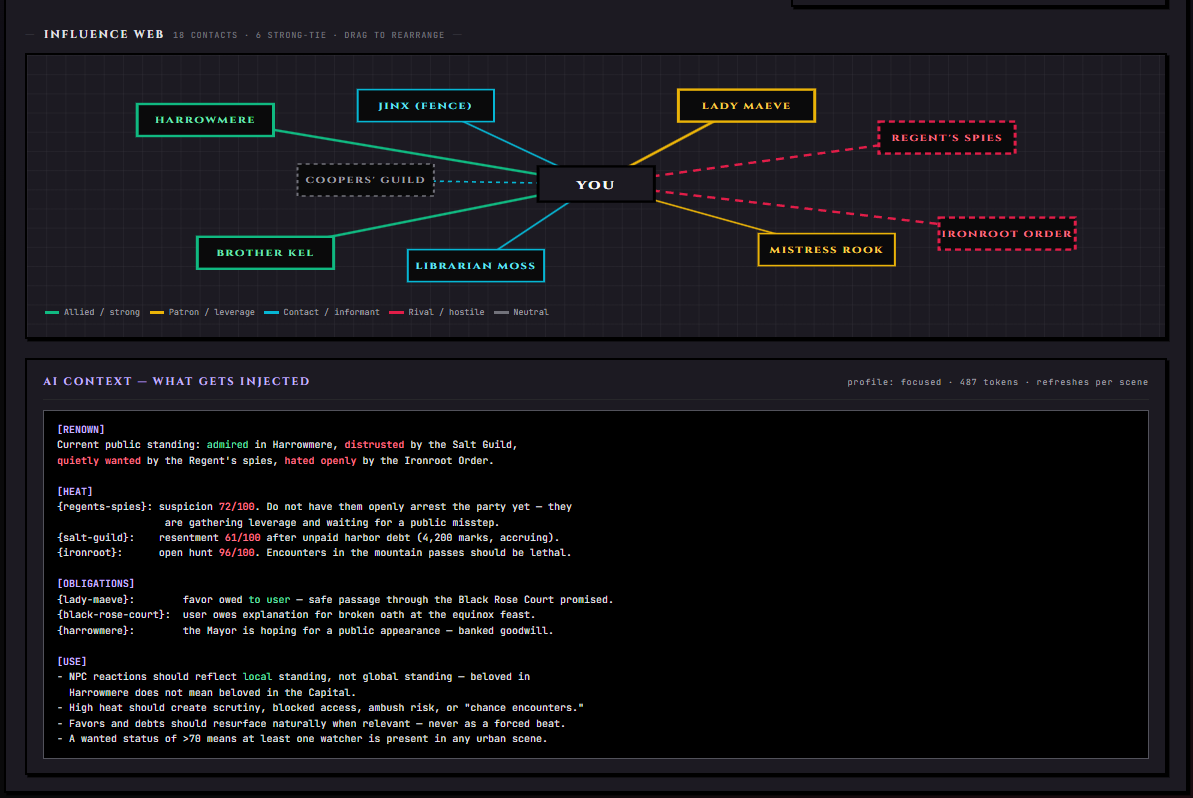
Storyboards are part of Story Director, but each lives in its own panel — this doc covers them in detail. For the agent that drives them, see Story Director.
A Storyboard is a chat-facing dashboard that surfaces a single slice of your story's living state. Each Storyboard is tied to a tracker module, and each one is structured as a small set of tabs — a hero view at the front, supporting context tabs in the middle, and promote-to-canon tools at the back. The Story Director writes into Storyboards as the chat progresses; you read, edit, accept corrections, and decide what gets promoted up into the lorebook.
There are five Storyboards. They share one wing panel — the Storyboards wing — and switch between tabs at the top:
| Storyboard | What it surfaces | Tracker module it's tied to |
|---|---|---|
| Quest Board | Active plots, blockers, deadlines, dependency chains | Quests |
| Cast | Character case files, relationship web, drift | NPC Relationships |
| Calendar | In-story date, events, celestial state | Calendar |
| Map | Locations, regions, travel routes, scene context | Map |
| Renown | Public standing, heat, favors, influence network | Gossip |
Open the Storyboards wing from the right rail. If the matching tracker module is disabled in Stage Settings, that Storyboard's tab won't appear at all. Disable Map and the Map tab vanishes on the next render.
The Shared Control Strip
Every Storyboard tab carries the same control strip across the top. It tells you, at a glance, what data is going to the AI and where the state lives.
| Chip | What it tells you |
|---|---|
| AI Context | Whether this Storyboard's data is being included in the AI's prompt this turn, and in what mode — focused sent, compact sent, radius sent, full sent, or off |
| Scope | canon for the lorebook canon, chat for solo chat state, or group for group chat state |
| Events | How many tracker events are recorded for this Storyboard |
| Last Write | When the Story Director last updated this view |
| Live / Open | Per-tab indicator showing which view is active right now |
Below the strip sits a row of stat tiles (counts and key numbers) and then the active tab's content.
AI Context Modes
Every Storyboard can be sent to the AI in different verbosity modes. Open the AI Context tab inside any Storyboard to control it.
| Setting | What it does |
|---|---|
| AI Context enabled | Master toggle. When off, no Storyboard data goes to the AI at all |
| Include this Storyboard | Per-tab toggle. Excludes one Storyboard without disabling them all |
| Context profile mode | focused (small, current items only), compact, radius (a configurable window of recent events), or full (everything) |
| Radius | Only shown when the mode is set to radius, this picks how many recent events to include. Each Storyboard defaults to a radius of 5; if the radius selector shows no stored value, it falls back to 8 |
The chips at the top tell you which mode is live. If you ever wonder why the AI doesn't seem to know about a quest — check the AI Context chip. It's almost always either off or set to a mode too narrow to include it.
Quest Board
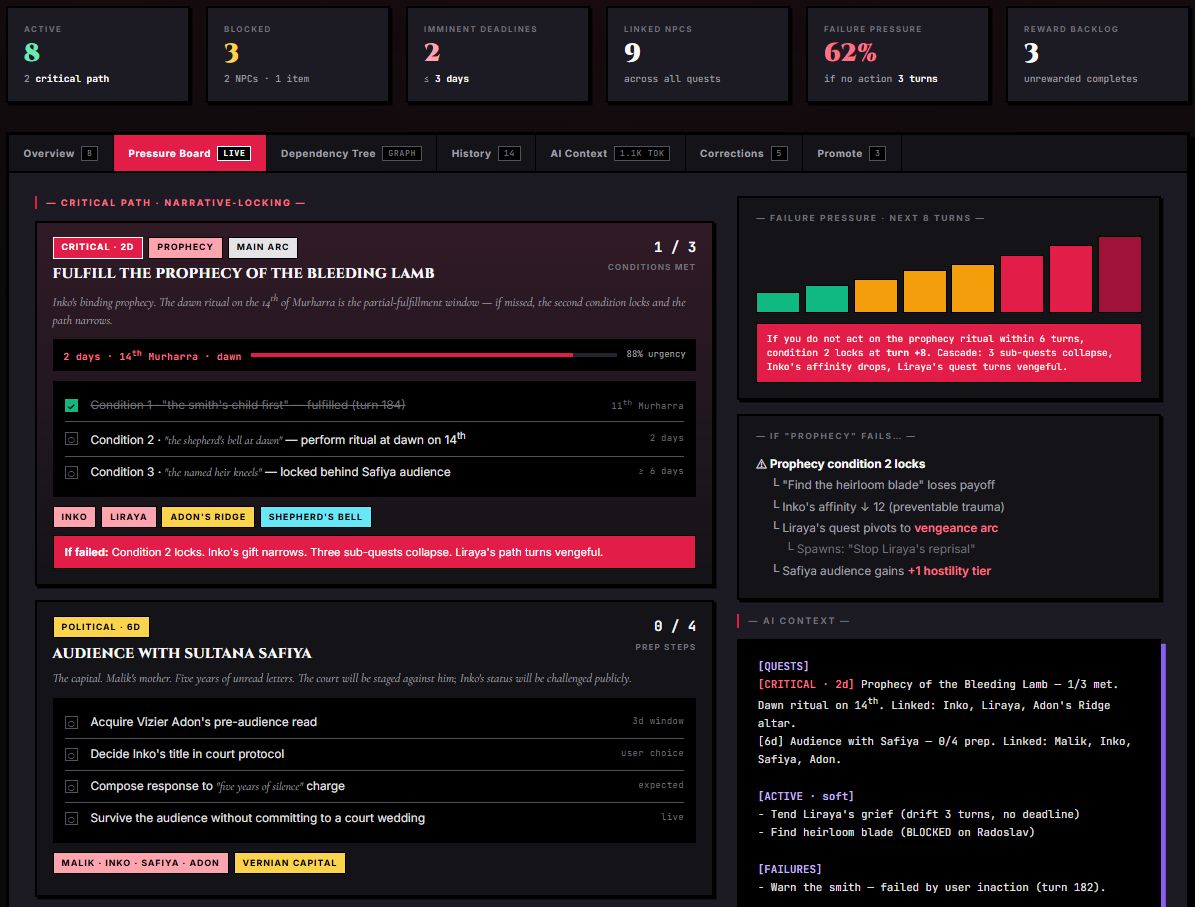
The Quest Board surfaces what plots are open, what's blocking them, and what's due to pay off. It's the triage panel for everything from main-quest arcs down to one-message side errands.
Stat Tiles
| Tile | Shows |
|---|---|
| Active | Count of in-progress quests |
| Blocked | Quests waiting on a prerequisite |
| Deadlines | Quests with imminent due dates |
| Linked Cast | Number of NPCs tied to one or more quests |
| Pressure | Failure-pressure percent across all quests |
| Rewards | Backlog of unclaimed quest rewards |
Tabs
| Tab | What it shows |
|---|---|
| Pressure Board | Live triage view — critical, active, blocked quests at a glance, sorted by pressure |
| Journal | Full quest list with descriptions, objectives, linked NPCs and locations, and inline AI generation |
| Dependency Tree | Graph view of prerequisite chains between quests — what unlocks what |
| History | Timeline of quest events (accepted, objective completed, failed, abandoned, logged note) |
| AI Context | Token-budgeted preview of what Quest Board data is sent to the AI |
| Corrections | Items the AI flagged as inconsistent — you accept or reject each one |
| Promote | Quests ready to upgrade from chat-state into the lorebook canon |
What Each Quest Tracks
| Field | What it holds |
|---|---|
| Title | Short display name |
| Description | Body text the AI sees |
| Quest type | main, side, hidden, urgent, daily, or event |
| Status | active, completed, failed, or abandoned |
| Objectives | List of steps. Each has a description, completed flag, optional progress counter (e.g. 3/10 herbs collected), and optional flag |
| Linked NPCs | NPC names that are tied to the quest. Auto-derived from descriptions, editable |
| Linked locations | Location names that anchor the quest |
| Rewards | Optional bag of XP, currency, items, and reputation deltas per faction |
| Acceptance time | When the quest was logged |
| Completion time | When it closed out |
| Deadline | Optional due date in your calendar's time |
| Chain ID + order | For multi-quest arcs — links a sequence under one umbrella |
| Prerequisite quests | List of quest IDs that must complete first |
| Priority | Higher numbers float to the top of the Pressure Board |
| Icon | Optional display glyph |
AI Context for Quests
When AI Context is on for the Quest Board, the AI sees a token-budgeted snapshot of your active quests plus recent quest events. In focused mode it sees only the highest-pressure quests; in full mode it sees the entire active list. Completed and abandoned quests are usually filtered out unless explicitly relevant.
History
The Quest Board's History tab is an append-only log of everything that's happened to your quests — when each one was accepted, every objective ticked off, every fail or abandon, every log entry the Story Director added. Scroll back to reconstruct exactly when a quest went sideways.
Corrections
Sometimes the Story Director's updates conflict with what's currently in the panel — a name change, an objective that's already done, a quest that the AI thinks should be re-opened. These land in the Corrections tab. You decide accept, reject, or open the side-by-side and edit manually.
Promote
Quests that are completed and feel like they should live forever in canon get promoted from the Promote tab. Promoting writes the quest into your lorebook as a permanent entry. The chat keeps its local copy; the lorebook now has a canonical record.
Hand-Editing the Quest Board
You can add quests yourself, refresh a single quest with an AI guide, tick off objectives, mark fails or abandons, log freeform events, and edit anything — name, description, type, deadline, rewards. The Story Director will respect your edits on subsequent turns.
Patterns for the Quest Board
A few patterns that earn the Quest Board its keep:
- Mainline + side. Tag the central plot quests as
main. Tag everything the player picks up along the way asside. The Pressure Board can then show a clean view of "what's the through-line right now." - Hidden quests for foreshadowing. The
hiddenquest type lets the Story Director track plots the player doesn't know about yet — they show up in the panel for your awareness but don't bleed into the Narrator's prompt at full strength. - Daily / event quests for recurring beats. A
dailyquest like "Tend the herb garden" is something that opens and closes every in-story day. Aneventquest like "Festival of Lights — find a partner" is bound to a specific date. - Chain quests for arcs. Give every quest in a sequence the same chain ID and an explicit order. Now the Dependency Tree shows the arc as a clean line.
- Prerequisites for unlocks. If Quest B can only happen after Quest A completes, mark A as a prerequisite. The Pressure Board will surface B as
Blockeduntil A closes out.
When NOT to Use the Quest Board
- Pure character-study chats with no goals or objectives
- Short one-shot scenes with a single, immediate beat
- Stories where keeping a list of "tasks" breaks the tone (introspective, lyric, vibe-driven pieces)
- Chats focused on a single ongoing dialogue where listing "what's next" would feel artificial
Cast
The Cast Storyboard is your living dramatis personae. Every NPC the Story Director has tracked gets a case file: emotions, memories, hidden thoughts, relationship dynamics, scene presence, and chemistry meters (when those sub-features are on).
Stat Tiles
| Tile | Shows |
|---|---|
| Cast | Total cast count plus an active / off-stage split |
| High Affinity | Number of NPCs with affinity at or above 80 |
| Active Hostility | Number with affinity at or below 25 |
| Hidden Knowledge | Secrets tracked across the cast (when the Secrets sub-feature is on) |
| Drift | NPCs whose tracked state has drifted from lorebook canon |
| Pressure | Composite relationship pressure score across the cast |
Tabs
| Tab | What it shows |
|---|---|
| Case File | Deep-dive on one selected NPC — affinity meter, trust meter, memories, dynamics, secrets, scene presence |
| Web | Relationship graph between all tracked NPCs — who's allied with whom, who's rivals |
| Relationship Audit | Mismatch detector — flags NPCs whose tracked relationships disagree with what canon says |
| AI Context | Token-budgeted preview of what Cast data is sent to the AI |
| History | Timeline of relationship events — memories logged, emotions shifted, presence changes |
| Corrections | AI-flagged inconsistencies you can accept or reject |
| Promote | Cast entries ready for lorebook canon |
What Each Cast Entry Tracks
| Field | What it holds |
|---|---|
| Name | Display name |
| Avatar URL | Optional portrait |
| NPC ID | Optional link to a canon character card |
| Category | friend, romance, family, rival, neutral, or enemy |
| Affinity | 0–100 — how much they like the player |
| Trust | 0–100 — how much they rely on the player |
| Memories | Append-only log. Each memory has text, impact (positive / negative / neutral), and a timestamp |
| Current emotion | Short label — "angry", "amused", "suspicious", "flirtatious" |
| Emotion intensity | 0–100 for how strongly they're feeling it |
| Emotion cause | Short reason — "player insulted her honor" |
| Dynamics | Free-form bag of named gauges — { longing: 45, resentment: 20, protectiveness: 80 } |
| Current thoughts | What the NPC is internally thinking right now — never spoken aloud |
| First met | Timestamp |
| Last interaction | Timestamp |
| Interaction count | Running total |
| Affiliations | List of organizations with role and status (active, former, honorary, exiled, secret) |
| NPC archetype | adult, child, baby, elder, monster, animal, spirit, pet, familiar — determines which need profile applies |
Chemistry Sub-Feature
When the Chemistry/Synergy sub-feature is on under Relationships in Stage Settings, each Cast entry adds seven compatibility metrics, each 0–100:
| Metric | Measures |
|---|---|
| Intellectual Spark | How well their minds engage with the player's |
| Emotional Resonance | Shared emotional vocabulary and rhythm |
| Physical Magnetism | Pure visual / kinesthetic pull |
| Sexual Tension | The unspoken thrum of attraction |
| Personality Mesh | Compatibility of temperaments |
| Life Compatibility | Could their day-to-day lives realistically intertwine |
| Goal Alignment | Do they want the same things long-term |
The case file then shows an overall chemistry score (computed average) and a trend label — rising, stable, declining, or volatile.
NPC Needs Sub-Feature
When the AI-Only Needs sub-feature is on, each NPC has a bag of needs — each with a current value, max value, and label. The AI tracks them and behaviors shift accordingly (a hungry NPC complains, a tired NPC withdraws) but the bars stay hidden from your UI. The point is that NPCs act on their needs without cluttering the panel.
Scene Presence
Already baked into every Cast entry, no sub-toggle needed. Tracks whether the NPC is present in the current scene, where in the scene they are ("corner booth", "by the fireplace"), what they're wearing, their physical status ("weary, nursing a bruised knuckle"), and what they're currently doing.
The Web Tab
The Web tab plots every tracked NPC as a node and every relationship between them as an edge. Edge color reflects alliance vs rivalry; edge thickness reflects intensity. This is how you spot factional clumps and isolated outliers at a glance.
Relationship Audit
When the Story Director's tracked relationships don't match what canon (lorebook entries) says — say canon claims X and Y are sworn enemies but the Cast tracker has them at affinity 75 — the Audit tab flags it. You decide which version is right.
Patterns for the Cast
- Use the dynamics bag for what affinity alone can't capture. Affinity is one number. Dynamics like
longing 45,resentment 20,protectiveness 80let one NPC carry several competing emotional currents toward the player at once. - Use emotion intensity instead of changing category. When an NPC is having a bad day, push their emotion to
furious 80for the scene. Don't flip their category fromfriendtorivalunless the change is durable. - Use current thoughts for dramatic irony. What the NPC is thinking but not saying drives the prose. A thoughts entry of "She's been awake since dawn trying to decide whether to tell him the truth" gives the AI a private layer to play.
- Use the Web tab to spot social patterns. When everyone the player has befriended is allied with one faction and everyone they've antagonized is in another, the Web makes the alignment visible at a glance.
When NOT to Use Cast
- Solo introspective scenes with no recurring named NPCs
- Stories where the protagonist's relationship to themselves is the only thing that matters
- Short scenes where there's not enough conversation history to track meaningfully
- Chats where you want the AI to write NPCs without accumulated relationship state biasing them
Calendar
The Calendar Storyboard is the in-story sense of time — what day is it, what month, which season, what's coming up, what just passed, what the moons are doing. It works for real-world calendars, medieval calendars, sci-fi stellar dates, fantasy calendars with custom months, and everything in between.
Stat Tiles
The Calendar stat row shows the current date, month, season, weekday, plus event counts (upcoming / past / total).
Tabs
| Tab | What it shows |
|---|---|
| Grid | A traditional month grid with event chips and moon phases on each day |
| Timeline | Linear timeline of upcoming and past events with relative-time labels |
| Events | Full event list with type filtering, density controls, and inline AI generation |
| Celestial | Moon disks, zodiac, active phenomena, eclipse indicators |
| Config | Calendar system setup — months, weekdays, era, format preset |
| AI Context | Token-budgeted preview of what Calendar data is sent to the AI |
| History | Timeline of calendar changes (date advanced, event added, moon advanced, etc.) |
| Corrections | AI-flagged inconsistencies |
| Promote | Calendar events ready for lorebook canon |
Calendar Configuration
| Setting | What it does |
|---|---|
| Calendar Name | Display label — "Verdant Empire Calendar" |
| Era Name | Era / age — "Third Age", "Year of Our Lord" |
| Months | Custom month list with day count and optional season |
| Days per week | Custom week length |
| Weekday names | Custom weekday system — "Sunsday, Embersday, Mornday..." |
| Current date | Day, month index, year, and era |
| Calendar format preset | Pre-built systems — medieval, Chinese, Japanese, Roman, sci-fi, futuristic, custom |
| Event proximity days | How many days ahead the AI sees upcoming events (default 3, range 0–30) |
| Hours per day | For non-24-hour fantasy worlds |
| Time format | 12h, 24h, or narrative (dawn / morning / evening) |
| Real-time sync | When on, calendar follows your real-world date |
Calendar Sub-Features
| Sub-feature | What it adds |
|---|---|
| Fantasy Calendar | Custom months, weekdays, eras, and holidays |
| Time of Day | Tracks hours and periods (dawn, morning, night) alongside the date — supports 12h, 24h, or narrative format |
| Real-Time Sync | Calendar follows your real-world date and month |
| Moon & Astrology | Moon phases, zodiac signs, celestial events, multi-moon worlds, eclipse phenomena |
What Each Event Tracks
| Field | What it holds |
|---|---|
| Title | Display name — "Festival of the Waning Moon" |
| Description | Body text |
| Date | Day, month, year, era |
| Type | holiday, event, deadline, prophecy, birthday, cosmic, supernatural, ritual, festival, or custom |
| Recurring | Annual, monthly, or single-occurrence flag |
AI Event Generation
The Events tab supports two AI generation flows:
- Bulk generate — pick a density (
few,moderate,many,packed,extreme) and a type filter, and the AI seeds the calendar with that many events in your world's style - One at a time — write a user guide ("an autumn equinox festival the local witches use to gather mushrooms") and the AI produces a single, tailored event
Celestial State
When the Moon & Astrology sub-feature is on, the Celestial tab tracks one or more moons, each with its own cycle length and current phase day. Multi-moon worlds — two moons orbiting at different speeds, three moons forming rare alignments — are supported. The zodiac is also tracked: a list of signs, their symbols, which months belong to which sign, and which sign is currently active. Active phenomena (eclipses, blood moons, comet sightings) appear as chips.
Calendar Format Presets
The Config tab carries a set of pre-built calendar systems. Pick one and the months, weekday names, era style, and prompt flavor all populate at once — useful when you want a world to feel medieval-European, classical-Chinese, or post-stellar-empire without designing the entire calendar by hand.
| Preset | Flavor |
|---|---|
| Medieval | January–December, seven-day weeks, "Year of Our Lord" era |
| Chinese | Lunar months named after animals, traditional zodiac, dynasty era |
| Japanese | Traditional month names, five-element cycle, imperial era |
| Roman | Latin month names, Kalends/Nones/Ides, "Anno Urbis" era |
| Sci-Fi | Stellar date format, multi-month colony cycles |
| Futuristic | Earth-relative calendar with corporate / national variants |
| Custom | Build your own from scratch — months, weekdays, era style, prompt flavor |
Patterns for the Calendar
- Use density
fewfor slice-of-life worlds,packedfor political dramas. A bustling court has 12 major events in a typical month; a fishing village might have two. - Use the event proximity setting to control how far ahead the AI sees. Default of 3 days is enough for "the festival is the day after tomorrow" beats. Crank it to 14 or 30 for sagas where players plan ahead.
- Tag deadlines as
deadlineevents. The AI treats these with appropriate dread — a quest deadline two days out generates pressure even without the Quest Board surfacing it. - Use multi-moon worlds for layered cycles. Two moons at different cycle lengths means there's almost always something in an interesting phase, and the player can build in-world meaning around alignments.
When NOT to Use Calendar
- Floating-in-time stories where dates don't matter — pure dream-logic, dialogue-only pieces
- One-scene one-shots that don't span any meaningful in-story time
- Stories where introducing a calendar system would force unwanted worldbuilding overhead
- Pieces where the absence of time anchors is part of the atmosphere
Map
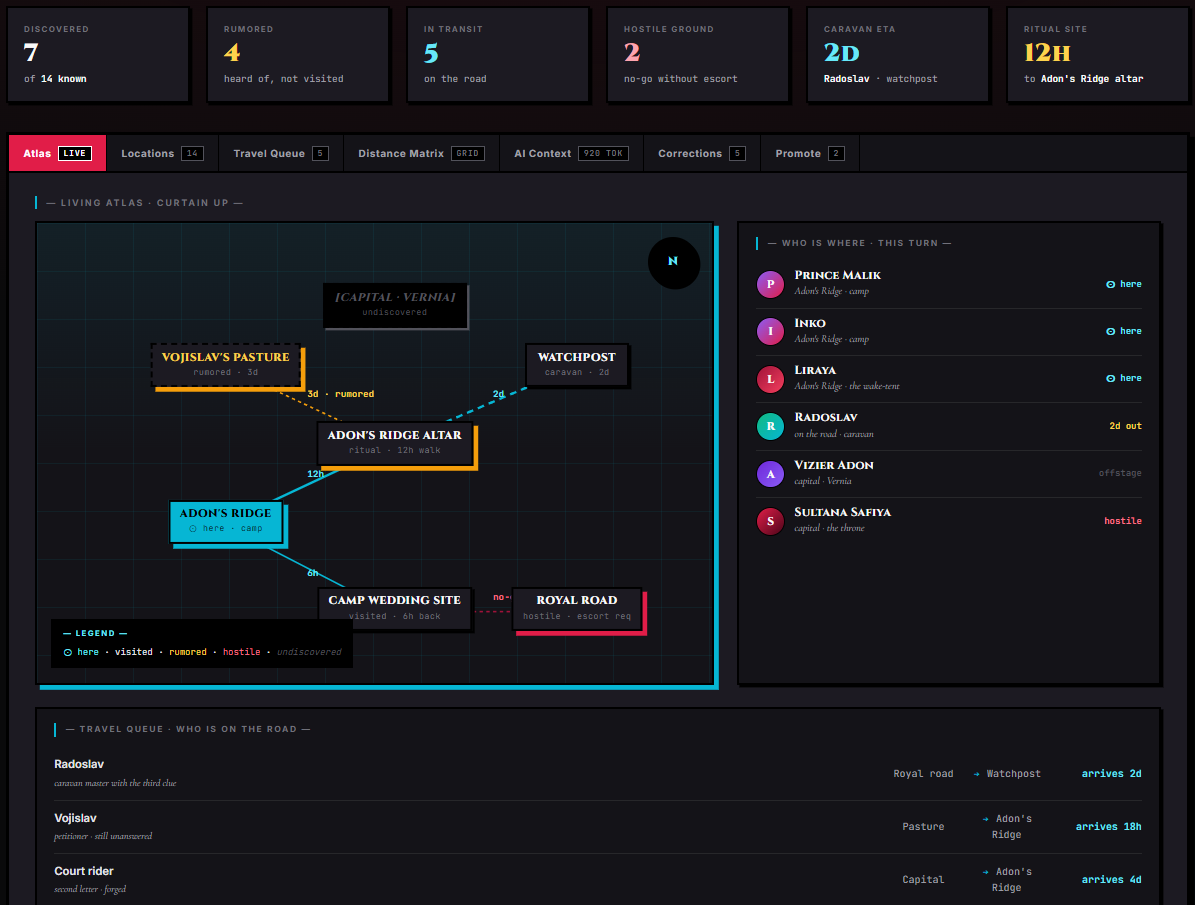
The Map Storyboard surfaces geography. Where you are, where you've been, where you've heard of, what's hostile, what connects to what, and what the current scene looks like in space. Maps are hierarchical — a world map can zoom into a region, into a settlement, into a dungeon, into a single encounter.
Stat Tiles
| Tile | Shows |
|---|---|
| Discovered | Count of discovered locations |
| Visited | Count of locations the player has set foot in |
| Rumored | Discovered but not yet visited |
| Hostile | Locations with high or extreme danger level |
| Connections | Total travel routes between locations |
| Current | Name of the location the player is in right now |
Tabs
| Tab | What it shows |
|---|---|
| Atlas | Visual map with location pins, current-position marker, biome label, danger heatmap, zoom-into-location portals |
| Locations | Searchable, filterable location list with detail sheets |
| Travel | Connections graph — what's reachable from where and how, with route types and difficulties |
| AI Context | Token-budgeted preview of what Map data is sent to the AI |
| History | Movement and discovery log |
| Corrections | AI-flagged mismatches |
| Promote | Locations ready for lorebook canon |
Hierarchical Maps
Maps in the Map Storyboard form a tree. Each map has a parent and zero or more children.
| Map scope | Used for |
|---|---|
| world | The top-level continental / planetary map |
| region | A sub-section of the world — a kingdom, a province, an island |
| settlement | A single town or city |
| dungeon | A specific complex (caves, a fortress) |
| encounter | A single tactical scene (the ambush at the riverbank) |
Each map is also classified as either persistent (canonical, kept forever in this chat) or ephemeral (a one-off scene that can be cleaned up when the scene resolves). A pin on a parent map can carry a child map ID, turning the pin into a portal — click it and the Atlas zooms into the child map.
What Each Location Tracks
| Field | What it holds |
|---|---|
| Name | Display name |
| Type | Free-form — "ruins", "village", "shrine" |
| Description | Body text the AI sees |
| Lore | Deeper background — old stories, hidden history |
| Position | Normalized 0–1 coordinates on the map |
| Discovered | Player has heard of it |
| Visited | Player has been there (with timestamp) |
| Icon type | Display glyph |
| Danger level | safe, low, medium, high, or extreme |
| Factions | List with name, influence level (dominant / significant / minor / hidden), disposition (friendly / neutral / hostile / unknown), description |
| Notable NPCs | List with name, role, disposition, quest-related flag |
| Connections | Travel routes — target location, route type (road / trail / river / sea / underground / magical / dangerous), travel difficulty (easy / moderate / hard / perilous), distance, discovered flag, description |
| Population | Free-form — "200 souls", "abandoned" |
| Economy | Free-form — "salt trade and fishing" |
| Special features | List of standout traits — "a shrine that whispers at night" |
| Mood | Current atmospheric tone |
| Last event summary | What happened the last time the player was here |
| Child map ID | If set, this pin is a portal into a deeper map |
Scene Context
Riding alongside the active map is a scene context — what the current scene looks like sensorily.
| Field | What it holds |
|---|---|
| Time of day | dawn, morning, noon, afternoon, evening, dusk, night, midnight |
| Day number | Numeric day index for chronological ordering |
| Season | spring, summer, autumn, winter |
| Calendar date | In-world date representation (driven by the Calendar Storyboard) |
| Weather | clear, cloudy, overcast, rain, storm, snow, blizzard, fog, haze, windy |
| Weather intensity | light, moderate, heavy |
| Temperature | freezing, cold, cool, mild, warm, hot, scorching |
| Atmosphere | peaceful, tense, mysterious, dangerous, romantic, melancholic, chaotic, sacred, corrupt, neutral |
| Ambient sounds | List — "wind through pines, distant wolves" |
| Lighting | bright, dim, dark, magical, flickering |
| Present NPCs | List with name, current activity, current mood |
| Description | Freeform scene note |
| Active events | List of in-progress occurrences |
The Story Director updates scene context on most turns so the AI's prompt always knows whether you're in a sunlit market or a fog-shrouded ruin at midnight.
Atlas vs Locations vs Travel
- Atlas is the visual view — a 2D canvas with pins, fog of war, the player marker, and the biome label. Drag, zoom, tap a pin to open its detail sheet.
- Locations is the list view — searchable, filterable by danger or by whether you've visited, expanded into rich detail sheets one at a time.
- Travel is the graph view — every location is a node and every connection between them is an edge. Color edges by route type, weight them by difficulty. Useful for planning journeys.
Patterns for the Map
- Start with one world map and zoom in. Don't pre-build every region. Let the Story Director discover places as the player travels, then zoom into a settlement when the story actually visits it.
- Use
ephemeralfor one-off scenes. That tavern ambush map you generated for a single scene? Mark it ephemeral so it doesn't clog your map tree later. Savepersistentfor places the player will likely return to. - Use danger level as atmosphere, not just mechanics. A
safevillage feels different in the prose than anextremecursed glade — the AI tunes mood and pacing accordingly. - Use the scene context for time-of-day shifts. Updating scene context every couple of turns keeps the AI describing the world consistently — bright morning markets in the afternoon, fog-shrouded ruins at midnight.
- Add factions to locations selectively. Faction influence on a location colors how NPCs there behave. A village under hostile-disposition Cult of the Black Sun influence will feel different than one under friendly-disposition Royal Order influence.
When NOT to Use Map
- Single-location chats — one coffee shop, one apartment, one therapist's office
- Pure dialogue / introspective pieces where geography never comes up
- Stories that explicitly want the setting to feel placeless
- Chats where introducing a hierarchical map system would make the worldbuilding feel heavier than the story warrants
Renown
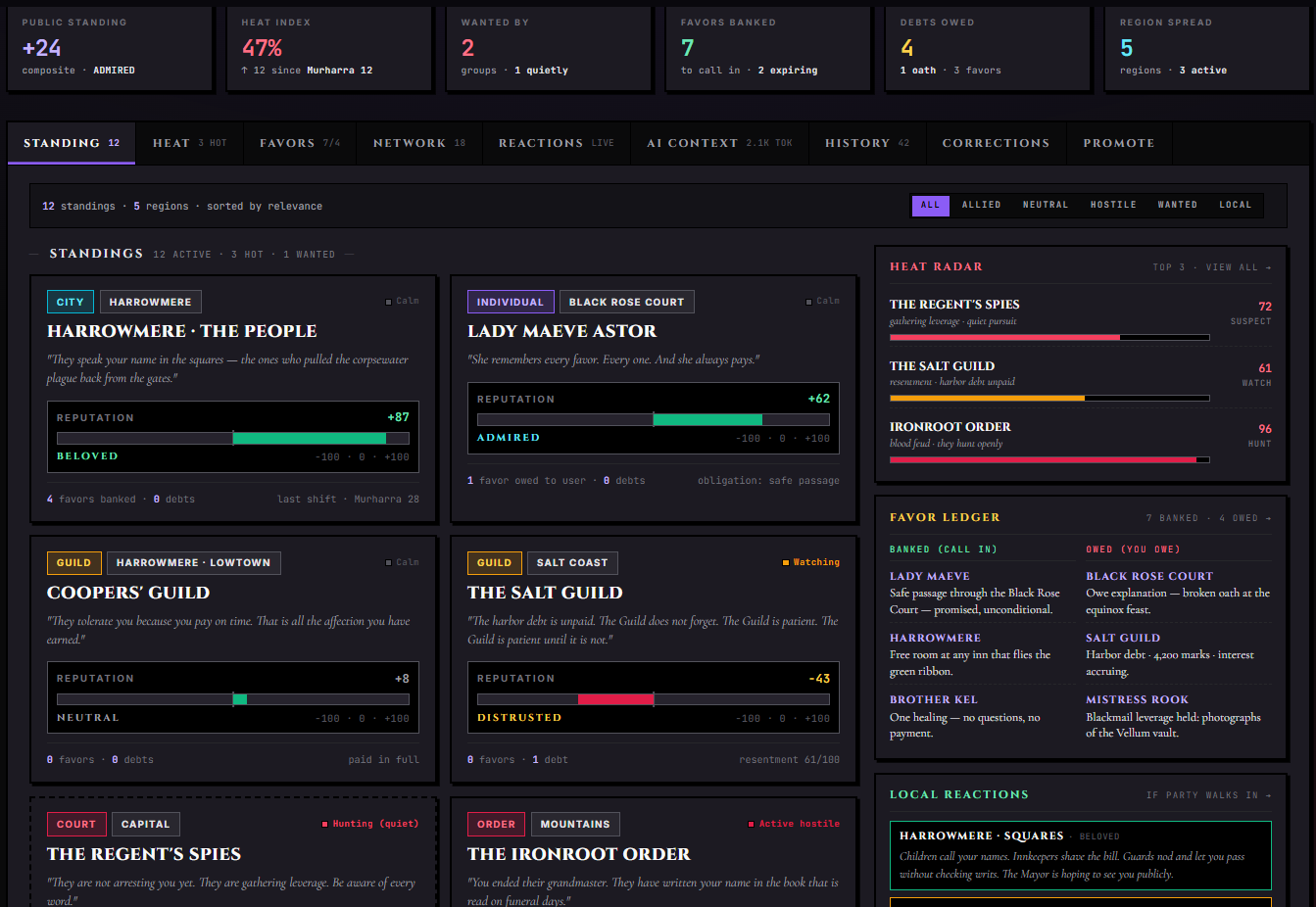
The Renown Storyboard is the player's social ledger. Public standing, heat (how hard people are looking for you), banked favors versus owed favors, predicted reactions if certain things become public, and the network of who's allied with whom around you.
Stat Tiles
| Tile | Shows |
|---|---|
| Public Standing | Composite reputation average across all standings |
| Heat Index | Average heat score across all standings (how hard people are looking for you) |
| Wanted By | Count of factions or people actively hunting you |
| Regions | Geographic regions where you have any tracked standing |
| Favors | Open favor count, split banked-vs-owed |
| Network | Number of non-neutral influence edges between standings |
Tabs
| Tab | What it shows |
|---|---|
| Standing | All tracked standings — reputation 0±100, region, title, mood (beloved → wanted) |
| Heat | Heat tracker — who's hunting you, how hot, what the open issue is |
| Favors | Open favors banked (people who owe you) and owed (people you owe) |
| Network | Influence-edge graph between standings |
| Reactions | Predicted reactions if particular things become public |
| AI Context | Token-budgeted preview |
| History | Reputation event log |
| Corrections | AI-flagged drift |
| Promote | Renown entries ready for lorebook canon |
What Each Standing Tracks
| Field | What it holds |
|---|---|
| Name | The faction or person you have standing with |
| Entity type | individual, group, guild, order, court, city, region, crowd, or faction |
| Region | Geographic scope — Capital, Salt Coast, or empty for global |
| Flavor | Italic descriptor shown on cards |
| Reputation | -100 (hated) to +100 (beloved) |
| Heat score | 0–100 — how hard they're hunting you |
| Heat label | Free-form — "gathering leverage", "open hunt", "resentment" |
| Relationship kind | For the influence web — allied, rival, patron, contact, neutral |
| Influence strength | strong, medium, weak |
| Banked favors | Count owed to the player |
| Owed favors | Count the player owes |
| Tags | Free-form tags |
| Notes | Free-form longer description |
| Last shift | Timestamp + reason for the most recent reputation change |
Auto-Derived Mood and Heat
Each standing carries an auto-derived mood label based on its reputation: BELOVED (very positive), ADMIRED (moderately positive), NEUTRAL, DISTRUSTED (moderately negative), HATED (very negative), or QUIETLY WANTED (negative + high heat).
The heat level derives from heat score: calm (0–24), watching (25–49), pursuing (50–74), or active (75–100). The Story Director uses these labels in directives ("the city watch is pursuing you") so the AI knows tone without having to read raw numbers.
Favors
Each open favor is tracked separately from the standing it belongs to.
| Field | What it holds |
|---|---|
| Standing | The standing this favor is tied to |
| Kind | favor, debt, oath, blackmail, obligation, or promise |
| Direction | banked (owed to you) or owed (you owe them) |
| Title | Short label — "Smuggle the relic to Eastport" |
| Description | Longer body |
| Status | open, settled, broken, or expired |
| Expires at | Optional deadline |
Banked favors are leverage — call them in when you need help. Owed favors are debts — leave too many unpaid and standings sour. The Story Director will sometimes prompt the AI to bring up old debts when an NPC has reason to.
Reactions
Each reaction is a prediction the Story Director has noted — what would happen if a particular fact becomes public in a particular place.
| Field | What it holds |
|---|---|
| Where | The location or social context |
| Related standings | Which standings this reaction is derived from |
| Severity | good, neutral, warn, or bad |
| Prediction | The italic reaction text injected into AI context — "the dock workers would refuse to load your ship" |
| Auto-flagged | Whether the prediction was AI-authored (so you can prune AI predictions en masse) |
The Network Tab
The Network tab plots every standing as a node and every non-neutral relationship between standings as an edge. Use it to spot patron / vassal chains, see how factions cluster, and identify who you can use to apply pressure on whom.
Patterns for Renown
- Use heat for menace, not just reputation. A standing with reputation +60 (admired) but heat 80 (active hunt) is the trope of "the hero everyone loves except the assassins guild that's been hired to kill them" — Renown can model that cleanly.
- Use favors as plot fuel. When a banked favor is sitting there, the Story Director will sometimes prompt the AI to bring it up — an NPC walks in needing help and you have the leverage to demand a price. Likewise, owed favors create pressure.
- Use oaths and blackmail as long-arc obligations.
oathandblackmailfavor kinds carry weight beyond ordinary favors. The AI treats them as load-bearing commitments. - Set region scopes for distributed reputation. "The player is beloved in the Capital but distrusted on the Salt Coast" only works if standings carry their region. Empty region = global.
- Use Reactions to plant future consequences. A reaction prediction of "the dock workers would refuse to load your ship if the true cargo became public" lets the AI know exactly what would change — and lets you build toward that reveal deliberately.
When NOT to Use Renown
- Stories with a single, isolated protagonist who doesn't move through a social landscape
- Pure intimate / two-person stories where third-party reactions don't matter
- One-shot scenes with no consequences past the final message
- Chats focused on the protagonist's interior life where third-party reputation never surfaces
Invisible Arcs — Plot the DM Can See That the Narrator Can't
Every arc, quest, and relationship the Story Director tracks is visible to the Narrator AI — that's the point. But sometimes you want to plant a seed the Narrator hasn't earned yet. A mystery the player isn't supposed to smell coming. A slow-burn payoff that needs five more turns to ripen. A character motivation the scene AI should never allude to until the moment you choose to surface it.
Invisible Arcs are plot threads the Director plants in the background that the Narrator cannot see. You use them to time payoffs, build foreshadowing without telegraphing, and keep long-game secrets out of the prompt until you're ready to detonate them.
What an Invisible Arc Tracks
| Field | What it holds |
|---|---|
| Name | Short label — "Mira's debt to the Guild," "the heir is a changeling" |
| Description | Full detail of the arc — backstory, stakes, what makes it tick |
| When planted | The turn or approximate moment you placed the seed |
| Reinforcement notes | How the arc has been quietly reinforced in the background — turns the Director used to deepen it without surfacing it |
| Payoff description | What eventually happens when the seed resolves — the reveal, the confrontation, the pivot |
| Target turn or condition | Optional. The turn number or narrative condition that should trigger surfacing ("when the player reaches the harbor," "after trust with Mira exceeds 80") |
| Linked storyboards | Which Storyboard entries are downstream of this arc — quests that unlock, Cast entries that shift, standing that changes |
Visibility Model
The Narrator AI receives the current scene state, active quests, Cast relationships, and all other Storyboard data on each turn. Invisible Arcs and their payoff details are stripped from the Narrator's prompt. The Narrator writes without knowing they exist.
The Director AI has full visibility. It uses that awareness to nudge the scene toward the arc's conditions — atmosphere that fits the eventual reveal, NPC behavior that could be read two ways in retrospect, pacing that makes space for the payoff — without being allowed to name the arc or telegraph its contents.
Creating an Invisible Arc
From the DM Assistant's Director's Cut tools. The Director's Cut tool panel has three arc-planting calls: Plant Seed, Reinforce Seed, and Resolve Seed. Plant Seed creates a new Invisible Arc with a name, description, and payoff. Reinforce Seed appends a reinforcement note and updates the arc's context for the Director. Resolve Seed is the surfacing event — the moment you're ready for the payoff.
Manually from the Storyboards wing. Open the Storyboards wing → any Storyboard tab → look for the Invisible Arcs section or sub-tab (it appears regardless of which Storyboard is active). From here you can add arcs by hand, edit any field, and manage the full list without triggering Director tool calls.
Surfacing a Seed — The Resolve Step
When you decide the moment has come, call Resolve Seed from the Director's Cut tools, or click Surface on the arc's entry in the Invisible Arcs panel.
When a seed is surfaced, it converts into a Visible Arc — a regular story arc the Narrator can now see and use. On the next turn, the Narrator has access to the full payoff description and can write into it. The arc's linked Storyboard entries (quests, Cast shifts, reputation changes) activate simultaneously.
The arc does not disappear from history — you can see every Invisible Arc you've ever planted, when it was seeded, when it was reinforced, and when it resolved, in the arc's History tab.
Managing Invisible Arcs
Open the Storyboards wing → Invisible Arcs sub-panel (listed under the "Hidden" sub-tab). From here you can:
- See all planted arcs with their status (seeded, reinforced, resolved)
- Edit any field — add reinforcement notes, update the payoff description, adjust the target condition
- Delete an arc entirely if the story has moved past the point where it makes sense
- Surface an arc manually (equivalent to Resolve Seed) at any time, regardless of whether the target condition is met
Patterns for Invisible Arcs
Long-game mysteries. Plant the seed in turn 3 ("the innkeeper recognized the sigil, said nothing"). Reinforce it in turns 12 and 24. Surface it in turn 40 when the player finally has leverage to act on what it means. The Narrator wrote 37 turns without knowing this thread existed — and the prose holds up on a reread.
Slow-burn romance triggers. An Invisible Arc for "Mira is beginning to love the player, doesn't know it yet" keeps the Narrator from writing it explicitly until you're ready. When you surface it, the Cast Storyboard's chemistry metrics activate alongside the reveal.
Hidden character motivations. "The mentor is dying and has been lying about his health for six sessions." The Narrator writes him as vigorous and cryptic; the Director ensures his behavior remains consistent with the arc; you surface it when the scene is right.
Foreshadowing that pays off N turns later. An arc with a target condition of "turn 50" seeds small details — a sound in the night, a locked door, a scar that's never explained — without ever risking the Narrator accidentally explaining them early.
When NOT to Use Invisible Arcs
- Short one-shot scenes where there's no "later" for a payoff to arrive
- Stories where maintaining director/narrator separation feels like overhead you don't want
- Chats where you'd rather let the Narrator improvise the whole arc organically, without your design
- Situations where you know exactly what you want and there's no reason to defer it — just write it
Promoting from Storyboard to Canon
Every Storyboard has a Promote tab. Promoting a quest, NPC, location, calendar event, or renown standing copies its current state from chat-level storage into the lorebook canon. Once in the lorebook, it becomes:
- Visible to other chats that share the same lorebook
- Eligible for Compendium retrieval
- A permanent entry you can edit or share
Promote when something has stabilized — a completed quest, an NPC the player has clearly made a long-term ally, a location they've returned to multiple times. Keep things in chat-state when they're still in flux.
Corrections Across Storyboards
Every Storyboard has a Corrections tab. It surfaces every place the Story Director's latest update conflicts with what's already in the panel. Common reasons:
- The AI used a slightly different name spelling
- An NPC's category changed (friend → rival) without a clear in-story trigger
- A location was created twice under near-duplicate names
- A quest the AI considered done was already marked failed
Each correction shows the existing value and the proposed new value. You can:
- Accept — apply the proposed change
- Reject — keep the existing value
- Edit manually — open a side-by-side and write your own version
Sweeping corrections regularly keeps the panels clean. Sweeping them never is fine too — the Story Director will keep flagging the same drift until you act.
History Across Storyboards
Every Storyboard has a History tab. It's an append-only timeline of everything that's happened to that Storyboard, with timestamps. Use it to:
- Reconstruct when a quest went sideways
- See exactly which turn an NPC's affinity flipped
- Audit how the AI has been moving the calendar forward
- Verify a location was discovered at the moment you expected
History is read-only. Editing happens in the main tabs; History is the receipt.
How Storyboards Relate to Trackers
Storyboards and tracker wing panels surface the same underlying state. The Cast Storyboard and the NPC Relationships wing panel are reading the same store. The Quest Board and the Quest Journal wing panel are reading the same store. The Calendar Storyboard and the Calendar wing panel are reading the same store. The Map Storyboard and the Map wing panel are reading the same store. The Renown Storyboard and the Gossip wing panel are reading the same Renown store.
The difference is the surface and the audience.
| Tracker wing panel | Storyboard tab |
|---|---|
| Lives in the right rail, one panel per module | Lives in the Storyboards wing, all five share a tabbed surface |
| Operational — at-a-glance state for the active turn | Reflective — Pressure Boards, dependency trees, audits, promote-to-canon flows |
| Best for live combat / movement / reputation reads | Best for "what's the whole shape of this story?" reviews |
Run both. They feed each other.
When NOT to Use a Storyboard
A few patterns where leaving a Storyboard tab closed (or its underlying module disabled) is the right call:
- You're doing a tight one-shot. A two-message scene doesn't need a Quest Board or a Renown ledger.
- The tone is wrong. If a Map atlas covered in danger heatmap pins breaks the gentle-slice-of-life atmosphere you're going for, leave Map off.
- You don't trust the data yet. Brand-new chat, no lorebook, no canon — the Storyboards will be near-empty for the first few turns. Let them seed before opening.
- You're stress-testing a character card. Disable Storyboards entirely so the Story Director isn't adding signal you didn't ask for.
- The token budget is tight. Every active Storyboard's AI Context costs tokens. Turn off the ones you don't need on this turn.
You can always turn a Storyboard back on partway through a chat. The Story Director will seed it from chat history when the matching tracker module is re-enabled.
Editing Storyboards by Hand
Every Storyboard supports hand-editing. You don't have to wait for the Story Director to update anything — open the relevant tab, click on an entry, and edit fields directly.
| What you can edit by hand | Examples |
|---|---|
| Add new entries | Hand-create a quest, a Cast member, a location, a calendar event, a Renown standing |
| Edit existing fields | Change a quest's deadline, an NPC's affinity, a location's danger level, an event's date |
| Move things forward | Mark a quest objective complete, advance the calendar by N days, change an NPC's emotion |
| Re-categorize | Flip a Cast member from friend to rival, change a quest from side to main |
| Delete | Remove a quest, an NPC, a location, an event, a standing |
Hand-edits are durable. The Story Director respects them on subsequent turns — if you manually mark a quest as abandoned, the AI won't reopen it without an explicit reason in the narrative.
For more substantial AI-assisted editing, every panel exposes a "refresh with AI guide" affordance. Click it, type a short instruction ("Rewrite this quest as more urgent, with the village burning down at sunset"), and the AI updates the entry in place.
AI Generation Inside Storyboards
Most Storyboard tabs include inline AI generation:
| Storyboard | Where AI generates |
|---|---|
| Quest Board | The Journal tab has "Generate Quest" with a user guide field |
| Cast | New Cast members can be AI-generated from a name and a short prompt |
| Calendar | Events tab has "Bulk Generate" (with density + type filter) and "Generate One" (with user guide) |
| Map | Locations can be AI-generated within a parent map |
| Renown | Standings can be AI-generated with region + entity type seeds |
These generation flows use the same model your chat is configured to use (BYOK respected). The Story Director model and the chat model can differ — generation requests inside Storyboards default to the chat model unless overridden.
Storyboards in Group Chats
Storyboards behave differently from per-character trackers in group chats.
| Storyboard | Scope in group chats |
|---|---|
| Quest Board | Shared — one canonical quest list for the whole party |
| Cast | Shared — one Cast representing all NPCs the party has met |
| Calendar | Shared — one canonical time |
| Map | Shared — one canonical geography |
| Renown | Shared — one canonical reputation map per party member rolls into a unified Renown |
The Story Director itself is also group-scoped — one story brain managing one shared narrative for the whole party. Switching active character in a group doesn't change which Storyboards are visible.
This contrasts with trackers like Combat, Inventory, Player Stats, and Spellbook, which split per-character. See Trackers for the full split.
Troubleshooting Storyboards
| Problem | Likely Cause | Fix |
|---|---|---|
| Storyboard tab is missing | The matching tracker module is disabled | Toggle it on in Stage Settings (Quest Board ↔ Quests, Cast ↔ Relationships, Renown ↔ Gossip) |
| Storyboard data doesn't reach the AI | AI Context is off, or in focused/compact mode, or in radius mode with the radius set too small | Open the AI Context tab, enable it, and switch to full, or raise the radius |
| Promote tab is empty | Nothing is ready to promote — quests still open, NPCs still mid-arc | Wait for state to stabilize, or hand-mark items as ready for promotion |
| Corrections tab keeps re-flagging the same drift | You haven't accepted or rejected the flagged correction | Open the Corrections tab and resolve each item, or hand-edit the underlying field |
| Map tab shows old data even after disabling Map | Old lorebook entries still in canon | The Storyboard tab respects the module toggle — disabling Map hides the tab; canon entries remain until manually deleted |
| Storyboards wing won't open | First time opening this chat — a lorebook container is being created | Wait a moment; the wing self-bootstraps a "Storyboards" lorebook the first time |
| Calendar dates don't match the prose | The Director only updates Calendar every N turns by default | Open the Calendar wing panel's gear icon and set update frequency to 1 |
| Cast affinity feels wrong | Hand-edits and AI updates conflicting | Check the History tab to see what changed when; resolve via Corrections or manual edit |
Storyboards vs Compendium
Promoted Storyboard entries land in the chat's Compendium — the lorebook attached to this chat that holds canon. From there:
- The Compendium retrieves promoted entries when their keywords appear in conversation
- Other chats sharing the same lorebook see the canonical version
- You can edit, share, or fork the canonical entries from the Compendium panel
Storyboards are chat-scoped state. Compendium is lorebook-scoped state. Promote moves something across that line.
Related Docs
- Story Director — the agent that writes into every Storyboard
- Trackers — the wing panels that share state with each Storyboard
- Compendium — where promoted Storyboard entries live as permanent canon, and the retrieval pipeline that reads them back into context
- Group Chats — per-character vs shared Storyboards in multi-character chats