Story Director
The systems that steer the story
Story Director
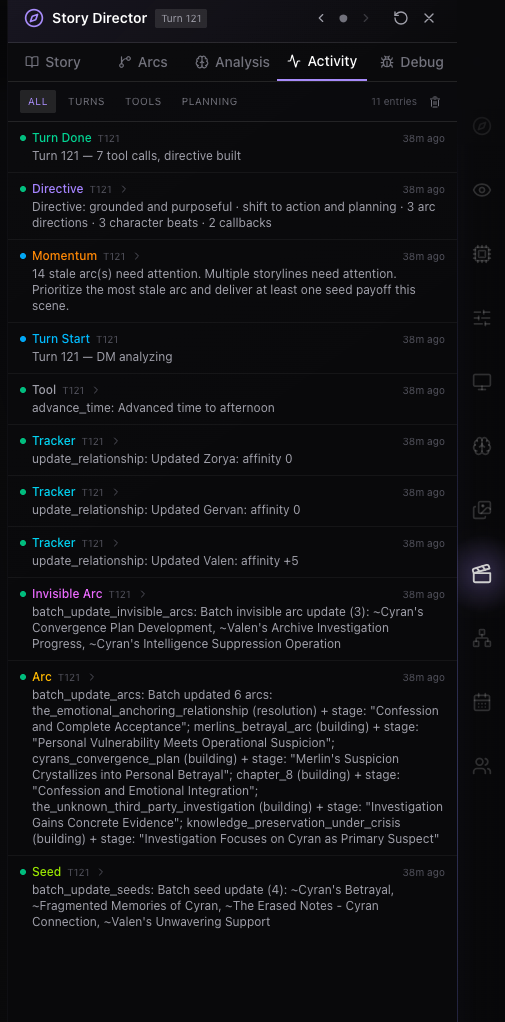
The Story Director is RoleCall's behind-the-scenes story brain. While the Narrator writes the prose you read in chat, the Story Director plans arcs, plants foreshadowing, tracks pacing, and maintains a living world state — and feeds the Narrator filtered hints so it can't accidentally spoil twists or reveal secrets.
Think of it like a tabletop session: the Narrator is the voice telling you what happens, but the Story Director is the game master pulling strings behind the screen. The Story Director also owns the Storyboards (your chat's story-state dashboard) and the Tracker modules (the wing panels showing live game state).
The Storyboards have their own panel and the Trackers have their own wings. This doc covers the agent that drives them. For the panels themselves, see Storyboards and Trackers.
How Story Director Fits Into a Chat
When Story Director is enabled, it runs before the Narrator writes the visible reply. It loads its accumulated state, looks at the current turn, updates any due story systems, and then hands the Narrator a filtered directive. The Narrator uses that directive while writing the prose you see in chat.
Each enabled turn has three major phases:
- Prepare context - RoleCall builds the normal chat prompt from the character, persona, preset, active lore, recent chat history, and enabled scene systems.
- Story Director planning - the Story Director model receives the current turn plus the story-state it is allowed to manage. It may update trackers, Storyboards, hidden arcs, memories, or other enabled state, then produces a filtered Narrator Directive.
- Narrator generation - the Narrator model receives the normal prompt plus the filtered directive and writes the assistant message.
The Story Director emits two visible kinds of output:
- A Narrator Directive - filtered hints about mood, pacing, who appears, what to avoid, and how to land the next beat. This is injected into the Narrator's prompt.
- State updates - game state changes pushed to your Storyboards, tracker wings, activity feed, and saved chat state.
Everything else - full story plans, hidden NPC motives, off-screen events, foreshadowing payoffs, and private notes - stays internal to the Director. The Narrator only sees what the Director chooses to surface in the filtered directive.
DM Assistant Toggle
In QuickPlay or Stage Settings, the DM Assistant switch turns Story Director on or off for the chat. The toggle has three states:
| Mode | Effect |
|---|---|
| Off | Narrator runs alone, no directives, trackers don't auto-update |
| TV-only | Legacy compatibility — read-only TunnelVision state lives in tvConfig. Treated as off for new chats |
| Full | Full pipeline — directive injection, tracker updates, Storyboard reads, the Story Director wing panel becomes available |
Story Director and the Compendium (lorebook retrieval/bookkeeping) are independent. Run either one, both, or neither. Compendium can retrieve relevant lore for the Narrator while Story Director plans the turn; Story Director does not have to be enabled for Compendium to work.
Narrator Tool Access Is Separate
The Narrator Tool Access toggle controls whether the final prose-writing Narrator can call tools during its own generation. It does not turn Story Director on, and turning it off does not disable Story Director.
| Setting | What it controls |
|---|---|
| Story Director / DM Assistant | Runs the pre-generation story planner, updates story state, and injects a filtered directive before the Narrator writes. |
| Narrator Tool Access | Lets the final Narrator call approved tools while writing, after Story Director has already planned the turn. |
Most users should leave Narrator Tool Access off unless they specifically want the final prose model to perform extra tool work mid-response. Story Director still gets its own planning/tooling pass when DM Assistant is on.
Where Story Director Lives
| Surface | Purpose |
|---|---|
| DM Assistant toggle (QuickPlay / Stage Settings) | Master on/off for the whole system |
| Story Director wing panel | View arcs, chapters, pacing, DM notes, debug state |
| Storyboards wing panel | The 5-tab dashboard (Quest Board, Cast, Calendar, Map, Renown) — see Storyboards |
| Tracker wing panels | One panel per enabled module — see Trackers |
| Tracker bottom toolbar | Minimized tracker icons that pop the panels back open |
| Author Note panel | Pairs with Story Director — note text is included in the Narrator's prompt |
Turning On the Story Director
From QuickPlay
Open QuickPlay on any chat. The DM Assistant row toggles it. When on, you'll see:
- DM Personality — pick from 10 personalities (see DM Personalities below)
- Story Director Model — choose which available model runs the Director. It can be separate from the Narrator's chat model.
- Storyboards section — toggles for the 5 first-class Storyboard modules (Quest Board → Quests, Cast → Relationships, Calendar, Map, Renown → Gossip)
- Legacy Trackers section — toggles for the remaining tracker modules
- Runtime controls — Default AI Awareness (turns between auto-updates), Max Tool Rounds, DM Temperature, Auto-retry invalid tool responses
From Stage Settings
The Stage Settings → Immersion Modules wing panel is the full configuration surface. Same toggles, plus:
- Smart Init — when on, the Director seeds your trackers on the first message instead of running a separate initialization call (saves a meaningful chunk of tokens)
- Per-module sub-feature toggles appear under each tracker that supports them (Relationships, Knowledge, Gossip, Calendar, Spellbook, Biological Cycles, Creature Codex)
En Masque (Chronicle) Mode
When you're playing in En Masque mode, the Story Director is always on. It's integral to the Chronicle experience — deeper world-building, more dramatic story management, group-scoped persistence.
Story Director Personalities
Each personality changes how the Director plans, paces, and hints to the Narrator. All ten use the same advanced framework — chain-of-thought planning, improvisation rules, directive safety, backup strategies — so the difference is style, not capability.
| Title | Character | Tagline | Best For |
|---|---|---|---|
| The Weaver | Meridian | "The world breathes. Your choices matter. Let's see what emerges." | Emergent, player-driven stories with a living-world feel |
| The Architect | Cassian | "Build the investment. Earn the devastation. Let the moments breathe." | Character-driven plots with layered mysteries and long payoffs |
| The Oracle | Vesper | "Knowledge is currency. Revelation is art. Timing is everything." | Mystery, dramatic irony, destiny-driven stories |
| The Romantic | Rosalind | "Love is built in quiet moments, not grand gestures." | Emotional depth, chemistry, slow-burn intimacy |
| The Thrill-Seeker | Magnus | "Fortune favors the bold. The stakes are always rising." | Fast pace, high stakes, action sequences |
| The Shadow | Morrigan | "The oldest stories are the ones that make you check over your shoulder." | Dread, horror, atmospheric tension |
| The Jester | Felix | "Life's a stage, and we're all ridiculous. Might as well laugh." | Absurdist humor, witty subversion, comedic timing |
| The Enigma | Cassandra | "The truth hides in plain sight. Question everything." | Unreliable narration, paranoia, puzzles |
| The Chronicler | Aldric | "History breathes. Legends walk. Your story joins the eternal chronicle." | Epic, mythic-scale stories with weighty consequences |
| The Balanced | Sage | "The story speaks. I listen. Together we find the way." | Default starting personality — listens carefully and adapts |
Personality Profiles
What the planner is actually wired for under the hood. Pick the one whose creative philosophy matches the kind of story you want to tell.
The Weaver — Meridian. A collaborative storyteller who believes the best stories emerge from the interplay between player choices and a living, breathing world. Meridian doesn't railroad — she weaves player actions into a larger tapestry, making them feel like their choices truly matter. Heavy on emergent moments and world-reactivity.
The Architect — Cassian. A master of emotional architecture who understands that the highest highs are earned through the lowest lows, and quiet moments give loud ones meaning. Cassian builds stories like a novelist — layering investment, planting seeds, then delivering payoffs that make players feel deeply. Long-horizon thinker; sits on setups for a while before cashing them in.
The Oracle — Vesper. A master of secrets and dramatic irony who excels at hiding information and revealing it at the perfect moment. Vesper runs multiple parallel storylines — some visible, some invisible — and knows exactly when to pull back the curtain for maximum impact. Heavy use of the invisible-arcs and shadow-world systems.
The Romantic — Rosalind. A warm, empathetic storyteller who believes that the heart of every great story is the connections between characters. Rosalind excels at building slow-burn chemistry, creating moments of vulnerability, and making relationships feel earned rather than forced. Strong relationship-state tracking; gentle hand on pacing.
The Thrill-Seeker — Magnus. An adrenaline-fueled narrator who lives for heart-pounding action, impossible odds, and triumphant victories. Magnus believes that stories should make you hold your breath, that danger should feel real, and that every win should be earned through sweat and blood. High momentum, short-horizon arcs, frequent stakes escalation.
The Shadow — Morrigan. A master of dread who understands that true horror isn't what jumps out at you — it's what lurks in the corner of your eye, the wrongness you can't quite place, the certainty that something is deeply, fundamentally not right. Morrigan builds fear like a slow-growing fungus, until it's everywhere. Atmosphere over jump-scares; weighted to the shadow-world and invisible-arc planners.
The Jester — Felix. A playful trickster who understands that comedy isn't just jokes — it's truth wrapped in levity, it's relief after tension, it's the absurdity of existence made bearable. Felix knows that the best humor comes from character, not gags, and that laughter hits hardest when it follows genuine emotion. Loose improvisation; willing to chase a player's bit.
The Enigma — Cassandra. A mysterious weaver of secrets and shadows who creates layered mysteries within mysteries. Cassandra believes that the best revelations are the ones players piece together themselves, and that every truth should cast new shadows. Heavy on contradictory clues and unreliable detail; reveals rarely close the loop cleanly.
The Chronicler — Aldric. A scholarly narrator who treats every story as part of a vast, living tapestry of history and legend. Aldric believes that worlds with deep roots create the most meaningful stories, where even small moments echo through ages. Heavy worldbuilding accretion; long memory of prior arcs.
The Balanced — Sage. A versatile narrator who reads the story's needs and adapts fluidly. Sage believes the best Story Director is one who serves the story, not their own preferences — sometimes that means comedy, sometimes tragedy, sometimes action, sometimes stillness. Recommended starting personality; weighted toward whichever planner the current scene seems to want.
Each personality exposes three philosophy tags shown in the picker:
| Tag | What it controls |
|---|---|
| Improvisation (fluid / structured / responsive) | How readily the Director abandons its plan when you go off-script |
| Player agency (collaborative / guided / authored) | How much the Director suggests versus directs |
| Information control (transparent / moderate / tight) | How freely the Director drops clues and answers questions |
Switching personality mid-chat is fine. The Director carries over its accumulated state — arcs, seeds, memories — but starts planning with the new personality's rules on the next turn.
Creativity Level
A second dial layered on top of personality. Controls how aggressively the Director intervenes.
| Level | Effect |
|---|---|
| Subtle | Minimal intervention — gentle mood and pacing nudges only |
| Moderate | Balanced — arc management, seed planting, light scene direction |
| Dramatic | Full orchestration — shadow world, parallel timelines, aggressive foreshadowing |
Start with Moderate. Lower to Subtle if the Director feels too pushy. Raise to Dramatic when you want a tight, plotty story with bigger swings.
Storyboards and Trackers — Brief Overview
The Story Director writes into two kinds of user-facing surfaces: Storyboards (a dashboard) and Trackers (per-module wing panels). Both are covered in detail in their own docs.
The Five Storyboards
Storyboards are the chat's story-state dashboard. All five live in one wing panel, switched between tabs.
| Storyboard | What it surfaces |
|---|---|
| Quest Board | Active plots, blockers, deadlines, dependency chains, promote-to-canon |
| Cast | Character case files, relationship web, drift detection, memories |
| Calendar | In-story date, events, celestial state, moon phases |
| Map | Locations, regions, travel routes, scene context, hierarchical zoom |
| Renown | Public standing, heat, favors, influence network, predicted reactions |
For full panel breakdowns, field reference, and patterns, see Storyboards.
The 17 Trackers
Trackers are wing panels that show live game state. Each one has its own toggle, its own panel, and its own AI directive pipeline.
| Tracker | Tracks |
|---|---|
| Combat | Encounters, enemies, HP, turn order, dice rolls |
| Player Stats | HP, MP, AP, shield, XP, level, currency, survival needs |
| NPC Relationships | Affinity, trust, emotions, memories, dynamics, scene presence |
| Map | Locations, regions, travel state, danger, discoveries |
| Quest Journal | Active and completed quests, objectives, deadlines, rewards |
| Inventory | Items, equipment slots, currency, loot |
| Corruption | Degradation metrics for darker themes |
| Parallel Events | Things happening simultaneously elsewhere |
| Bonds | Magical or supernatural connections between characters |
| Knowledge | What the player knows vs believes vs suspects vs has wrong |
| Calendar | In-story date, time, seasons, events, celestial state |
| Biological Cycles | Heat, rut, pregnancy, ovulation, lunar transformations |
| Spellbook | Learned spells, abilities, cooldowns, cast history |
| Gossip | Rumors, reputation scores, organizations, social clusters |
| Memory Journal | What NPCs remember about the player |
| Creature Codex | Species bestiary plus individual creature instances |
| Party Management | Adventuring party — members, formation, tactics, shared loot |
Five trackers (Quest Journal, Relationships, Map, Calendar, Gossip) share state with the five Storyboards. The other 12 are tracker-only.
For full per-module reference, sub-features, AI directives, and "when not to enable" patterns, see Trackers.
How Tracker Updates Reach Your Screen
Each turn, the Director plans the next beat and emits a set of typed update commands — start combat, update relationship, discover location, advance time, plant seed, and so on. The platform parses these commands, applies them to the matching tracker store, persists the resulting snapshot, and re-renders the wing panel. By the time the Narrator's prose finishes streaming in, your trackers are already up to date.
The active Director uses a bounded multi-phase pipeline. Planning is always one call. Focused Storyboard/dossier work and the combined Legacy Tracker pass can add calls when those systems are active. Multiple due Storyboard domains share a combined focused call rather than automatically making one call per board.
Token Budget and Tool Rounds
Story Director is at least one additional model call per enabled turn, not always exactly one. The Interpreter, focused Storyboard updates, Legacy Trackers, and recovery work can each add calls. Every extra round resends substantial prompt and state context.
Skipped trackers aren't lost — they're picked up on the next eligible turn. But for cleaner pacing:
- Set your highest-priority trackers (Cast, Quest Board) to
1 - Set moderately important trackers (Calendar, Map, Gossip) to
2–5 - Set rarely-changing trackers (Creature Codex, Spellbook) to
0(manual)
If trackers stop updating consistently, reduce frequency-1 modules or switch to a stronger Director model.
For the exact active call graph, production token reference, configuration examples, and TTRPG interaction costs, see Story Director and TTRPG inference calls.
Auto-Initialize, Auto-Update, Swipe Resync
Three different flows keep your trackers in sync.
Auto-Initialize (first message)
When you enable a tracker for the first time on an existing chat — say you're 20 messages in and suddenly turn on Quest Journal — the platform analyzes your chat history and asks the AI to seed the tracker with story-appropriate state.
With Smart Init on (the default when DM Assistant is enabled), the Story Director handles this seeding through its normal tool calls on your next message — no separate API call, much cheaper.
With Smart Init off (or DM disabled), a dedicated initialization request runs once per newly-enabled module.
You can also trigger this manually per panel: click the refresh icon in the wing panel header and it re-syncs that tracker from your chat history.
Auto-Update (every turn)
When the Director is on, each turn includes tracker updates. The Director:
- Looks at the latest message exchange.
- Decides which trackers are due (based on each module's update frequency).
- Emits typed update commands.
- Your wing panels update before the Narrator's prose finishes streaming.
If a tracker is not due that turn (e.g. you set Calendar to every 5), it gets skipped — no wasted tokens.
Swipe Resync
When you swipe to a different version of an AI message, your trackers may now reflect the previous swipe's events. The platform notices, and quietly re-syncs trackers in the background:
- It collects your enabled modules
- Builds the message history up through the chosen swipe
- Asks the AI to recompute what tracker state should look like at that point in the conversation
- Applies the result
You'll see a "Trackers re-synced to this swipe" toast. The originating model and provider used for the resync follow the active scene configuration.
The Story Director Wing Panel
Open the Story Director wing panel to inspect what the Director is thinking. Five tabs:
| Tab | What it shows |
|---|---|
| Story (Overview) | Current chapter, mood, suggested next-step actions, recent DM notes |
| Arcs | Active and completed arcs, planted seeds, arc relationships |
| Analysis | Turn-by-turn analysis log, pacing state, story-health gauges |
| Activity | DM Activity feed — turns, tool calls, planning events. Can be popped out to its own window. |
| Debug | Shadow world state, raw context dump (for debugging) |
You can navigate previous turns with the chevron buttons in the panel header — see what the Director was thinking 10 turns ago. The Reset DM context button (the rotate icon) wipes the accumulated story state and re-evaluates everything from chat history.
Chapters
Major narrative units the Director maintains automatically. Each chapter tracks:
- Status —
planned→active→concluding→complete - Title, premise, major goal, emotional journey, themes
- Turn range — min / target / max estimates plus turns elapsed
- Created-at-turn marker
You don't manage chapters by hand. The Director decides when to transition based on pacing analysis.
Story Arcs
Medium-term plot threads weaving through chapters.
| Field | Description |
|---|---|
| Type | main, side, character, world, mystery |
| Horizon | immediate (1–5 turns), short (5–20), medium (20–50), long (50–100), epic (100+) |
| Scope | world (shared, visible to other systems) or player (personal, private) |
| Status | seeding → building → climax → resolution → complete |
Tap an arc to expand its details. The Resolve button on an arc closes it out — useful when the Director thinks an arc is still active but you know it concluded.
Planted Seeds (Foreshadowing)
Hints the Director drops early that pay off later. Each seed tracks when it was planted, when it was reinforced, what the eventual payoff is (kept secret from the Narrator), which arc it connects to, and whether it's been paid off.
Story Beats
Specific moments the Director wants to hit — a dramatic reveal, an emotional confrontation, a surprise encounter. Each beat has a When scheduling tag (next, soon, eventually, when_ready), prerequisite conditions, and a flexibility setting that controls how rigidly it should play out.
DM Notes
Five kinds of internal notes the Director keeps for itself:
| Type | Purpose | Example |
|---|---|---|
| observation | Patterns noticed in player behavior | "Player avoids combat, prefers diplomacy" |
| plan | Upcoming story intentions | "Introduce the rival when player returns to the capital" |
| reminder | Triggered notes for future conditions | "When player meets the blacksmith, hint about the cursed blade" |
| theory | Hypotheses about player intent | "Player seems to be building trust with Kira for a betrayal arc" |
| callback_opportunity | References to revisit | "Player promised the innkeeper they'd return — use this" |
Notes are scoped world (sharable with other systems) or player (private to this chat).
Shadow World
The Shadow World system creates the feeling of a living world by tracking things happening off-screen that the player doesn't know about yet. This data is never leaked to the Narrator — it's purely for the Director's planning.
Invisible Arcs
Plot threads the player hasn't discovered. These progress silently in the background through their own status flow: seeding → building → approaching_player → visible → resolved.
Hidden Events
Off-screen events occurring simultaneously with the player's story — a cult meeting in the catacombs while you explore the market, a guild vote determining trade routes. Transition through hidden → partially_revealed → fully_revealed as the player discovers clues.
NPC Off-Screen Actions
What NPCs do when the player can't see them — pursuing goals, making progress on agendas, forming alliances. The Director keeps these so NPCs feel like they have independent lives.
Parallel Timelines
Major world events progressing elsewhere — wars, expeditions, political shifts. Each has named stages with turn numbers and significance, a reveal strategy (gradual / sudden / player_discovery / never), and a planned convergence point.
Core Memory System
Beyond regular DM notes, the Director maintains core memories — facts that are never pruned and persist for the entire story.
Each core memory has:
| Field | Values |
|---|---|
| Category | character / world / plot / relationship / revelation / promise / consequence |
| Scope | world (shared) or player (private) |
| Importance | critical / major / significant |
| isSecret | Director knows, Narrator doesn't |
| hasBeenUsed | Whether this fact has driven a story moment yet |
Examples:
- The player's true identity (revelation, critical, secret)
- The king promised safe passage (promise, major)
- Player killed the merchant — townsfolk will remember (consequence, significant)
Pacing Engine
The Director tracks narrative rhythm and steers the Narrator to prevent monotonous pacing.
Mood States
The current story mood cycles through: calm → building → tense → action → climax → aftermath → reflective → intimate.
Pacing Flags
The engine raises flags that bias the Narrator's directive:
- needsQuietMoment — too much action (8+ turns since last calm beat)
- needsTension — too quiet (12+ turns since last action)
- readyForClimax — tension has built for 4+ turns, payoff is due
- needsBreather — just had a climax, let the dust settle
These translate into the Narrator getting a mood: calm or pacing: build_slowly directive on the next turn.
Narrator Directives
The filtered output the Narrator actually sees each turn. Looks roughly like this in the prompt:
<STORY_DIRECTOR>
Mood: tense
Pacing: Take your time. Let moments breathe.

Scene Guidance:
  Setting: The dimly lit throne room
  Atmosphere: Heavy with unspoken tension
  Tension: high (7/10)

Include in this response:
  Characters: Midas, the court advisors
  Themes: power dynamics, hidden loyalty
  Details: a servant's nervous glance at the door

Avoid in this response:
  Topics: the war in the north
  Keep offscreen: Icarus

Ending: End with an unexpected sound from the corridor
</STORY_DIRECTOR>
Directive Safety
The Director never puts these into a directive:
- Character secrets or hidden motivations
- Upcoming plot twists or their timing
- Why the Director is suggesting something
- Connections between planted seeds
- NPC true identities before reveal
- Answers to active mysteries
The Director may put these into a directive:
- Atmosphere and mood suggestions
- NPC emotional states (without why)
- Themes to explore
- Which characters should appear or stay offscreen
- General pacing guidance
- Foreshadowing elements without their meaning
That asymmetry is the core trick: the Narrator gets enough to write a good scene, but not enough to spoil the long game.
What Gets Sent To AI
Story Director is not one giant prompt where every system sees everything. RoleCall separates the turn into jobs, and each job receives only the slice of context it needs.
Story Director Model
When DM Assistant is on, the Story Director model can receive:
- The current user message and a recent chat-history window.
- Turn number and basic scene identity.
- The active character/card context needed to understand the scene.
- Persona/player context when the chat has one.
- The selected Story Director personality and runtime settings.
- Enabled Storyboards and tracker snapshots, such as cast, relationships, quests, map, calendar, renown, inventory, party state, resources, or other enabled modules.
- Existing Story Director state, including chapters, arcs, planted seeds, private notes, pacing state, hidden events, off-screen movement, and shadow-world state.
- Relevant Storyboard or managed lore/Compendium manifests when those systems are active.
- TTRPG sheets, shops, mechanics state, or recent mechanics events when TTRPG mode is active.
- Tool schemas for the story-state updates it is allowed to perform.
The Story Director model is allowed to update story state. Depending on which modules are enabled, it may write relationship changes, quest progress, map discoveries, calendar events, memories, hidden events, arcs, notes, or mechanics updates. These updates are saved as scene state and reflected in the appropriate wing panels.
Narrator Model
The Narrator model receives the prompt needed to write the visible assistant response:
- Character/card, persona, and preset prompt context.
- Recent chat history after the active context budget is applied.
- Active lorebook entries and retrieved Compendium/TunnelVision entries, if enabled.
- Stagecraft prompt contributions and Author Note text, if enabled.
- Enabled public scene context, such as tracker summaries that are meant to be visible to the Narrator.
- The filtered Story Director directive when Story Director is enabled.
The Narrator does not receive the full private Story Director state by default. Hidden arcs, unrevealed twists, off-screen plans, private motives, and internal planning notes stay with Story Director unless the Director intentionally turns a safe part of them into a directive or visible state.
Narrator Tool Access
When Narrator Tool Access is off, the Narrator writes from the prompt it was given and does not receive the broad final-narrator tool set.
When Narrator Tool Access is on, the Narrator may also receive approved tool schemas during generation. Depending on the scene setup, those tools can include lore search, relationship or tracker updates, inventory/quest-related updates, visual-novel helpers, or other enabled scene tools. Tool results from those calls are returned to the Narrator so it can finish the response.
This setting is powerful because it lets the prose model act while writing. It is also the setting most likely to add latency, extra provider calls, and more visible activity-feed events. It is optional; Story Director does not require it.
Compendium and TunnelVision
Compendium/TunnelVision is separate from Story Director. When enabled, it can make its own retrieval or bookkeeping calls using recent chat context, active lorebook trees, managed lorebook entries, and the current assistant response after generation. Its job is to decide what lore should be read or written; it does not replace the Story Director's story-state planning.
Character Minds, Participants, and TTS
Participant Registry, Character Minds, Character Voices, and TTS are separate systems that may run alongside Story Director:
- Participant and Character Minds jobs can receive the latest turn, compact scene context, participant names/kinds, and the specific memory or registration tools needed for that job.
- Speaker labeling receives one assistant message and the current participant roster so dialogue can be mapped to existing participants.
- TTS receives text segments to synthesize and the selected provider voice id. It does not need the private Story Director state or full Character Minds memory.
Provider Requests and Credentials
The selected model provider sees the prompt, tool schemas, and tool results required for the specific model call being made. Request credentials are used to authenticate provider calls; they are not inserted into prompts as text.
Author Note + Story Director
The Author Note panel pairs naturally with the Story Director. Your Author Note is inserted into every Narrator prompt regardless of what the Director is doing.
| Author Note setting | Effect |
|---|---|
| Position: After Scenario | Injected near the top of context, after the character card. Good for standing instructions: "Always write in third person past tense." |
| Position: In Chat | Injected at the chosen depth in the message history. Good for "right before the AI replies" reminders. |
| Depth | When position is In Chat — 0 is right before the AI's reply, higher numbers go further back |
| Frequency | 1 = every turn, 4 = every 4th, 0 = never |
The Author Note text supports {{char}}, {{user}}, and other macros.
Common patterns:
- Inject style guardrails ("Stay in present tense", "Match the character's archaic register") as After-Scenario, every turn
- Inject session-specific context ("We're in chapter 2 — the player has just lost their mentor") as In-Chat at depth 0, every turn
- Inject a periodic reminder ("Remember: NPCs in this region speak with a Welsh-inflected accent") every 4 turns to refresh it cheaply
When the Director and the Author Note disagree — say the Director wants a quiet beat but your Author Note says "Stay tense" — the Narrator gets both, and tends to prioritize the Author Note because it's text the user wrote.
Per-Character Immersion (Group Chats)
In a group chat, each character has its own immersion snapshot. That means:
- The Cast tracker for Character A reflects A's relationships with everyone else; Character B has a separate Cast view reflecting B's perspective.
- Combat, Resources, Inventory, Spellbook are scoped to whoever is "you" right now — the persona currently driving the chat sees their own loadout.
- Map, Calendar, Quest Journal, Renown, Gossip are shared across the whole group (one canonical world state).
Switching active character in a group swaps the per-character trackers in and out. The Director's dm_context itself is group-level — one story brain for the whole party — but the trackers it updates split between shared and per-character lanes.
For the full split, see Trackers.
Choosing a Story Director Model
The Director relies on reliable structured commands across a bounded sequence of planning and state-update phases. Models differ significantly in tool reliability, context handling, latency, and how often they trigger corrective retries.
Models that work well have dependable tool calling or Tagged-command output, follow a forced planning schema, and can handle the Director's large context:
- GLM 4.7
- Claude Sonnet (4 / 4.5 / 4.6 / 4.7)
- Gemini Flash / Pro
These families have historically handled multi-system Director work well, but current availability and provider behavior can change.
Models to avoid for Director duty: models that ignore forced tools, emit malformed JSON/Tagged commands, have a context limit below the assembled Director prompt, or repeatedly time out. A cheap model that requires recovery calls can cost more than a reliable model that completes each phase once.
Cheap, reliable option: Gemini Flash. Fast, tool-call compliant, low cost. Spend your premium budget on the Narrator (whose prose you actually read) rather than the Director.
NemoAI + AI Visuals: When using RoleCall's in-house NemoAI models with "AI Visuals" enabled, the Director can emit image-generation directives that produce inline scene illustrations alongside the Narrator's prose. This is a RoleCall-exclusive combination not available with third-party providers.
The Director uses the models available in RoleCall's model picker for your account and environment.
Director Runtime Controls
The QuickPlay panel exposes per-chat tuning:
| Control | What it does |
|---|---|
| Default AI Awareness | Chat-level default for how often trackers auto-update (turns). Per-tracker overrides take precedence. |
| Max Tool Rounds | Compatibility control for older/pre-generation agent paths. The active direct Director orchestrator uses fixed planning/dossier/tracker phase bounds, so this value does not currently cap its active call count. |
| DM Temperature | Inference temperature for the Director. Default 0.7. Range 0–2. |
| Auto-retry invalid tool responses | When on, the Director gets one retry if it emits a malformed tool call (instead of dropping the update) |
Troubleshooting
| Problem | Likely Cause | Fix |
|---|---|---|
| Trackers stopped updating | Module was not due, planning did not request its dossier, or the model failed its structured command | Check Activity, reduce frequency-1 modules, and try a model with more reliable tool output |
| Director repeatedly retries or reports no update | Tool protocol, context, provider, or post-provider execution failure | Open Activity and the operation receipt; try a compatible model, then report the incident code if provider success and Director failure disagree |
| Chapter or arc never advances | Model not following story-structure prompts well | Try a different DM personality, or raise creativity level to Dramatic |
| Narrator ignores the directive | Narrator is not deferring to the directive, or the directive is too subtle | Try the Architect or Oracle personality for more assertive directives |
| Storyboard tab is missing | The matching tracker module is disabled | Toggle it on in Stage Settings (Quest Board ↔ Quests, Cast ↔ Relationships, Renown ↔ Gossip) |
| Trackers don't seed on first message | Smart Init is off and the legacy init request also failed | Click the refresh icon on each tracker panel to manually re-seed from chat history |
| Stale tracker state after swiping | Swipe resync didn't run | Click the refresh button on each tracker, or send a new message — the Director re-evaluates on every turn |
| Author Note not appearing in prompts | Frequency set to 0, or depth set beyond chat length | Set frequency to 1, lower the depth, or switch position to After Scenario |
| DM context feels stale | Accumulated state diverged from current chat | Open the Story Director panel and click the rotate icon to reset and re-evaluate from history |
When NOT to Use Story Director
The Director adds real value — but it also adds at least one model call every turn and can add several more when other Director features are active. Skip it when:
- You're writing a tight, short-form scene that doesn't need accumulating state
- You're using a model with weak tool-call support and the Director would just emit malformed updates
- You want absolute control over what the Narrator does and don't want it deferring to a directive
- You're testing a character card and want a clean signal of how the card alone performs
- You're running on a tight token budget and the second model call is the budget breaker
You can always turn it on partway through a chat — it'll seed its initial state from the existing chat history.
Related Docs
- Storyboards — the 5-tab dashboard the Story Director writes into
- Trackers — the 16 wing panels the Story Director updates each turn
- Compendium — lorebook retrieval that runs in parallel with Story Director
- Group Chats — per-character vs shared trackers in multi-character chats
- Compendium — where promoted Storyboard entries live as permanent canon